Step 1
Choose the interval
Enter whole minutes and seconds, or pick a preset. Give the timer a short name so the next session is easy to identify.
Choose the length first. Setting, loading or sharing a setup never starts the countdown.
Choose the length first. Setting, loading or sharing a setup never starts the countdown.
Enter whole minutes and seconds, or pick a preset. Give the timer a short name so the next session is easy to identify.
Press Start to begin and prepare browser audio. Pause keeps the remaining fraction of a second; Reset restores the selected duration.
Up to five setups are saved in this browser. Copy a setup link for another person; they must press Start themselves.
Set ten minutes for one revision problem and name it for that task. Enter 10 minutes and 0 seconds, press Set timer, then Start when the materials are ready. Editing the fields alone does not replace the selected countdown.
If interrupted, decide whether the interruption belongs in the time budget. Pause excludes it; leaving the timer running includes it. Reset starts the next attempt from ten minutes rather than disguising the remainder of the previous attempt as a fresh session.
For a five-minute break, apply 5 minutes and 0 seconds, then start deliberately. If you need to see the deadline from across the room, fullscreen enlarges the timer but hides its setup controls until you exit.
Keep the tab open and check that sound can actually be heard through the selected device. Permission to notify is not proof that a notification will arrive while the device sleeps. Use a separate reliable reminder when the return time is important.
Use the 30-second preset with Repeat for equal-length drill rounds. Start begins the first round; a missed refresh does not restart the sequence from the time you look at the screen. After 95 elapsed seconds, three rounds have passed and about 25 seconds remain in the fourth.
That count describes the schedule, not three exercises you completed. For alternating 30 seconds of work and 10 seconds of rest, this single-duration repeat cannot express the pattern. Choose a purpose-built interval plan rather than assuming Repeat programs two phases.
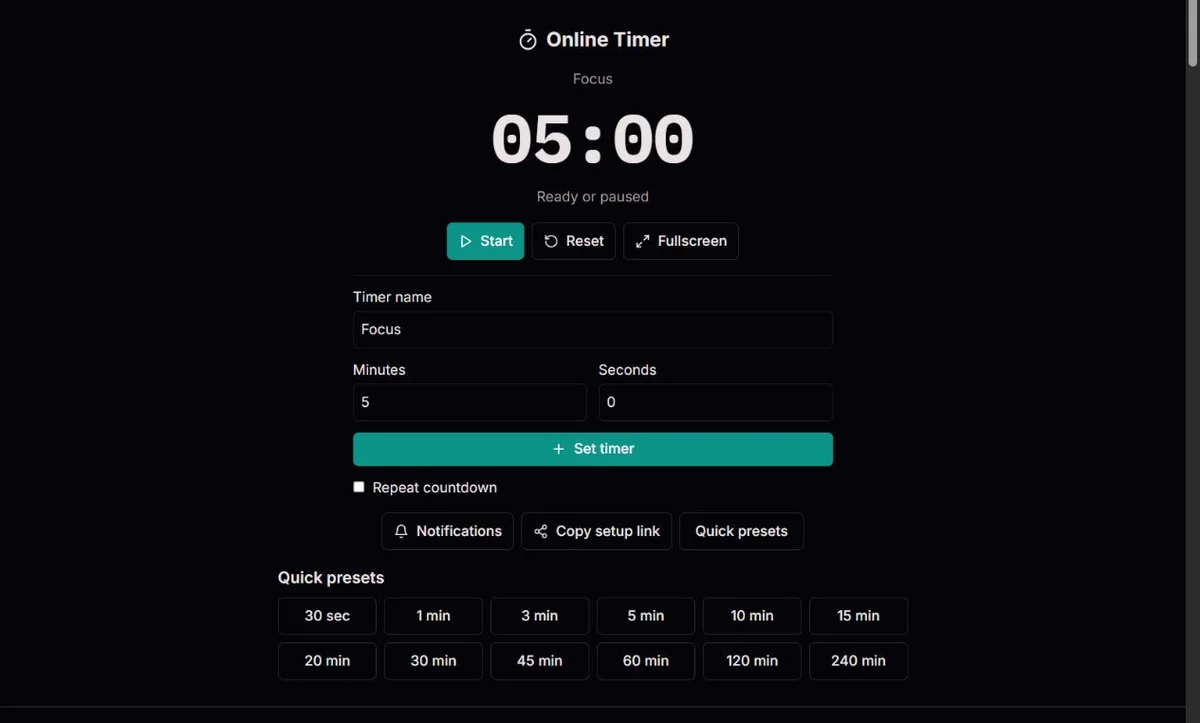
Minutes and seconds are separate whole-number fields. For 2 minutes 30 seconds, enter 2 and 30, not 2.5 and 0. Seconds run from 0 to 59; 90 seconds must be entered as 1 minute and 30 seconds. The total must be at least one second and at most 24 hours, so 1440 minutes with any additional seconds is invalid.
Set timer applies the duration, stops any previous countdown and stores the named setup when local saving is available. A preset or a saved setup also selects an inactive duration. You then press Start. Changing the minutes or seconds without applying them does not change the countdown already selected, and a setup link uses that selected duration, not unfinished edits.
A countdown measures a chosen duration. A stopwatch measures how much time an activity took; an alarm targets a clock time; a structured focus timer manages different work and break phases. Choose the tool that matches the question. This page provides one running countdown, not simultaneous timers or an appointment at a chosen time zone. The comparison of Pomodoro and regular timers develops this choice for planned focus and break sessions.
For a recipe step that specifies eight minutes from a particular action, select 8 minutes and 0 seconds and start at that action, not when opening the page. The timer tracks that instruction’s duration; it does not measure food temperature or cooking completion. For a classroom exercise or speech of 2 minutes 30 seconds, agree whether preparation counts and reset before each new speaker. If the needed duration has no quick button, such as 25 minutes, enter 25 and 0 in the custom fields and apply it rather than selecting a nearby preset.
05:00Selected duration01:40After 200 seconds00:00At the deadlineA five-minute timer represents 300 seconds of elapsed time. If the browser waits several seconds before running a callback, subtracting only one second would make the session longer. This timer instead keeps an absolute deadline and derives the remaining time from it.
The screen rounds remaining milliseconds up to whole seconds, so 00:01 means that some of the last second remains. Pause retains that fraction. Starting again creates a new deadline from the retained duration rather than dropping a whole second with every pause.
A callback refreshes the display; it is not the clock itself. Browser scheduling can be delayed by other work or power management. The standard explains why requested delays are not a promise of exact execution time. HTML timer scheduling rules.
Repeats stay aligned to the original sequence of deadlines. If three rounds pass while the page is delayed, the next refresh advances past all three and shows the interval that is currently in progress. It issues one completion notice, not three consecutive sounds.
This is useful for returning to a running drill, but it is not evidence that you performed the missed rounds. The elapsed-interval count describes the timer schedule, not a workout log. Named setups store duration and name, never an armed countdown or completion history.
The timer uses device wall time to include sleep gaps. A forward clock correction can finish it early; a backward correction never increases the displayed remainder but can stall progress until time catches up. Avoid changing device time during a session. Monotonic clocks solve a different problem, as described in the timing specification. High Resolution Time and clock differences.
Start a five-minute countdown and pause after exactly 200 elapsed seconds. The remaining duration is 100 seconds, displayed as 01:40. A twenty-second interruption while paused does not consume that remainder. Resuming gives you 100 more seconds; Reset instead restores all 300 seconds and leaves the timer stopped.
The display is a view of the deadline, not a second-by-second activity log. Its upward rounding means that 00:01 can represent 877 milliseconds remaining. A 30-second repeat checked at 95 seconds continues toward the original 120-second boundary rather than inventing a new boundary at 125 seconds.
Repeat repeats the selected full interval, not whatever happened to remain when you paused. Switching it off means the current interval can finish without another scheduled repeat. Stop sound silences the current alert; it does not change a running repeat. The controls govern different states, which matters when an alert and a next round coexist.
| Action | Remaining duration | Next decision |
|---|---|---|
| Start | 300 seconds | Countdown runs |
| Pause after 200 seconds | 100 seconds | Interruption time is excluded |
| Resume | 100 seconds | Continue the same attempt |
| Reset | 300 seconds | Start a new attempt deliberately |
Illustrative elapsed times, not a live measurement or assurance that alerts occur exactly on time.
Starting prepares browser audio, but it cannot confirm speakers, headphones, device volume or muted site settings. This timer has a fixed completion sound, not an in-page sound selector or volume slider. If audio is blocked, the countdown can still work visually. Keep it observable instead of assuming a silent countdown stopped. The timer setup guide compares presets, alerts and fullscreen for different tasks; use this page’s controls as the current reference.
Notifications requests browser permission. A denied or unsupported request has its own message; fullscreen availability is independent of sound and notification permission. Background throttling or suspension can delay the callback that notices a deadline. Deadline arithmetic catches up after execution resumes, but cannot deliver an alert while code is not running.
Up to five named durations are stored in this browser. Applying a new named duration adds it; an identical name/duration is not kept as another duplicate, and older entries drop off beyond the cap. Loading a saved entry does not arm it. Deleting an entry removes the reusable setup, not a countdown already running.
A storage warning means saved data could not be read or written; the countdown remains usable. Unreadable data is not silently replaced. Sharing carries the name and selected duration, not remaining time, Repeat, notification permission or a running deadline. Review private names before sending. Reloading does not recover an active session, so a settings link is not a session backup. HTML Standard on delayed timer execution.
The countdown uses a millisecond deadline, recomputes on regular refreshes and when the page becomes visible, and consumes each completed deadline once. Repeat mode skips elapsed rounds arithmetically. Inputs accept whole values only, from one second to 24 hours.
Keep the page open. Closing or reloading it does not restore a running timer. Sound, notifications and fullscreen depend on permissions and device support; sleeping or suspended devices may deliver an alert late or not at all. Do not use this as the only reminder for a critical task.
For a timing report, include duration, repeat state, browser, whether the device slept, and any clock changes. Do not include private timer names. Saved-data problems leave unreadable storage intact rather than silently replacing it.
No. It loads only the name and duration. Start and Repeat require deliberate actions on the receiving page.
The countdown advances to the current interval and reports elapsed rounds once. It does not replay an alert for every missed round.
No reliable closed-browser scheduler is provided. Keep the page open and use a separate device reminder for important events.
The fields are editable preparation. Press Set timer to apply them; doing so stops the previous countdown and selects the new duration. Start then begins it. This distinction prevents an unfinished edit from silently rewriting a running task. Check the displayed duration before sharing or starting.
Enter 1 minute and 30 seconds for 90 seconds, or 0 minutes and 30 seconds for half a minute. Both fields require whole numbers, so fractional minutes and a seconds value of 90 are rejected. The maximum is 1440 minutes and 0 seconds.
No. Delete removes the saved name/duration entry. The currently selected countdown is separate; pause or reset it with the timer controls if needed. Clearing browser site data can remove reusable setups but is not a dependable way to control a visible running timer.
No. It shares a duration and name, not a synchronized session or deadline. The recipient gets an inactive setup and starts independently. Repeat and notification permission are not transferred. For a coordinated event, agree on an actual start time separately.
The browser may have delayed refreshes while the tab was hidden or the device slept. On return, the timer derives the remainder from its deadline rather than adding the missed screen updates to the session. Repeat can report elapsed rounds; a clock correction can also affect wall-time-based progress.