A weekday meeting
Choose Monday to Friday, name the alarm for your meeting and preview a gentle sound. The next date makes it easy to check that a weekend is skipped.
Set a free online alarm clock with saved alarms, weekday schedules, sound previews, snooze, sharing and a clear next-alarm countdown. Runs in your browser.
Choose when you need the reminder, check the sound, and confirm the next occurrence. We keep the details beside your saved alarms so you can see what will happen.
Set a one-time date, every day, weekdays or selected days. Give the alarm a short name and check the next occurrence before adding it.
Preview the selected sound at your chosen volume. More options includes snooze and supported vibration. A five-second test opens the real alarm popup.
Your alarm is saved in this browser. You can edit it or share its settings. Keep the page open and the device awake while it runs.
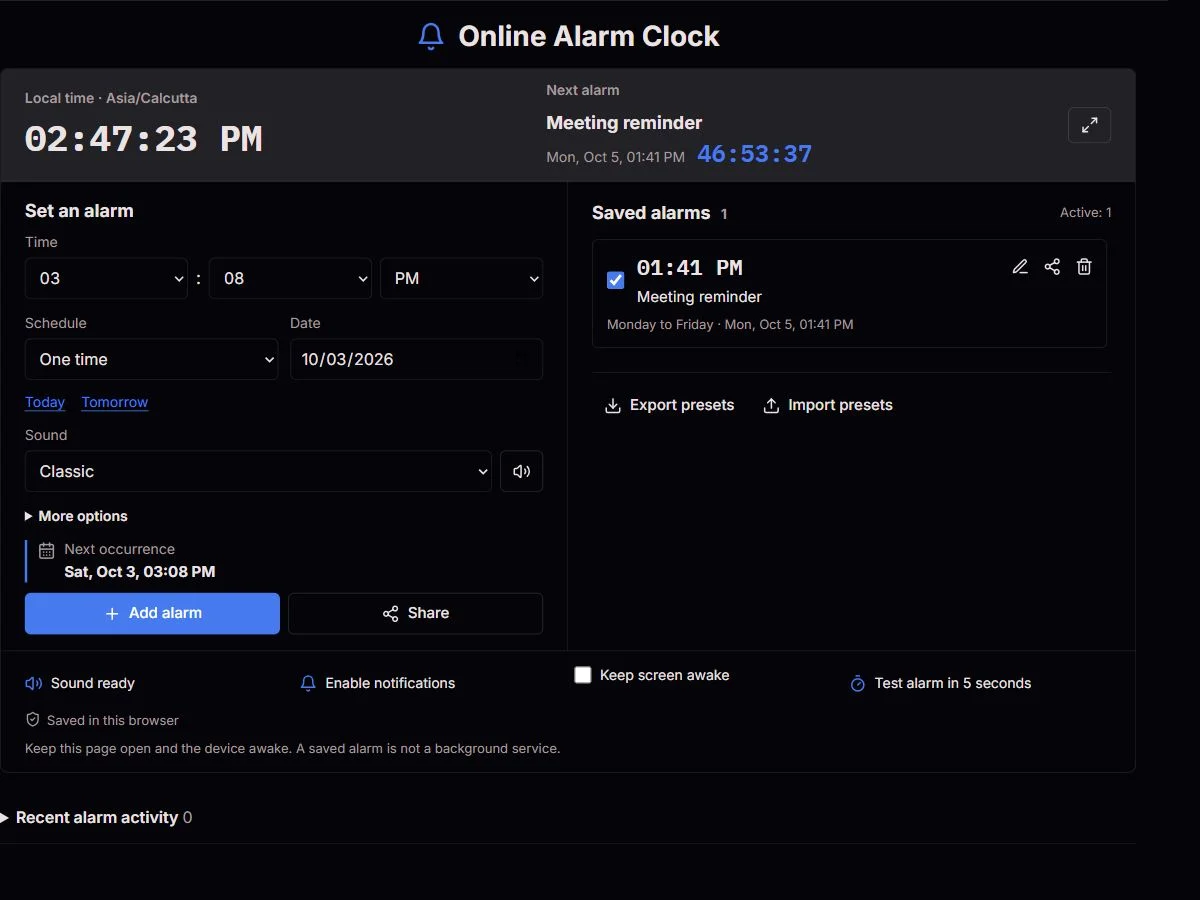
Choose Monday to Friday, name the alarm for your meeting and preview a gentle sound. The next date makes it easy to check that a weekend is skipped.
Use selected days for a changing class timetable. Share a preset with classmates, who check their own local time and activate it themselves.
Set a one-time reminder for a particular clock time. If you want a break in twenty minutes rather than at a specific time, use our timer instead.
Give the reminder a clear name and use a sound you can hear from the worktop. Keep the device awake; do not rely on a browser alarm for safety-critical cooking tasks.
One-time alarms turn off after firing. Repeating alarms keep their original clock time. Today and Tomorrow help with date selection; selected-day alarms require at least one day.
Thirteen synthesized sounds range from Gentle and Soft bell to Siren and Urgent. Preview plays the selected sound, not a different preset. Zero volume is an intentional mute, even when an alarm is enabled.
Choose 1, 5, 15, 30, 45 or 60 minutes. Snooze starts when you press it and does not change the original repeating schedule. Vibration is optional and only offered when the browser supports it.
Notifications need browser permission and platform support. They supplement the on-page popup, not a closed-browser alarm. Keep screen awake requests a wake lock while this page is visible; battery saving or the operating system can release it.
Switch between 12-hour and 24-hour time in More options. Fullscreen enlarges the current clock without changing your alarms. The five-second test opens the same popup as a scheduled alarm, so you can check the sound and Stop button before relying on it.
Edit changes the time, name, schedule and sound together. Switch an alarm off without deleting it, or use Undo after deletion to restore it switched off. Recent activity shows the last 20 of up to 100 records stored locally; exports include presets only, not your history.
We schedule each alarm using an absolute target time derived from the device's local clock and calendar. The countdown is recalculated from that target rather than counting interval ticks. Due alarms are queued, so reminders at the same time are not silently discarded.
Keep this page open and the device awake. A saved alarm is not a background service.
After a delayed check, alarms up to five minutes overdue can ring. Older occurrences are recorded as missed; recurring alarms move to their next date. Closing the page, sleeping the device or suspending the browser can prevent an alert. Always use a device-level backup for critical reminders.
Schedules follow the displayed device timezone. If a daylight-saving change skips a local time, the browser moves it forward by the gap; a repeated local time uses the first occurrence. After a timezone change, future schedules are recalculated. A snoozed deadline still represents the chosen number of elapsed minutes.
Will an alarm work if your computer sleeps?Alarm settings and the last 100 activity records use local browser storage on this device. Clearing site data removes them; private browsing or blocked storage can prevent saving. Exported JSON contains presets, not activity history. Imports are validated and remain off until you review and enable them.
Share carries the time, date, schedule, name, sound, volume and snooze setting in a link. It is a reusable setup, not remote control of another device. Names appear in the URL, so leave out sensitive details. Local clock times are not converted between the sender's and recipient's timezones.
No. Saving preserves settings, but it does not keep the alarm running after this page closes. Browser notifications do not change that limitation.
The browser may stop checking alarms and playing audio. On return, recent overdue alarms can ring and older ones are marked missed. Use your device's built-in alarm when reliability is essential.
Check the tool volume, system volume and output device. Press Enable sound or Preview sound, then run the five-second test. A browser can require another tap after reloading or resuming.
Yes, when browser storage is available. The page shows a warning if saving fails. After a refresh, check sound readiness again and keep the alarm page open.
No. Snooze creates a separate deadline from the moment you press it. A repeating alarm retains its original time and selected days.
Yes. Due alarms enter a queue. Stop or snooze the current popup to handle the next one. The waiting count shows that another reminder is pending.
The recipient's device timezone. Review the displayed date and next occurrence before activating a shared preset, especially when people are in different countries.
ClockTools coordinates alarm checking between tabs in supported browsers. The other-tab message tells you which tab is responsible. Keep the running tab open; do not treat multiple tabs as an independent backup.
Tell us your browser, device, timezone, scheduled time and what happened. Do not send private alarm names or an unredacted export.
Report an alarm issue