A remote-team handover
Keep your team’s cities together and choose their shared working days. Look for overlap before proposing a call; a green sample is a planning hint, not a promise that colleagues are free.
A good world clock helps you notice the date, not just the digits. Add the places you care about, choose a clear reference, and switch to planning when a conversation needs one exact start.
A good world clock helps you notice the date, not just the digits. Add the places you care about, choose a clear reference, and switch to planning when a conversation needs one exact start.
Search for a city and add it from the suggestions. We keep each place once, show its country and time zone, and let you move your main city first.
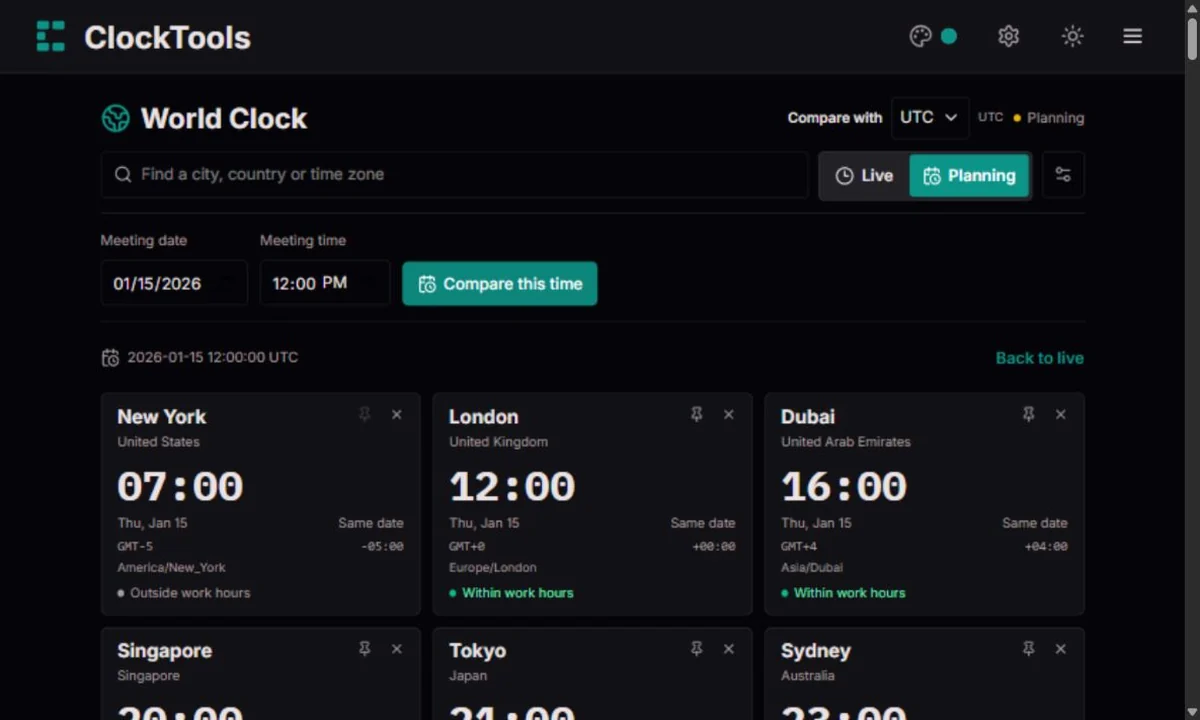
Live follows your device clock. Planning asks for a date, local time and reference zone, then holds that instant still. A missing or repeated local time needs your attention before applying it.
Read every city’s date as well as its hour. The overlap chart helps you compare chosen workdays. Copy a timestamped summary or share the setup; a planned link preserves the same instant.
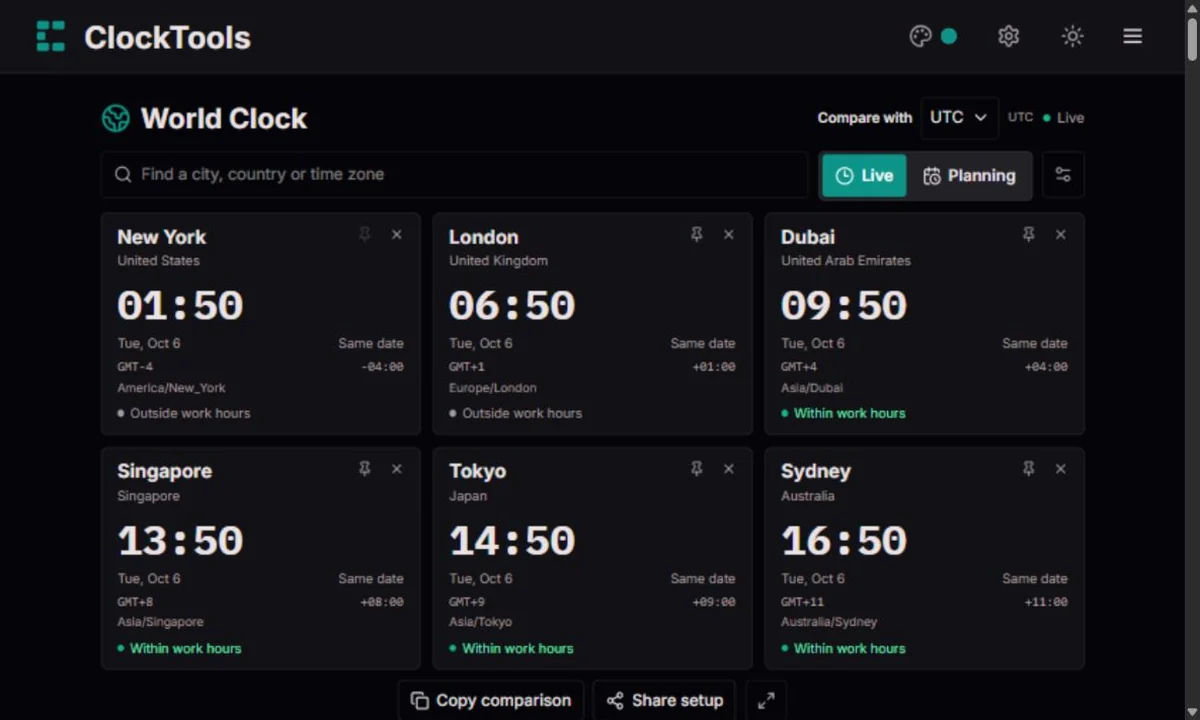
Keep your team’s cities together and choose their shared working days. Look for overlap before proposing a call; a green sample is a planning hint, not a promise that colleagues are free.
For family or friends abroad, use their city as the reference and plan an evening that suits them. Work-hour coloring can be switched to your preferred hours and days; it is not a sleep detector.
Set an exact date in the host city, then copy the city-by-city summary. Include dates and zones in the invitation, especially when attendees are on opposite sides of midnight.
Compare departure and destination cities on the actual travel date. Airlines publish schedules in local time; check the ticket’s date and airport carefully. Our clock helps with interpretation, not live flight status.
Search runs in your browser. The larger GeoNames list loads on demand; built-in places remain available if it fails. Accents are normalized, and common city aliases are supported. Pin moves a city first; remove keeps the others intact.
Compare with your device’s zone, UTC, a saved city or any named time zone supported by your browser. Search a city, country or IANA name, or narrow the list by country. You do not need to add the reference to the board. Each card shows the time difference and any change of calendar date; switching the reference keeps a planned meeting at the same instant.
Live reads the device clock again after a hidden tab or sleep. Planning holds a UTC instant until you choose another or return to live. For a repeated local time, select the first or second occurrence; a skipped time is rejected.
Choose 12 or 24 hours and show seconds only when useful. Fullscreen gives the city board more space. Date labels, UTC offsets and text availability hints remain visible; color alone never carries the meaning.
Options sets one shared local schedule for the selected cities, with start, end and weekdays. The chart samples each coming hour and half-hour. It does not verify calendar bookings, holidays, breaks or every minute between samples.
City order, reference, seconds and work hints save locally when possible. Planning is temporary unless shared. Copy includes the instant, dates and zones; a shared planned link preserves the UTC instant. Live links show current time, not a frozen screenshot. Links include your selected city list.
Our world clock makes a shared moment look simple, but that simplicity rests on centuries of observation, engineering and agreement. Here is the longer story of how people moved from a town’s own solar noon to a reference that connects the world.
24 h
Imagine arranging a journey when the clock in the next town does not quite agree with yours. Before standardized civil time, local solar time gave communities a natural reference: noon belonged to the Sun’s passage across their own meridian. Because Earth turns, that passage happens earlier farther east and later farther west. Neither town’s clock had to be faulty. They could simply be answering the question ‘What time is it here?’ using different geographical starting points.
In the idealized mean-solar picture, a full rotation is divided into 24 hours: 15 degrees of longitude correspond to an hour, and one degree to four minutes. That is a useful explanation of why longitude and time are connected, not a formula for today’s legal clock time. A sundial follows the apparent Sun, while mean solar time smooths out its uneven pace through the year. Our modern clocks add another layer: a community follows an agreed civil-time rule, even when its clock’s twelve o’clock does not coincide with local solar noon.
1840–1852
Local time was easier to live with when journeys were slow and most appointments stayed within one town. Railways changed the scale of coordination. A timetable had to connect departure, arrival and onward travel across a network, not merely describe the clock at one station. A few minutes’ disagreement could turn a simple instruction into an awkward calculation. British railway companies increasingly adopted Greenwich time during the 1840s, giving their schedules a common reference while local customs continued to change at different speeds.
Agreement was only half the problem. People also needed a way to learn the reference time and keep their clocks close to it. In 1852, the Shepherd master clock at the Royal Observatory, Greenwich, began distributing time signals by telegraph. An electrical signal could carry a timing reference across a distance far faster than a person carrying a watch. This is the important change: timekeeping became a service that connected places. A station, office or public clock could follow a shared signal rather than independently determine its own noon.
1884
A world that exchanged maps, navigation information and schedules needed a shared geographical starting line. The International Meridian Conference of 1884 selected Greenwich as the common prime meridian. That decision gave longitude a widely shared zero and helped international timekeeping work from a common reference. But it did not instantly produce the familiar map of present-day time zones, and it did not mean that every country’s wall clocks suddenly displayed the same hour.
It helps to separate three questions: where longitude begins, how an international time reference is maintained, and which clock time a country chooses for everyday life. They are related, but they are not identical. Governments and communities developed civil-time arrangements for transport, administration and local needs. Some countries use one zone; others use several. The modern world clock therefore needs the rules attached to a place and a date. Drawing equal-width bands around Earth or dividing a city’s longitude by fifteen cannot reliably tell you what its legal clocks should show.
IANA
Time zones are often introduced as neat strips on a classroom globe. Real life is less tidy. Borders, regional decisions and seasonal clock changes shape civil time, while some places use half-hour or quarter-hour offsets rather than whole hours. India and Nepal make a useful comparison: their clocks differ by fifteen minutes, even though both sit within the broad Asian part of a world-time map. These are not rounding errors. They are the clock conventions people actually use.
The date matters just as much as the hour. At one shared instant, a person may still be finishing Monday while another has already begun Tuesday. A late-evening family call or an early-morning handover can cross that boundary without either participant noticing a change of day. We keep the date beside each clock for that reason. A named IANA zone also carries more meaning than an offset written on its own: it identifies a set of civil-time rules that may change over time, rather than permanently promising one numerical difference from UTC.
1967–1972
As technology demanded steadier timing, the rotation of Earth was no longer enough to define every detail of an exact second. Atomic timekeeping offered a reproducible physical reference. In 1967, the SI second was defined using the cesium-133 transition frequency: 9,192,631,770 cycles correspond to one second. The significance is not merely that a clock became more accurate. Laboratories could realize the same unit from the same physical definition instead of relying only on astronomical observations or the behavior of a particular mechanical clock.
Coordinated Universal Time, UTC, connects atomic timekeeping with the world’s civil-time reference. The modern leap-second system began in 1972, allowing adjustments that keep UTC related to Earth’s rotation. A leap second is not the same thing as daylight saving: one concerns an international time scale, while the other changes a region’s civil clock. GMT remains a familiar term for zero-offset time, but UTC is the reference we use when describing a shared instant. Our browser tool converts that instant for your chosen places; it does not operate an atomic clock, distribute an official time signal or certify the accuracy of your device.
UTC
International timekeeping is a collaboration, not simply one master clock sitting somewhere on Earth. Time laboratories compare their clocks, and the BIPM uses contributed clock and time-transfer data to compute the international reference. That common foundation lets systems in different places coordinate events without demanding that everyone live by the same local hour. For an ordinary user, the distinction becomes practical when an invitation has to mean the same meeting in London, Mumbai and Sydney.
A useful digital approach is to preserve one instant and display it through each place’s time-zone rules. The invitation is one event; its local hour and even its calendar date can differ. Our World Clock follows that idea in Planning: changing the comparison reference changes how you read the event, not when it occurs. We also let you compare with UTC or a named zone without adding another city to the board. The history has brought us from separate local noons to shared references, but the everyday goal is still wonderfully human: help people arrive, call, work and celebrate together at the intended time.
UTC → IANA · Time-zone rules → Local time and date
UTC+01:00 describes a difference at an instant. Europe/London describes a set of time rules that can change with the date. Names such as CST are ambiguous across regions. For scheduling, keep the city or IANA zone and the date, rather than relying on a short abbreviation.
The example below uses one fixed instant: 15 January 2026 at 12:00 UTC. Kolkata is 17:30 and Kathmandu 17:45. Fifteen minutes can matter for a call, so our comparisons retain minutes rather than rounding offsets to whole hours.
Moving a clock forward skips local readings; moving it backward repeats some. New York’s 02:30 on 8 March 2026 is missing, while 01:30 on 1 November occurs twice. Our planner rejects the gap and asks which occurrence you want for the repeated time. It never quietly moves your meeting to another hour.
“Tuesday at eight” is incomplete when another city is already on Wednesday. Add the date before sharing. Zone rules are also political: the IANA database is maintained as governments change civil time. Your browser’s installed rules may lag a new decision, so reconfirm important future appointments.
| City | Local time | UTC offset |
|---|---|---|
| New York | 07:00 | GMT-5 |
| London | 12:00 | GMT+0 |
| Kolkata | 17:30 | GMT+5:30 |
| Kathmandu | 17:45 | GMT+5:45 |
We read one device-clock instant for all live cards, then format it through Intl.DateTimeFormat with each city’s IANA zone. Dates and offsets are calculated from structured parts, not a parsed display string. Planning uses the Temporal polyfill to resolve a local date and time, including gaps and folds. GeoNames supplies city-to-zone mappings, not a live time feed. The comparison picker combines a bundled IANA country-to-zone directory with the named zones your browser supports, validates each zone and groups recognized aliases. This extends beyond the GeoNames city index. The directory identifies places; the browser’s time-zone data still supplies the actual conversion rules.
The device clock, browser time-zone data and city mappings can be wrong or outdated. Historical and far-future rules are not guaranteed; planning is limited to 2000–2099. Work hints are configurable samples, not calendar availability. Reconfirm important bookings with the organizer or official schedule. No alarm, flight tracking or background meeting notification is provided.
How are the times calculated?No. Live time comes from the device clock and its browser time-zone rules. Selecting a city does not request your location. Incorrect system time affects every city.
Cities may change daylight saving on different dates, or not change at all. Compare the actual date instead of assuming today’s difference applies year-round.
No. It checks only the local hours and weekdays you selected. The chart samples hours and half-hours, not calendars, holidays or every minute.
The ordered cities, reference, format, seconds and work schedule. A planning link also preserves the UTC instant. A live link reads the recipient’s device clock. Opening a link does not change their device time zone.
It may already be selected, use a different common spelling, or not be in the bundled GeoNames list. Try the country or IANA zone. We do not claim every settlement or every historical time rule is covered.
Yes, when browser storage is available. If saving fails, the clocks keep working for this visit and show a warning. Clearing site data removes saved choices. A planned instant is restored only from a shared planning link.
Compare with your device’s zone, UTC, a saved city or any named time zone supported by your browser. Search a city, country or IANA name, or narrow the list by country. You do not need to add the reference to the board. Each card shows the time difference and any change of calendar date; switching the reference keeps a planned meeting at the same instant.
Clock · Alarm Clock · Timer
Found a wrong city, date or offset? Send the city names, IANA zones, chosen date, reference, browser and expected result. Include a primary source for a rule change when possible. A screenshot without private information helps us reproduce the problem.
Report a problem