What Is A Shareable Alarm And How Does It Work?
A shareable alarm lets you create an alarm setup and share it as a link. It makes reminders easier to send, reuse, and coordinate, especially when another person needs the same alarm details.
What Is A Shareable Alarm?
An alarm is usually personal. You set a time on your own device, wait for it to ring, and use it as a reminder for yourself. But sometimes an alarm is not only for one person. Sometimes you want another person to use the same alarm time, the same label, or the same reminder setup without explaining every detail manually.
A shareable alarm is an alarm setup that can be shared through a link. Instead of telling someone, "Set an alarm for 6:30 PM with this label and this sound," you can send them a link that contains the alarm details. The person receiving the link can open it and use the alarm setup on their own device.
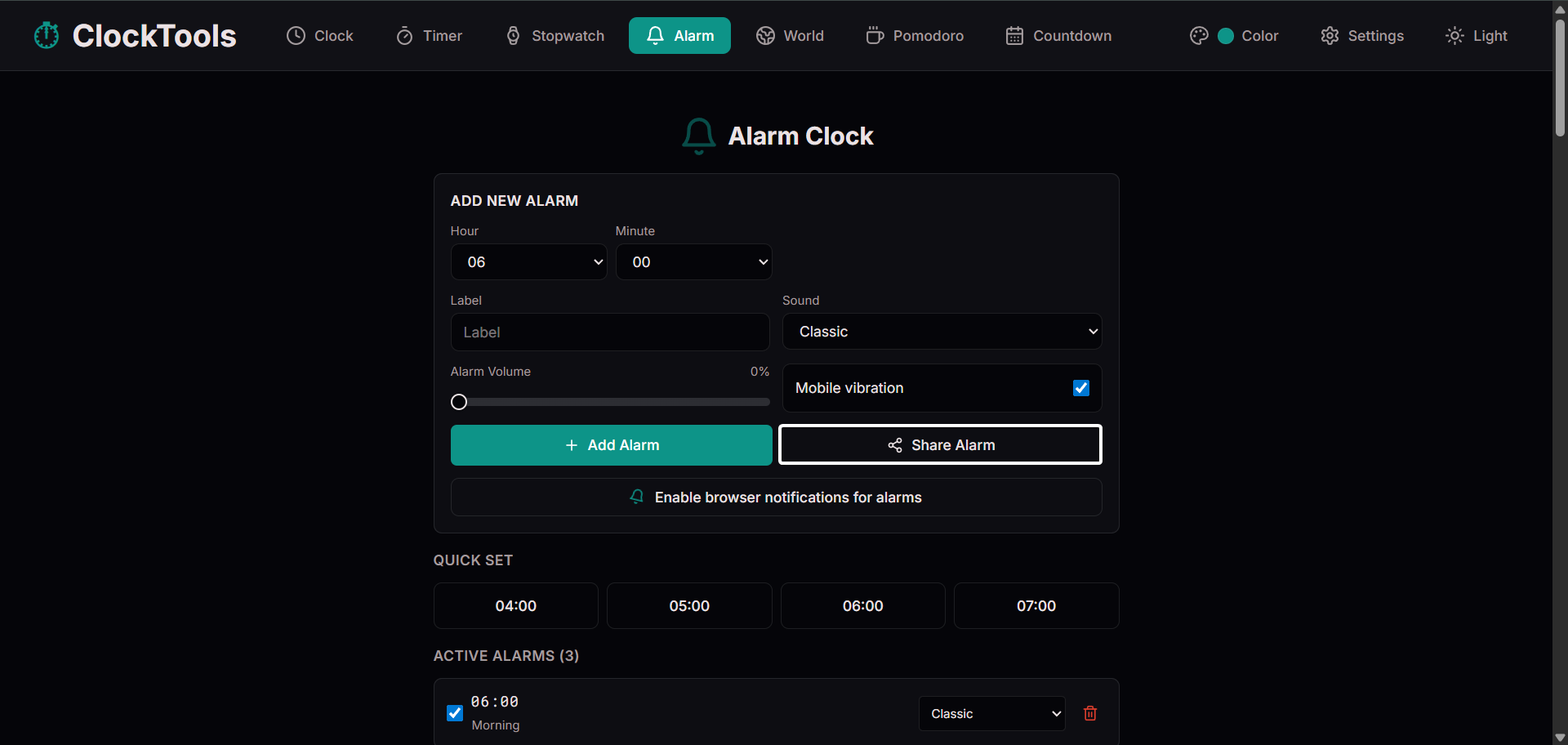
This is different from a normal alarm because a normal alarm usually stays only on the device where it was created. If you set an alarm on your phone, it belongs to your phone. If you set an alarm on a browser page, it belongs to that browser session. Other people do not automatically receive that alarm.
How Is A Shareable Alarm Different From A Regular Online Alarm?
A regular online alarm is mostly a personal tool. You open a page, choose a time, and set the alarm for your own browser. It works well when you are the only person who needs the reminder. A shareable alarm adds one more layer: portability.
The alarm setup can move through a link. That makes it easier to share, easier to repeat, and easier to coordinate. Multiple people can open the same alarm setup on their own devices.
A regular online alarm answers the question, "Can I set an alarm?" A shareable alarm answers the question, "Can I help someone else set the same alarm?" That difference is small, but it changes how useful an online alarm can be for real routines.
Why Does ClockTools.app Shareable Alarm Stand Out?
Many online alarm tools are basic. They let you choose a time, start an alarm, and stop there. That is useful, but it does not always match how people actually manage reminders in daily life.
ClockTools.app is different because we think an online alarm should be more practical. Our shareable alarm feature is built around real use cases. People coordinate with classmates, family, teammates, coworkers, students, clients, and friends. A shareable alarm makes that coordination easier.
Our approach stands out because it combines simple link-based sharing, recipient-friendly setup, useful alarm labels, sound options, volume control, mobile vibration support, browser notification support, and a clean mobile-friendly layout. The feature sits inside a larger set of time tools available from the ClockTools.app homepage, so users can move between alarms, timers, clocks, and focus tools without learning a new interface every time.
What Should Users Know Before Using A Shareable Alarm?
A shareable alarm is useful, but users should understand how it works. The alarm does not run from our server after you share it. The recipient needs to open the link and set the alarm on their own device or browser. This is the safer and more practical approach because users stay in control of their own alarms.
Browser behavior can also affect alarms. Notifications, sound, vibration, and background behavior may depend on the browser, device, operating system, power settings, and permissions. For important reminders, users should keep the page open and make sure their device settings allow alerts.
For critical reminders, such as medical, emergency, legal, financial, or safety-related alerts, users should also use a trusted device-level alarm or official reminder system. ClockTools.app is designed for everyday convenience and productivity, not for life-critical timing.
How Can Shareable Alarms Improve Daily Routines?
Shareable alarms can make daily routines easier because they reduce repeated setup. For students, a shareable alarm can be used for class reminders, study breaks, exam preparation, and group study starts. For remote workers, it can help with meeting reminders, focus blocks, follow-up calls, and deadline check-ins.
For families, it can help coordinate wake-up times, cooking checks, school routines, and travel preparation. The biggest benefit is clarity. Instead of sending a message like "Do not forget the thing at 7," a shareable alarm can carry the time and purpose together.
This is why shareable alarms feel like a natural next step for online alarm tools. They turn a private reminder into a useful shared setup while still keeping control on each user's own device.
What Is The Final Takeaway?
A shareable alarm is a simple idea with a lot of practical value. It lets you create an alarm setup and share it as a link, making reminders easier to send, reuse, and coordinate.
A regular online alarm is useful when you only need a reminder for yourself. A shareable alarm is better when the reminder needs to travel to someone else. At ClockTools.app, we built our shareable alarm feature to make online alarms more useful for real life.
To try it, open the ClockTools.app online alarm clock, create your alarm setup, and use the Share Alarm option.
Frequently Asked Questions?
What Is A Shareable Alarm?
A shareable alarm is an alarm setup that can be shared through a link. The link can include alarm details so another user can open the setup and set the alarm on their own device.
How Does A Shareable Alarm Work?
A shareable alarm works by placing alarm details into a shareable link. When someone opens the link, the alarm setup can load into the alarm tool so they can review it and set it.
Does A Shareable Alarm Ring On Someone Else's Device Automatically?
No. The recipient needs to open the link and set the alarm on their own device or browser. This keeps the user in control and avoids unwanted alarms.
Can I Use ClockTools.app Shareable Alarm For Meetings?
Yes. A shareable alarm can be useful for meeting reminders, online classes, group study sessions, remote work calls, and other shared schedules.
Can I Add A Label To A Shareable Alarm?
Yes. Alarm labels are useful because they explain what the alarm is for. A clear label can help the recipient understand the purpose of the reminder.
Does The Shareable Alarm Need An Account?
No. ClockTools.app is designed to be simple and easy to use without requiring an account for normal alarm use.
Do Browser Notifications Work With Shareable Alarms?
Browser notifications can work if the user's browser supports them and the user grants permission. Device settings, browser rules, and background behavior can affect notifications.
What Should A Recipient Review Before Setting A Shared Alarm?
The recipient should verify the alarm time, AM or PM choice, label, sound and volume settings, and any notification or vibration permissions on the device that will run it. A shared setup should be reviewed rather than accepted blindly.
Is A Shareable Alarm Better Than A Normal Online Alarm?
A shareable alarm is better when you want to send or reuse an alarm setup. A normal online alarm is enough when you only need a reminder for yourself.
Can The Recipient Change A Shared Alarm Before Setting It?
Yes. Opening the link loads the alarm details for review; the recipient can adjust the setup before setting it on their own device. The sender does not remotely activate or control the recipient's alarm.

About The Author
Vigneshwaran Vijayakumar
Founder, Developer and Publisher of ClockTools | Digital Marketing Manager | India
Vigneshwaran is an engineer with decades of technical experience, including professional work as a Digital Marketing Manager in Dubai. His work connects data analysis, SEO, conversion-rate optimization, content systems, visual production, and applied AI and machine learning. At ClockTools, he turns that multidisciplinary experience into focused browser utilities and practical, source-aware guides.