Stopwatch
Online Stopwatch for Workouts: How to Track Rounds and Rest?
A boundary-based method for logging flexible workout rounds and rest with stopwatch laps, placing the device sensibly, correcting timing mistakes, and interpreting durations without turning them into performance scores.
By Vigneshwaran Vijayakumar, Developer and Publisher | | Reviewed under the ClockTools editorial policy
Table of contents
Use an online stopwatch for workouts when round lengths are flexible and you want a record of what actually happened. Set the device in a stable, readable place, open the ClockTools stopwatch, press Start once, and tap Lap at every round and rest boundary. The total keeps running while each + split records the phase that just ended.
Choose a countdown timer instead when every work or rest period has a fixed duration and you need an end cue. A stopwatch records elapsed time; it does not tell you when a prescribed interval should finish. That distinction is especially important when touching a screen at every boundary would interfere with the movement.
Pick the timing mode before the workout
Do not choose between a stopwatch and timer based on which screen looks familiar. Choose based on whether duration is an observation or duration is an instruction.
| Timing need | Better fit | Reason |
|---|---|---|
| Record the actual length of flexible rounds | Stopwatch with laps | Each boundary produces a measured split |
| Keep one total for an unstructured session | Stopwatch without laps | The display answers total elapsed time |
| End every work period after a preset duration | Timer | The countdown moves toward a known endpoint |
| End every rest after a preset duration | Timer | You do not need to watch the elapsed value and decide manually |
| Compare repeated phases after the session | Stopwatch with a written lap pattern | Like phases can be separated during review |
If the plan says “work until the set is complete, then record the time,” a stopwatch fits. If it says “stop after 40 seconds,” a countdown fits. Changing tools is better than pretending a missed cue or an improvised lap is an accurate interval.
Build a round-and-rest lap protocol
The ClockTools stopwatch begins at 00:00.00 with Start, Share, and Precision controls. Once started, Pause and Lap become the primary actions. Use that state change to run one continuous sequence:
- Write the boundary pattern where it can be seen:
round end → rest end → round end → rest end. - Choose the display precision. Whole seconds or deciseconds reduce visual noise for longer phases; milliseconds are available when the display format itself matters, but manual taps still depend on the person operating the device.
- Put the device in position before the first movement begins.
- Press Start at the beginning of round 1.
- Tap Lap at the end of round 1. That split represents round 1.
- Tap Lap at the end of rest 1. That split represents rest 1.
- Continue alternating the same boundary rule. Use Pause only if the entire session stops, not as a substitute for a lap.
- Pause at the end, review the list, and reset only after the useful values have been recorded.
This method needs a deliberate operator. If the device cannot be reached without disrupting the activity, use another person to mark boundaries or use a countdown workflow that does not require a lap tap.
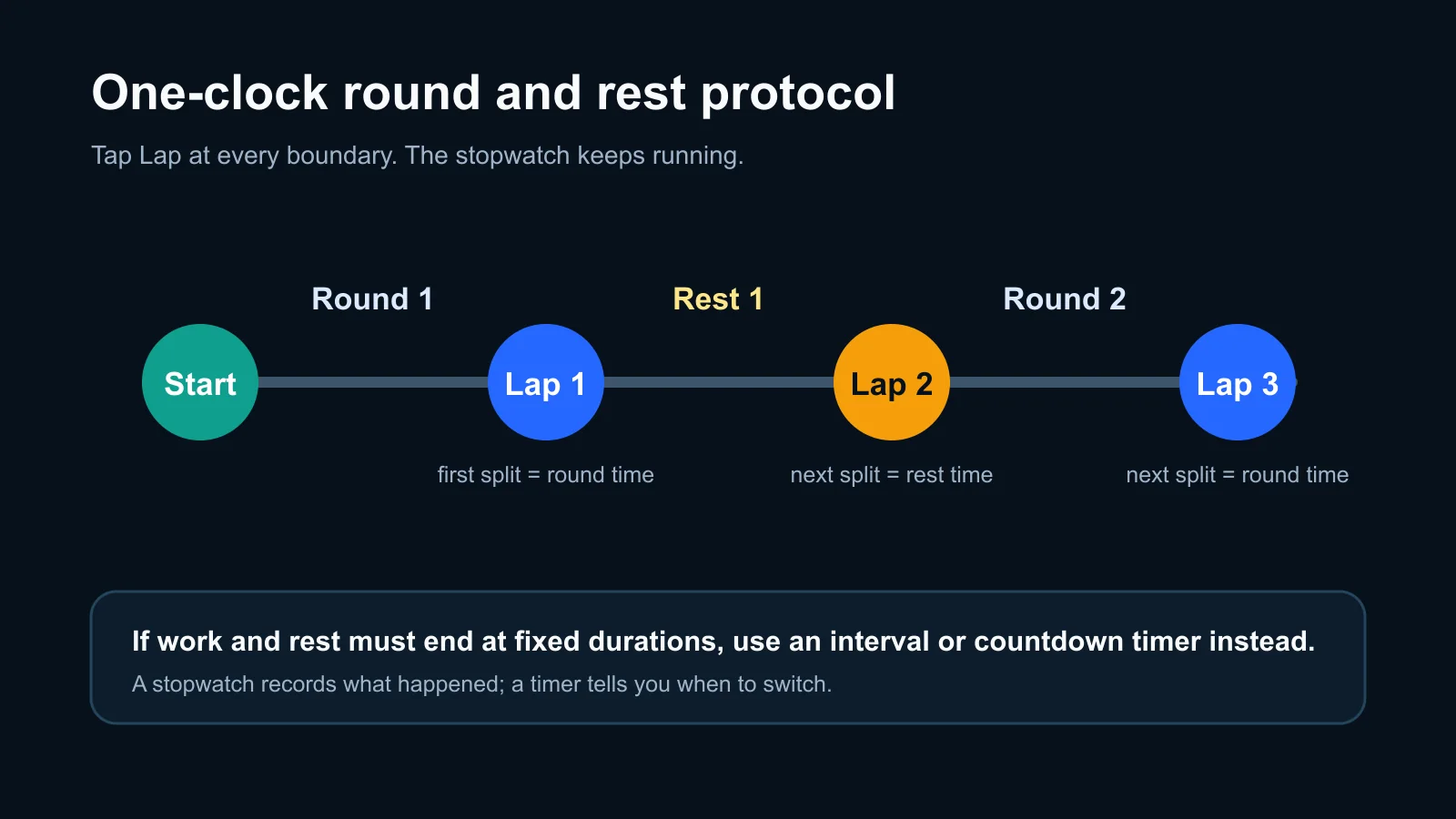
One continuous stopwatch can record alternating phases when every Lap tap has a predetermined meaning. A countdown is clearer when the device must cue each switch.
Decode an alternating lap list
The table below is a hypothetical interface example. The durations are invented to explain the row pattern; they are not a recommended workout, a measured ClockTools test, or evidence of performance.
| Boundary tapped | Cumulative total | Phase split | Review label |
|---|---|---|---|
| Round 1 ended | 00:00:48 | +00:00:48 | Work phase 1 |
| Rest 1 ended | 00:01:23 | +00:00:35 | Rest phase 1 |
| Round 2 ended | 00:02:14 | +00:00:51 | Work phase 2 |
| Rest 2 ended | 00:02:52 | +00:00:38 | Rest phase 2 |
The total in the last row shows 2 minutes 52 seconds since Start. It does not mean rest 2 lasted that long. The +00:00:38 split is the interval between the third and fourth boundary taps.
Compare row 1 with row 3 when reviewing work phases, and row 2 with row 4 when reviewing rests. Comparing row 2 with row 3 answers only which interval was longer; it does not compare equivalent phases.
Place the device before pressing Start
Device placement is part of the timing method because every lap is a manual interaction.
- Use a stable, dry surface that is outside the path of feet, weights, bands, moving equipment, and other people.
- Keep the display readable without carrying the device through the movement.
- Make sure the Lap control can be reached without leaning into equipment or rushing across the area.
- Keep the screen awake and the stopwatch tab visible when the record matters. ClockTools notes that mobile operating systems may limit background-tab activity.
- Rehearse one boundary tap before starting the session if the setup is unfamiliar.
A phone on the floor beside a moving foot may be easy to see and still be badly placed. Readability, reach, and physical clearance all matter. If those conditions cannot coexist, change the timing method rather than forcing access to the screen.
Recover from timing mistakes honestly
Manual timing errors do not always require discarding the entire session, but the recovery must preserve what the record actually shows.
| Timing mistake | Honest recovery | Information that is no longer exact |
|---|---|---|
| An extra Lap tap | Mark it and add the two adjacent splits when they belong to one intended phase | The exact intended boundary tap |
| A missed Lap tap | Label the next split as a combined interval and resume at the next clear boundary | The separate durations inside the combined interval |
| Pause tapped instead of Lap | Press Start to continue and mark the stopped gap | Elapsed time during the pause |
| A boundary tap was late | Keep the displayed value and note the late tap | The activity’s exact physical boundary time |
Do not divide a combined interval by two simply because two phases were missed. The total supports a combined duration, not equal components. If exact interval cues are essential, this is evidence that a countdown timer is the better tool for the next session.
Treat lap labels as durations, not scores
After multiple laps, ClockTools marks the shortest and longest split as Fast and Slow. In an alternating round/rest log, the shortest split may be a rest and the longest may be a work phase. Those labels compare elapsed duration across the rows; they do not identify the best round, the hardest effort, correct technique, or an appropriate recovery period.
Precision deserves the same restraint. A display with three decimal places can show milliseconds, but a manual boundary tap still includes human reaction and device interaction. Use the precision level that makes the record readable, and avoid presenting manually marked workout laps as laboratory measurements.
Keep timing separate from exercise decisions
The stopwatch records time. It does not choose exercises, loads, intensity, recovery, warm-up, or cool-down, and it cannot determine whether a workout plan is suitable for a person. Follow the plan or qualified guidance that applies to the activity rather than changing it to produce neater splits.
Do not remove planned preparation or recovery merely to shorten the total. The American Heart Association’s warm-up and cool-down guidance explains why gradual transitions belong around physical activity. That guidance is separate from the ClockTools timing protocol: one addresses the activity, while the other explains how to record elapsed phases.
Review the record before resetting
When Pause is pressed, ClockTools preserves the elapsed display and lap rows and offers Start and Reset. Before resetting:
- Label the first row as work or rest and alternate from there.
- Mark any extra, missed, paused, or late boundary.
- Compare work with work and rest with rest, not every row with every other row.
- Decide whether manual lap timing was practical enough to repeat.
The final decision may be to keep the stopwatch, simplify the lap pattern, move the device, ask someone else to operate it, or switch to a countdown. A useful review improves the measurement method; it does not turn the lap list into a judgment about the workout.
Frequently Asked Questions
Should I use a stopwatch or countdown timer for workout intervals?
Use a stopwatch to record how long flexible rounds actually take. Use a countdown timer when each period must end after a preset duration or when you need a cue without checking elapsed time.
How do I record both rounds and rests with Lap?
Start once, then tap Lap at every boundary: round end, rest end, round end, rest end. Label the alternating rows afterward and compare like phases.
Where should I place my phone during a workout?
Place it on a stable, dry surface outside the path of movement or equipment. It should be readable and reachable without carrying it, rushing, or moving into an unsafe position.
What do the Fast and Slow lap labels mean?
They identify the shortest and longest recorded split. They refer only to duration and do not assess effort, technique, quality, or whether a work or rest period was appropriate.
What should I do if I miss a lap boundary?
Treat the next split as a combined interval, label it honestly, and resume at the next clear boundary. The stopwatch cannot reconstruct separate durations inside a boundary that was never recorded.
Can a stopwatch tell me how long my rest should be?
No. It can measure the rest you took, but it does not prescribe an appropriate recovery period. Use the workout plan or qualified guidance relevant to the activity.

About The Author
Vigneshwaran Vijayakumar
Founder, Developer and Publisher of ClockTools | Digital Marketing Manager | India
Vigneshwaran is an engineer with decades of technical experience, including professional work as a Digital Marketing Manager in Dubai. His work connects data analysis, search engine optimization, conversion-rate optimization, content systems, visual production, and applied AI and machine learning. At ClockTools, he turns that multidisciplinary experience into focused browser utilities and practical, source-aware guides.