Our IP subnet calculator helps you turn an address into a usable network plan. Start with IPv4 or IPv6, inspect the range, then explore sizing and subnet divisions when you need them. You do not need to squeeze every technical detail into your first calculation.
How do you use our subnet calculator?
Enter your address and boundary
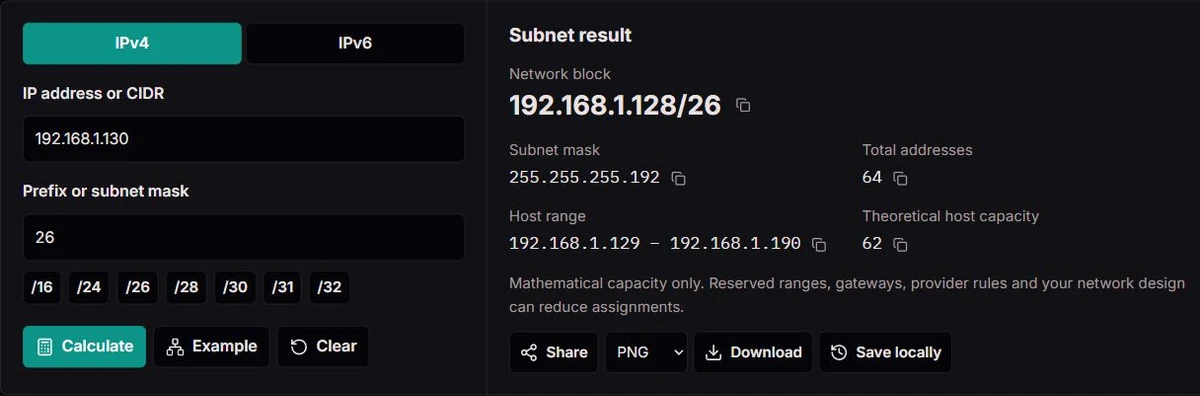
Choose IPv4 or IPv6. Enter an address with a prefix, such as 192.168.1.130/26, or keep the address and prefix separate. IPv4 also accepts a contiguous dotted subnet mask. Press Calculate when the setup is ready.
Read the network, not just the mask
Review the network block, address count and endpoints. A /31 point-to-point link, a /32 host route and an IPv6 prefix have different meanings; our result calls out those differences instead of inventing broadcast addresses.
Plan, check and take it with you
Open the planning tools to size a network or divide a parent block. Copy individual values, download a branded PNG, CSV or text report, or save one of five recent setups locally. Shared links reopen the selected address and prefix.
Read the network, not just the mask. Review the network block, address count and endpoints. A /31 point-to-point link, a /32 host route and an IPv6 prefix have different meanings; our result calls out those differences instead of inventing broadcast addresses.
Where does subnet planning help?
A growing office LAN
You need 60 devices today, including the gateway. Required hosts suggests /26 with 62 traditional host addresses. That leaves little growth room: allow for printers, phones, access points and reserved addresses before choosing the final size.
Separate VLANs without overlap
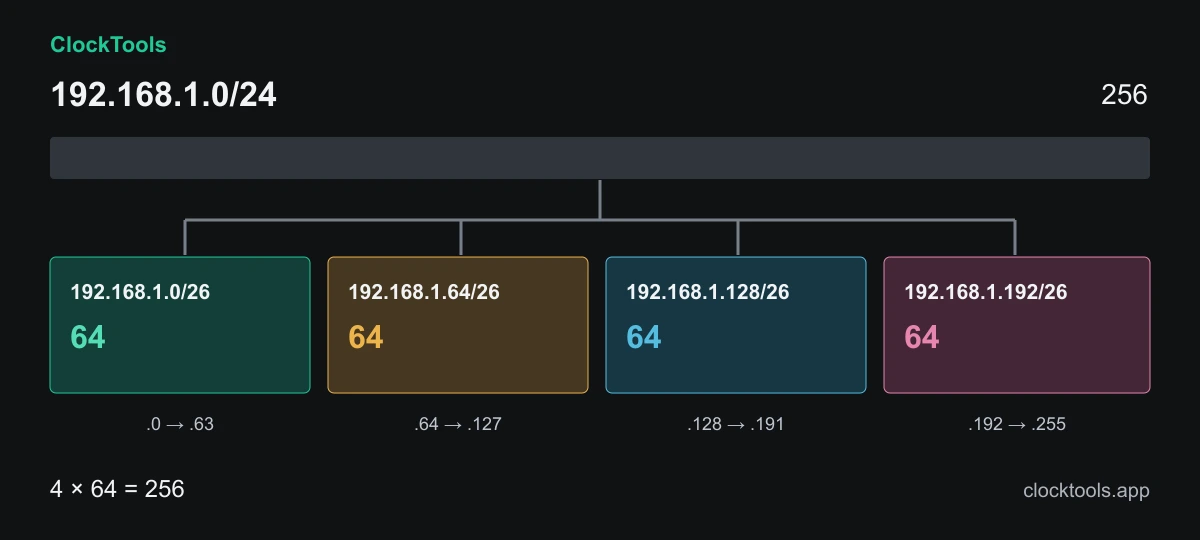
Split 192.168.1.0/24 into /26 networks for four equal segments. Each segment has its own boundary. Address separation alone is not security isolation: configure routing and firewall policy for the intended access.
A practical networking lesson
Compare /24, /25 and /26 in the binary details, then check the worked diagram. Each extra prefix bit halves the address space. The calculation lets you verify your reasoning without turning the page into a memory test.
A VPN or support handover
Check planned ranges against existing sites before configuring a tunnel. Our report makes the chosen network and mask easy to communicate. The calculator cannot discover remote subnets or confirm that an address is available.
What can you do with these options?
IPv4 and IPv6
IPv4 shows dotted masks, wildcard masks and traditional host endpoints. IPv6 shows the full address interval and exact integer count, without subtracting an IPv4-style network and broadcast pair.
Host-based sizing
Enter a positive device count to find the smallest ordinary IPv4 subnet that fits. Include infrastructure and planned growth in the count. The suggestion does not silently select /31, which is intended for suitable point-to-point links.
Equal-size splitting
Choose a longer prefix to divide the current parent into equally sized blocks. The first 64 are displayed and exported; the full number of blocks is shown. This limit prevents large IPv6 splits from freezing the page.
Variable-length planning
Enter host counts such as 60, 28, 12. VLSM allocates the largest requirement first, places each subnet on its proper boundary and rejects a plan that exceeds the parent. Remaining addresses are not necessarily one contiguous CIDR block.
Binary details and address types
Expand the details to inspect network bits, masks, wildcard values and historical address classes. Classification applies to the entered IP only. A very broad block may contain several different special-use ranges.
Reports, sharing and local history
Copy one value or export the current result as PNG, CSV or TXT. Planning CSVs contain the displayed rows. Save deliberately to keep up to five setups in this browser. URLs and downloaded reports contain the addresses you choose, so check them before sharing.
Understand the network behind the numbers
A /24 split into four /26 networks. Worked example: each /26 contains 64 addresses, with 62 traditional host addresses. Four non-overlapping blocks fill the original /24.
How does a subnet boundary work?
An IPv4 address is a 32-bit value, often written as four decimal octets. A prefix determines which leading bits identify the network. The remaining bits describe positions inside that network. The subnet mask presents the same boundary with leading ones followed by zeros; an interrupted mask such as 255.0.255.0 is not a valid CIDR mask.
Take 192.168.1.130/26. The first 26 bits identify 192.168.1.128/26, a block of 64 addresses ending at 192.168.1.191. For a conventional multi-access IPv4 subnet, .128 identifies the network and .191 is its directed broadcast. The ordinary host interval runs from .129 to .190. A gateway is one of those host addresses, not an extra address outside the count.
That distinction matters when reading a router screen. The address on an interface and the network advertised by a route are related but not identical. Our calculator preserves the address you entered while also showing the normalised network block. Changing the prefix can change the network boundary even when the interface address stays the same.
Why did the Internet move from address classes to CIDR?
Early IPv4 allocation grouped networks into broad classes. Class A, B and C blocks offered dramatically different capacities, so an organisation could receive far more space than it needed or struggle with a block that was too small. Historical classes explain older diagrams, but they are not the rule that sizes a modern subnet.
The CIDR allocation and aggregation plan describes a more flexible approach: carry the prefix length with the address instead of assuming a boundary from its first octet. Contiguous, aligned networks can also be represented by an aggregate route. This connects address conservation with the practical problem of keeping routing tables manageable.
Inside an office, the same prefix idea helps balance capacity, segmentation and growth. It does not automatically reduce traffic or create access control. A smaller address range becomes useful when it fits the surrounding VLAN, routing and firewall design. We keep the old class label in the details so it supports learning without distracting from the actual CIDR calculation.
Why are /31, /32 and special addresses different?
The familiar total-minus-two host rule belongs to ordinary IPv4 subnets, not every possible prefix. The point-to-point /31 standard allows two endpoint addresses on a suitable link and removes the directed broadcast interpretation. Both ends must support the intended configuration. A /32 describes one address and is commonly used as a host route.
Private addressing is another distinction, not a prefix-size rule. A private LAN can contain many different subnet sizes. Shared carrier-grade NAT space, loopback, link-local, documentation, benchmarking and multicast blocks have their own roles. The IANA special-purpose registry is useful when an address looks valid but is unsuitable for ordinary public routing.
Our address-type label describes the selected address. It is not a scan, an allocation lookup or a promise that the entire network is reachable. A /0 covers the full address space, including reserved blocks. Its theoretical count must never be read as permission to assign every address to devices.
What changes when you plan an IPv6 network?
IPv6 uses 128-bit addresses, so a /64 contains 2⁶⁴ addresses. Writing that quantity as an ordinary floating-point number risks losing exact digits. Our result keeps the full integer count and gives the first and last addresses as boundaries, not as an invitation to enumerate the entire subnet.
The IPv6 addressing architecture has no broadcast address. Multicast serves functions for which IPv4 uses broadcast. It also has address roles and reservations that differ from IPv4, so subtracting two endpoints would not produce a meaningful universal device capacity. Many ordinary IPv6 LAN designs use /64; do not shrink them merely because only a few devices are present.
Prefix calculations help with a delegated block and its subdivisions, but deployment also depends on router advertisements, interface addressing, provider policy and the requirements of your network. Zone identifiers such as %eth0 describe local interface context and are not accepted as part of a shareable subnet address.
How can you build a subnet plan that leaves room to grow?
Start with devices, then add infrastructure, reservations and realistic growth. For ordinary IPv4, 60 requested hosts need a /26 with 62 host addresses. If the requirement means 60 workstations plus a gateway and several printers, a larger subnet may be appropriate. Required-host sizing is a capacity check, not a complete design decision.
For 60, 28 and 12 hosts inside 192.168.1.0/24, our VLSM plan assigns 192.168.1.0/26, 192.168.1.64/27 and 192.168.1.96/28. The largest allocation comes first because its alignment is harder to accommodate later. The remaining 144 addresses are unused space, not automatically a single subnet.
Write down the purpose, VLAN, gateway, DHCP pool, exclusions and routing policy alongside the CIDR block. Avoid overlapping ranges when joining sites by VPN. Before making a production change, check the running configuration and available assignments; this calculator works from your input and cannot inspect your devices.
Accuracy, limits and corrections
We calculate the network boundary, endpoints and exact address count from the selected IP version and prefix. IPv4 host capacity follows ordinary multi-access rules, with explicit /31 point-to-point and /32 single-address cases. IPv6 reports address intervals rather than an invented usable-device count. Planning checks alignment and parent capacity.
Results are mathematical planning aids, not live network measurements. They do not verify address ownership, free DHCP leases, routing, firewall isolation or provider-specific reservations. Very broad blocks can cross address categories. Equal-size previews and planning exports are capped at 64 rows; VLSM accepts up to 32 requirements.
If a result seems wrong, send the IP version, a non-sensitive example address, prefix or mask, requested host counts and the expected value. Include the browser and a screenshot if useful. Do not send internal network diagrams or confidential addresses. We review the calculation and explanation together.
Yes. Select IPv6 to calculate a prefix from /0 to /128, its address interval and exact total count. IPv6 does not use an IPv4-style broadcast address or a universal total-minus-two host rule.
Can I enter a subnet mask instead of a prefix?
Yes, in IPv4 mode. Enter a contiguous dotted mask such as 255.255.255.0 in the prefix field. Invalid or non-contiguous masks are rejected rather than silently changed.
How many hosts fit in a /24 network?
A /24 contains 256 IPv4 addresses and normally 254 traditional host addresses. A gateway and reserved devices use that same pool. Provider-specific policies can reduce what you may assign.
Why does /31 have no broadcast address?
On a supported point-to-point link, its two addresses represent the two endpoints. The calculator follows that interpretation and does not label the upper endpoint as a directed broadcast.
What does VLSM do?
Variable-length subnet masking divides a parent IPv4 block into different subnet sizes. Our planner sorts requested host counts largest-first, aligns each allocation and reports when the plan does not fit.
Does a public-looking address mean it is reachable?
No. Classification is not a connection test, route lookup or ownership check. Even a syntactically valid address may be reserved, unallocated, filtered or unreachable from your network.
What is saved or included in a shared link?
Save locally keeps up to five address-and-prefix setups in this browser. Share creates a URL containing the selected IP, prefix and version. Reports also contain the calculation, so only share information you intend to disclose.
Can the calculator configure my router?
No. It helps you plan and document a network. Router, DHCP, VLAN and firewall changes must be applied and checked separately in the appropriate administration tools.