Step 1
Choose a mode
Use URI component for one query value, whole URI for existing structure, or form value for application/x-www-form-urlencoded data.
A whole address and a single query value have different boundaries. Choose the mode before copying the result.
A whole address and a single query value have different boundaries. Choose the mode before copying the result.
Use URI component for one query value, whole URI for existing structure, or form value for application/x-www-form-urlencoded data.
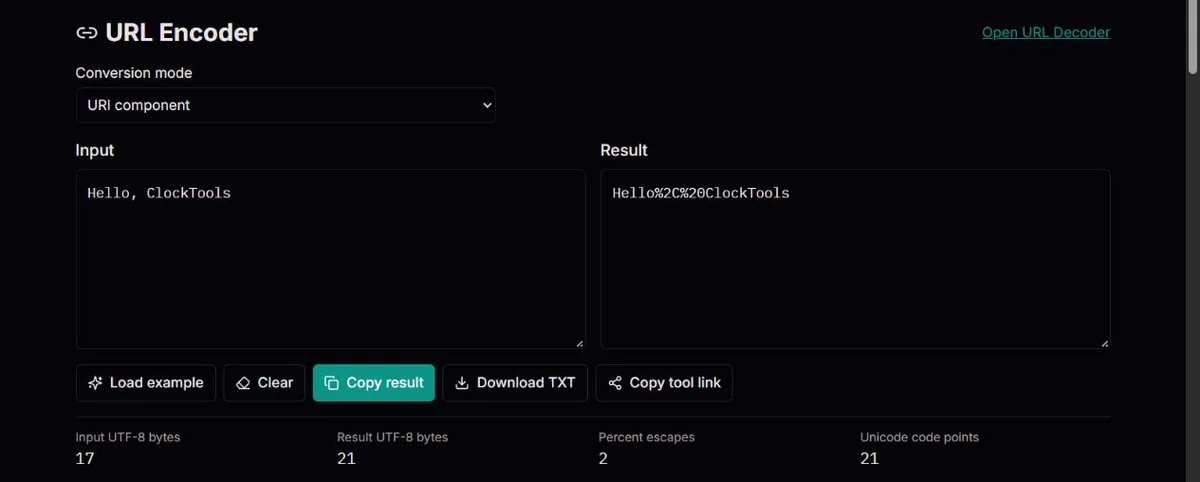
Paste unencoded text. Review percent escapes and UTF-8 byte counts; the tool does not fetch the address.
Copy or download TXT after checking the mode. The setup link contains only the tool address, never your input.
To build a search value for A&B + café, choose URI component and encode the value alone. The result is A%26B%20%2B%20caf%C3%A9. Insert it after q= in an illustrative address such as https://example.test/search?q=, keeping the address structure outside the conversion.
Whole-URI mode would leave the ampersand structural. It cannot decide that the ampersand in an already assembled raw query was intended as data. Agree on the boundary before encoding, not after an unexpected server response.
When debugging a form receiver, use A+B C and compare component with form value. The component result is A%2BB%20C; form gives A%2BB+C. Both protect the original plus, but represent the space differently.
Check the receiving protocol rather than choosing the shortest output. A form decoder interprets raw + as space; a generic component decoder keeps it. This one-value tool does not assemble field names, repeated parameters or an entire request body.
For international text, compare café with its encoded result before sending to a UTF-8 endpoint. The input occupies five bytes; caf%C3%A9 occupies nine ASCII bytes and has two percent escapes.
Those counts describe representation, not word count or visual complexity. A precomposed accented letter and a letter followed by a combining mark can look alike but produce different bytes. The tool does not normalize them or decide which representation a signed request requires.
Use URI component for one query value or one intended path segment. It protects &, =, /, ? and # from taking structural roles when that value is inserted. Use whole URI only when those delimiters already represent the intended structure. Neither mode is a parser that discovers which parts of an ambiguous string should have been data.
For example, folder/name becomes folder%2Fname as a component but stays folder/name as a whole URI. That difference determines whether you are supplying one value containing a slash or leaving a path separator. The receiver may still impose its own path rules; percent encoding does not guarantee a slash-containing identifier will be accepted.
The JavaScript URI functions preserve some punctuation that a strict RFC 3986 encoding convention might escape. This is an important compatibility distinction, not a fourth mode. If an API specifies extra escaping or canonicalization, use its required serializer rather than assuming a plausible result is protocol-compliant. ECMAScript definitions and legacy character-set distinction.
A&BOriginal query valueA%26BEncoded value?q=A%26BValue inserted into a queryPercent encoding writes a byte as a percent sign followed by two hexadecimal digits. The text café becomes caf%C3%A9 in component mode because é takes two UTF-8 bytes. This is a representation change, not encryption: anyone can decode the text.
Reserved characters have structural roles. An ampersand may separate query fields, a slash may separate path segments and a hash begins a fragment. Encode a value before inserting it into that structure. Encoding the entire completed address as a component also hides the structural separators.
Whole-URI mode preserves reserved delimiters through encodeURI. It does not validate a hostname, create a URL object, remove unsafe schemes or serialize an international domain name. The generic syntax distinguishes reserved and unreserved characters; this tool labels the JavaScript component behavior rather than claiming a strict RFC canonicalizer. RFC 3986 character categories.
HTML form encoding has its own convention: spaces become +, while a literal plus becomes %2B. It also escapes punctuation such as !, apostrophes, parentheses and ~ that the JavaScript component encoder leaves unchanged. Form mode follows that value-encoding set.
Only one value is encoded here. Pasting a=b&c=d in form mode produces an encoded value containing those characters, not two independently assembled fields. Use a structured URL or form serializer when building complete parameter collections, especially with repeated names or empty fields.
Do not encode an already escaped value blindly. Encoding %2F again produces %252F, which can be appropriate for nesting but usually signals an extra layer. Agree with the receiver on exactly one layer at each boundary. The browser URL standard defines the form serializer and its distinct percent-encode set. WHATWG form serialization.
The table changes the mode while keeping each input literal. A plus is data in the first two value modes and becomes %2B. A space is %20 in component mode and + in form mode. Tilde and exclamation illustrate why changing modes is not merely changing the spelling of spaces.
The input-byte counter uses UTF-8. Output bytes and Unicode code points describe the output string, including the ASCII %, hex digits and punctuation. Each %HH escape is three output characters but represents one byte at the encoded boundary. The counters do not count grapheme clusters or validate a server length limit.
Use Load example to insert the demonstration, not to fetch an address. Conversion follows edits and mode changes; there is no network lookup or separate submit step. Keep your original elsewhere before clearing or opening the decoder: the counterpart link does not transfer this input.
| Input | Mode | Encoded result |
|---|---|---|
| A&B | URI component | A%26B |
| A+B C | URI component | A%2BB%20C |
| A+B C | Form value | A%2BB+C |
| folder/name | URI component | folder%2Fname |
| folder/name | Whole URI | folder/name |
| ~! | URI component | ~! |
| ~! | Form value | %7E%21 |
Literal examples, not completed request bodies. Field boundaries and receiver rules still need to be chosen.
If %2F becomes %252F, the existing percent sign was encoded. Whole-URI mode also encodes literal percent signs; it is not a preserve-already-escaped option. Return to original text unless an outer layer intentionally contains an encoded inner value. Preserve the original signed URL rather than decode/re-encode it speculatively.
An invalid Unicode message can indicate a lone surrogate in the input. The page rejects it instead of silently substituting a character. Obtain valid original text; arbitrary deletion or replacement may alter an identifier. If the receiving system needs a legacy byte encoding, this UTF-8 tool is not the matching converter.
Copy result and Download TXT export the exact output. If clipboard permission fails, select the result and copy manually; if download fails, copy instead. Copy tool link shares only the page address, without your input, query or fragment. Local conversion does not make clipboard history or downloaded files private, and encoding itself is not a security check.
Conversion is local and applies encodeURIComponent, encodeURI or the form-value escape set once. Byte counts use UTF-8; character counts use Unicode code points, not grapheme clusters. No address is opened and no network request is made with the input.
Encoding is not sanitization, encryption, URL validation or proof that an address is safe. Lone Unicode surrogates are rejected rather than silently replaced. This tool does not offer a strict RFC 3986 component mode or assemble complete form bodies.
Keep a copy of the original input. Report the selected mode and a fabricated value that reproduces an escaping problem. Never submit access tokens or signed private URLs. Check the receiving system’s decoding rules before changing production links.
Use URI component for a single value. Use form mode when the receiving protocol specifically uses form encoding with plus spaces.
No. Percent-encoded text is reversible and provides no confidentiality.
The percent sign was encoded again. Start from the original text unless another encoding layer is intentionally required.
It assumes reserved delimiters already have their structural meaning. It cannot know that an ampersand in a raw query was meant to be part of a value. Encode that value separately in component or the required form mode, then assemble the surrounding structure with a suitable serializer.
Only as one value, which is usually not what you intend. a=b&c=d is not parsed into two fields. A complete form serializer encodes names and values separately and then joins them with = and &. Repeated names and empty fields also need that structured treatment.
The form-value percent-encode set escapes them, while JavaScript component encoding leaves them unchanged. Form still leaves * unescaped. Choose according to the receiver, not visual neatness. This page does not provide an extra strict-RFC mode to resolve a different API-specific requirement.
Not blindly. An escaped delimiter can become structure when restored in the wrong place, and a multibyte character requires all of its UTF-8 bytes. If a receiver has a length limit, confirm whether it counts bytes, decoded text or the whole request; this tool cannot infer that contract.
No. It copies the tool address, not input or result, and removes the current query and fragment. To transfer text you must deliberately copy or download it. The encoder/decoder counterpart link likewise does not carry your current data, so retain the original before navigating.