Step 1
Choose the matching mode
Component decodes reserved escapes; whole URI keeps escaped structural delimiters; form value also turns + into a space.
One action removes one layer. The original text stays editable, including malformed escapes.
One action removes one layer. The original text stays editable, including malformed escapes.
Component decodes reserved escapes; whole URI keeps escaped structural delimiters; form value also turns + into a space.
Paste escaped text and compare the output. Incomplete escapes or invalid UTF-8 produce an error without changing the input.
Copy or download the one-pass result. If it still contains escapes, investigate the sender rather than decoding repeatedly without a reason.
For a query copied from a log, first identify field boundaries in the encoded form. In q=A%26B&lang=en, the value for q is A%26B; component decoding gives A&B. Decoding the whole query first would make that internal ampersand look like another separator.
Keep the original log text and use fabricated samples for sharing. Decoded text can reveal names or tokens. The tool inspects a value, not a full query-field collection and not the destination of a redirect.
To investigate plus signs, compare C++ with C%2B%2B. Component mode leaves both as C++; form mode turns the literal plus signs in C++ into spaces but decodes %2B into plus.
Determine how the sender encoded the value before selecting form mode. An unexpected space is not evidence the original contained one. The warning for raw + is a prompt to investigate the convention, not an automatic instruction to switch modes.
For a nested redirect value, decode %252F once to obtain %2F and stop to identify the layer. A separate deliberate second component pass would produce /.
That may be right for an inner value and wrong for a whole address. Preserve evidence of each stage instead of decoding until the text looks readable. Readability does not establish a valid signature, safe destination or intended path structure.
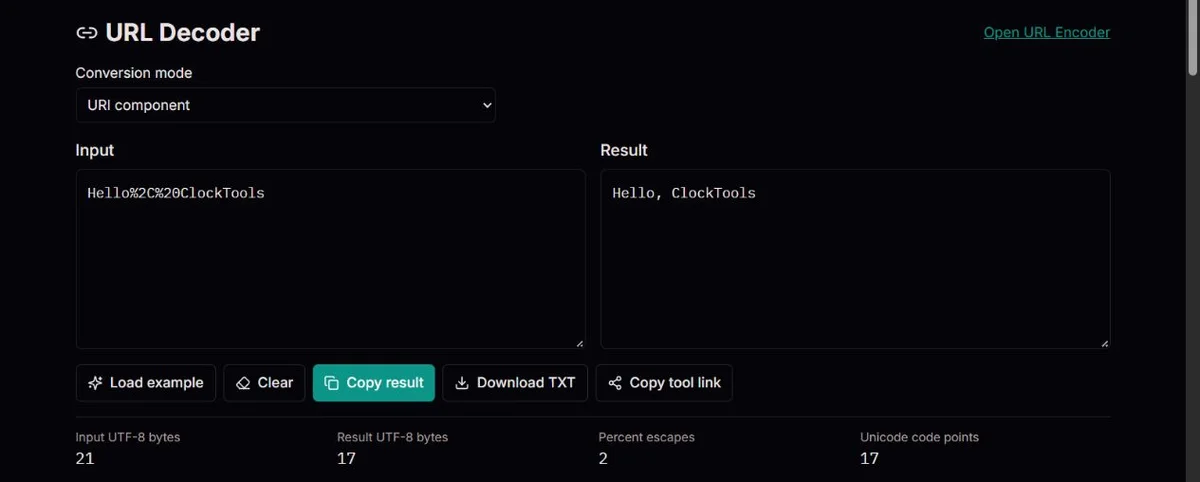
Component mode decodes reserved escapes within a value. Whole URI preserves the escaped delimiters that decodeURI treats as structural. Form value first replaces literal + with spaces, then performs strict component decoding. Choose the convention used by the sender, not whichever output looks most familiar.
These modes process one string, not a parsed collection of fields. If a query contains multiple names, establish the encoded separators before decoding each name and value. An encoded %26 inside a value must not become a field separator simply because you decoded the collection too early.
JavaScript defines a specific preserve-escape set for decodeURI, including slash, ampersand and plus. This explains why %2F%26 stays visible in whole-URI mode while component mode gives /&. Preserved escapes can be correct output, not a failed conversion. ECMAScript decodeURI and its preserve-escape set.
%252FNested escaped input%2FAfter exactly one pass/After a separate second passA decoder reverses percent escapes at a chosen boundary. For example, %252F becomes %2F after one pass, not /. The sender may have nested a value inside another query, or it may have encoded the value twice by mistake. Those cases need different fixes.
Automatically decoding until nothing changes can turn data into structure. A slash can change path segmentation, and an ampersand can become a query separator. Preserve the original address and establish how many layers the receiving application expects before rewriting it.
Whole-URI mode uses decodeURI and deliberately retains escapes for reserved delimiters such as %2F and %26. Component mode uses decodeURIComponent and removes those escapes inside a value. This distinction follows the need to keep parsing boundaries explicit, discussed in the URI standard. RFC 3986 guidance on decoding.
Every percent escape needs two hexadecimal digits, but syntax alone is not enough. %C3%A9 is valid UTF-8 for é; %C3%28 is not a valid UTF-8 sequence. This strict decoder rejects invalid text instead of inserting a replacement symbol that could hide the fault.
Older data can use a different character encoding. This tool is not a Latin-1 decoder or a charset detector. If the original bytes came from another encoding, obtain the source charset and use a matching conversion rather than guessing from the visible output.
The + convention applies only to form values. A literal + in a general URI is not automatically a space. Form mode normalizes + first, then decodes percent escapes, so %2B correctly becomes a literal plus. Its UTF-8 error behavior is stricter than the forgiving WHATWG form parser; invalid byte sequences remain correction errors here. WHATWG form parsing order.
The fixed table distinguishes the same form-like input decoded with different rules. %2B becomes a literal plus in component/form mode; only a literal input + becomes a space in form mode. Normalizing plus before percent decoding preserves that distinction. Whole-URI decoding deliberately retains %2B because plus belongs to its preserve set.
The percent-escape counter describes the input on this decoder. Output bytes and code points describe decoded output, not glyphs on screen. caf%C3%A9 yields café: two input escapes represent the two UTF-8 bytes of é, while the output has five UTF-8 bytes and four code points. An empty output accompanied by an error is not a successful empty value.
The sample control replaces the input with a fixed demonstration. Clear removes it; copy and TXT export operate on the result and are unavailable when there is no output. Copy tool link shares the page only. The encoder link does not transfer this input, so keep the original and mode when comparing a round trip.
| Input | Mode | Result |
|---|---|---|
| caf%C3%A9 | URI component | café |
| A%2BB+C | Form value | A+B C |
| A%2BB+C | URI component | A+B+C |
| %2F%26 | Whole URI | %2F%26 |
| %252F | URI component | %2F |
| %C3%28 | URI component | UTF-8 error; no output |
The error row is not partial text. No example follows a link or proves that a decoded address is safe.
A trailing %, %2 or %GG fails the escape-syntax check. A literal percent in encoded data needs %25; replacing every % indiscriminately would also hide real escapes. Inspect the source value or ask the sender rather than guessing a correction from the incomplete string.
A syntactically valid %E9 still cannot represent é in UTF-8: that byte alone is incomplete. %C3%A9 can. Likewise %C3%28 and %FF are rejected, even though each escape has two hex digits. The strict error is useful evidence of a byte-encoding problem. This is not a Latin-1 or charset-detection tool.
If a first pass leaves %2F, identify whether whole-URI preservation or an encoded outer percent caused it. Compare mode and original input before adding another pass. For mixed plain text and escapes, a bare percent can cause the entire conversion to fail; failed conversion leaves the editable input intact and produces no partial result.
If copy or export fails, use the visible result and the alternative available action. Keep private redirects and credentials out of reports. Decoding reveals a representation; it does not verify a hostname, signature, accessibility or trusted destination, and the page never opens the address for you.
The decoder checks percent-escape syntax, then applies one strict JavaScript URI decoding pass. Form mode converts literal + to spaces before that pass. Failed conversion produces no partial output and never overwrites the input.
Decoded text is not proof that an address is safe or reachable. The tool does not follow links, verify signatures, parse complete form fields or support non-UTF-8 byte encodings. Counts describe code points and UTF-8 bytes, not visual glyphs.
Correct the original escape or ask the sender for valid UTF-8. Report a synthetic failing sequence and the selected mode, not private redirects or credentials. A decoding fix can change application semantics, so test it against the receiver before deploying it.
Whole-URI decoding preserves reserved delimiters. Choose component mode when you intentionally want to decode a value containing a slash.
Only form mode treats literal plus signs as spaces. Component and whole-URI modes keep them as plus signs.
No. Each conversion removes one layer. Remaining escapes are left visible so you can investigate them.
A single E9 byte is not valid UTF-8 for é; UTF-8 uses C3 A9. Another decoder may assume a legacy charset or replace invalid bytes. Find the original encoding rather than treating one readable letter as proof of correct decoding. This page intentionally provides strict UTF-8 only.
Escape syntax and UTF-8 validity are different checks. C3 begins a multibyte sequence, but 28 is not a valid continuation byte. The conversion returns an error with no partial output and keeps the original editable, making the missing or changed byte easier to investigate.
No. Encoded data such as %26 can become & and be mistaken for a separator. Identify the encoded field boundaries first, then decode each value according to its convention. This page does not perform that structured parsing or assemble a corrected query for you.
Check the status. Empty input naturally gives empty output; malformed escapes or invalid UTF-8 also give no output but display an error. The input remains available for correction, and copy/export are disabled without result text. Do not interpret an error as removal of unwanted characters.
This is a percent-escape decoder, not a general decoder selector. Text such as & or a Base64 string is not interpreted under those formats. Obtain the actual encoding and use the corresponding tool; a string remaining unchanged does not establish that it was percent-encoded.