Step 1
Choose an expression
2d6
Use 2d6 for two six-sided dice, or build a mixed pool. Ordinary dice have 2–1,000 sides; the expression starts with at most 50 dice.
A dice expression describes the experiment. Check the count, sides and modifiers before accepting a result.
A dice expression describes the experiment. Check the count, sides and modifiers before accepting a result.
2d6
Use 2d6 for two six-sided dice, or build a mixed pool. Ordinary dice have 2–1,000 sides; the expression starts with at most 50 dice.
1 2 3 4 5 6
+
1 2 3 4 5 6
The browser generates the values before the reveal. Reduced motion shortens the animation, and Cancel discards an unfinished reveal.
3 + 4 = 7
Dropped dice do not contribute to the total. Copy the completed output or export recent rolls; Share sends notation, not a winning roll.
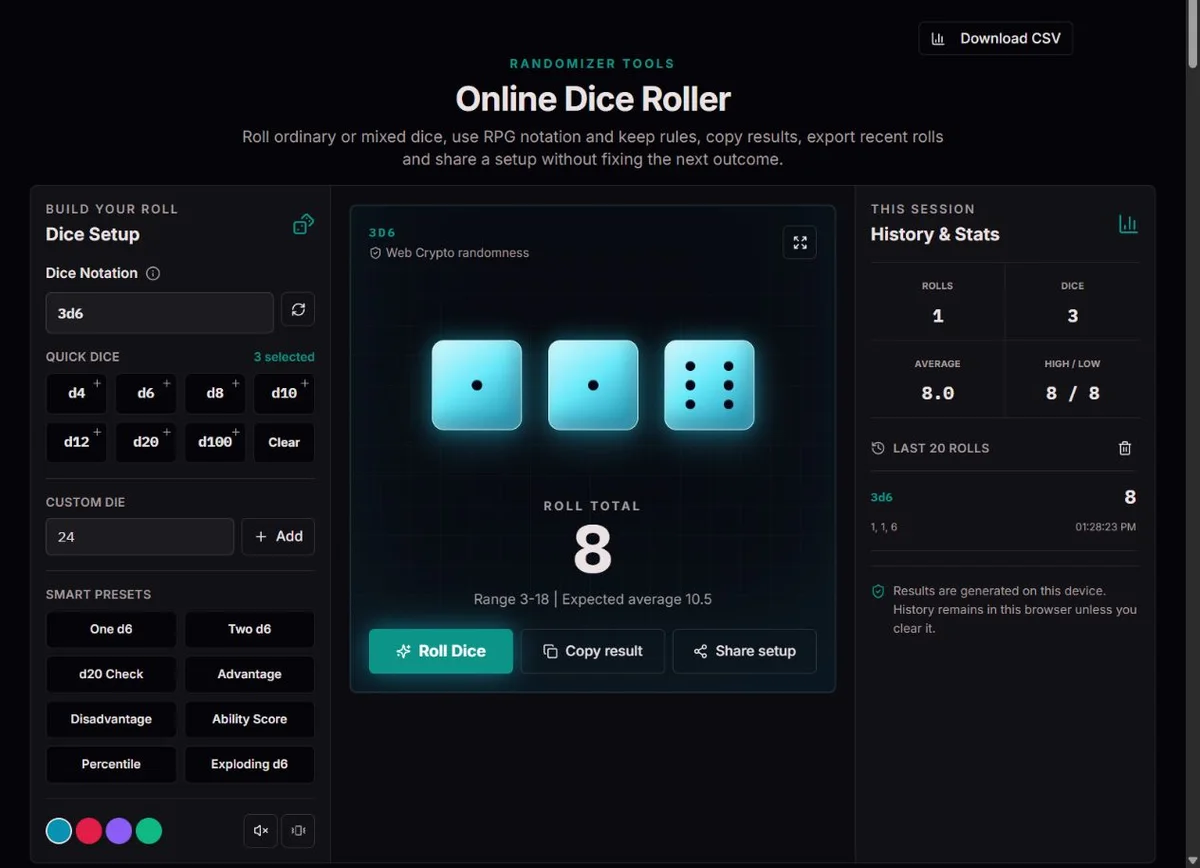
For a fixed bonus, enter 1d20+5 and roll only after agreeing on the target. If the rule calls for advantage, use 2d20kh1+5, not 2d20+5: the latter adds both dice. Read the full result including kept and dropped values. The preset encodes a selection rule, not character abilities, critical-hit policy or every rule of a game.
Compare one d12 with two d6, recording each expression separately. d12 covers 1–12 uniformly; 2d6 covers 2–12 with more ways to reach the center. Their means and ranges differ too. Export the recent rolls before changing the experiment so a mixed-history average does not obscure the distinction. A short sample need not reproduce theoretical frequencies.
Number eight agreed prompts 1–8 and use one d8. A sum of two smaller dice will not give equal index chances and may omit some indices. Quick-die controls build the expression, so repeated clicks can add dice rather than replace the current pool. Inspect the notation or clear it before configuring a different prompt list.
The British Museum’s Naukratis record records six-sided dice from Naukratis, including limestone examples with drilled pips. Objects show that recognizable dice long predate browser animations, but they do not establish that every ancient die was balanced.
A digital d6 models six equally likely integers rather than simulating wood, bone, gravity or a table surface. The animation is an illustration of a value generated separately; it is not a physical test of a real die.
Modern tabletop notation makes the experiment portable: the number before d is the quantity and the number after it is the side count. Writing the full expression before the roll avoids silently changing a bonus or deciding afterwards which die counts.
The official D&D Basic Rules explain advantage as rolling two d20s and using the higher, and disadvantage as using the lower. Here 2d20kh1 and 2d20kl1 express those keep rules; they do not automatically implement every rule of a game.
For a target of at least 15 on a d20, one die succeeds on 6/20 outcomes. Keeping the higher of two succeeds with probability 1 − (14/20)² = 51%; keeping the lower succeeds with (6/20)² = 9%. These are worked calculations, not measured session rates.
The midpoint of the minimum and maximum is not generally the expected value after keep or exploding modifiers. An expected average is therefore shown only for ordinary sums with fixed arithmetic. Exploding dice can add further rolls beyond the initial count; the display does not calculate an exact full probability distribution.
The count before d states how many dice; the number after d states sides. 2d6+1d20 rolls two d6 and one d20, while 1d20+5 rolls one die plus a fixed bonus. Quick dice add to the current expression, and presets replace it without rolling. A custom die accepts a whole-number side count from 2 to 1,000. Check the expression after using controls, especially after an advanced modifier.
Choose the experiment before pressing Roll. Theme, sound, vibration and fullscreen affect presentation, not die sides or modifiers. Space or Enter outside editable controls can start a roll; repeated actions during a pending roll do not create overlapping results. Cancel discards an unfinished reveal, but cannot turn an already completed roll into a different one. Agree on redraw policy before play rather than rerolling selectively.
Keeping is not summing: 4d6kh3 rolls four dice but totals the highest three. For an invented result 6, 4, 3, 1, the kept total is 13, not 14. 2d20kl1 uses the lower. Ties among equal values can affect which graphic is marked dropped without changing the numeric total. Use the output notation to check the rule, rather than counting every visible face.
The Exploding d6 preset 1d6! adds another roll when the triggering maximum appears, retaining earlier values. A hypothetical 6 followed by 2 totals 8. This differs from a reroll that replaces an unwanted value. The dice notation reference explains modifier syntax and order; combine rules only when the game requires them. Additional rolls can exceed the initial count, and the engine’s iteration limits are not a promise of an unbounded probability model.
For 2d6+3, a hypothetical 3 and 4 produce 10; the fixed bonus contributes to the total but is not another die. Minimum 5 and maximum 15 describe ordinary bounds, while mean 10 is a long-run expectation. The next result is not pulled toward 10 because the previous one was high. Advanced keep or exploding expressions have a different distribution and do not receive a simple midpoint average here.
Session average is an observed average over retained results, not the expected mean of the current expression. Mixing d20 checks and d6 pools makes it unsuitable for judging either. History stores only 20 completed rolls; older entries drop out and change totals, average, high and low. CSV keeps recent records; copy the full current output as well when a reviewer needs detailed modifier notation.
| Expression | Operation | Consequence |
|---|---|---|
2d20+5 | Sum two dice, add 5 | Not advantage. |
2d20kh1+5 | Keep the higher, add 5 | The dropped die contributes nothing. |
4d6kh3 | Keep highest three | Four visible rolls, three retained values. |
1d6! | Explode on maximum | Extra rolls may appear; not an ordinary 1–6 bound. |
Use a short ordinary expression such as 1d6 first. The page requires at least one die, at most 90 characters and 50 initial dice, with ordinary sides 2–1,000; the notation parser then checks grammar. A supported library feature is not automatically a recommended game rule. If a combined expression fails, add its components one at a time and verify brackets, modifier spelling and valid counts.
A loading or randomness error produces no completed roll. Try again after preserving the notation; do not treat a blank panel as a zero. If only clipboard access fails, CSV remains useful. Reset returns the expression to 1d6 and cancels a pending reveal; clearing history is separate. Share carries the setup for a fresh roll, not a seed, immutable receipt or reproduction of the displayed result.
2d6 + 3Range 5–15; expected mean 10. Individual rolls need not be near the mean.
2d20kh1Both dice are rolled; only the higher contributes. This is not a guaranteed success.
4d6kh3Roll four d6s and omit the lowest. Read the marked dropped value, not just the visible dice count.
The existing notation engine uses the browser’s cryptographic random source. Results are fixed before animation. Only ordinary dice sums with fixed addition or subtraction receive a calculated expected mean; advanced modifiers are not assigned a misleading midpoint average.
Expressions are limited to 90 characters, 50 initial dice and 1,000 sides per ordinary die. Exploding or reroll rules can generate additional values and take longer. Recent history retains 20 rolls on this device when storage permits. This is a game and learning tool, not certified gambling equipment.
Check notation, kept/dropped values and the full copied output when a total is unexpected. Share a minimal expression, browser and locale in a correction report. Preserve private campaign details yourself; cancelling an unfinished reveal records no completed roll.
No. Each die has equal face probabilities, but different sums have different numbers of contributing pairs. Seven has six pairs out of 36.
Keep and exploding rules change the distribution. A midpoint is not a reliable expected value, so the tool omits that claim for those expressions.
No. It carries the expression. The recipient makes a fresh roll when they choose to roll.
Quick-die buttons add to the current pool. Repeated clicks can increase an existing group or append one. Read the notation before rolling, or clear it and build from scratch. Selecting a preset replaces the expression but does not roll automatically.
A keep/drop rule can exclude values and fixed arithmetic can add or subtract a bonus. Inspect the marked dropped values and complete copied output. For 4d6kh3 with 6,4,3,1 the 1 is omitted and the total is 13.
Yes. Enter 24 in the custom-sided control or use 1d24. Each face is an integer from 1 to 24 in the model; a familiar-looking die graphic is not a physical 24-sided simulation. Check the game actually calls for those sides.
No. It discards an unfinished load or reveal without adding a completed history entry. Previously completed records remain. Reset and clear-history actions have different purposes. Choose when rerolls are allowed before generating outcomes.
Not by itself. It is a small retained sample, often mixing expressions with different distributions. An average near expectation does not prove every outcome frequency or the entire implementation correct; a deviation does not alone prove a defect. Separate experiments and preserve their settings.