Step 1
Enter readable text
AB9.- -... ----.Try AB9. Letters are uppercased; unsupported characters are listed rather than transliterated silently.
Convert supported letters, digits, punctuation and explicit prosigns to Morse, then copy or export the checked result.
Convert supported letters, digits, punctuation and explicit prosigns to Morse, then copy or export the checked result.
AB9.- -... ----.Try AB9. Letters are uppercased; unsupported characters are listed rather than transliterated silently.
Each space marks a character boundary. A written slash marks a word boundary, not a transmitted slash character.
morse-message.txt.- -... ----.Download text, WAV or a code image. Speed and Farnsworth spacing also apply to the WAV file.
Type the exact agreed spelling first, including any space between a given name and surname. If a letter is unsupported, decide with the person how it should be represented rather than accepting a shortened name. For a date, choose a readable format such as 2026-10-14 and keep its hyphens as encoded characters. Copy the output to the decoder before exporting the image. On a badge or keepsake, preserve wider gaps between character groups and a distinct word break; decorative dots and bars must remain readable after resizing. The generated image contains written code, not timing information or an audio track.
Generate MEET AT 9 as a short instruction, then decode your own output and keep the text as the answer key. For a written clue, tell players that spaces separate letters and / separates words. For an audio clue, begin with 18 WPM characters and 10 WPM spacing, around 640 Hz, with repeat off while you check one complete pass. If listeners need more time, reduce spacing speed before making every mark slower. Supply a chart for a first puzzle; omit the answer, not the boundaries that make it decodable.
Generate AB9 to compare short letters with a full five-mark digit. At 20/20 WPM it has 11 marks and takes 2.22 seconds; at 20/10 the same marks take about 3.17 seconds because the letter pauses grow. Export a WAV after choosing the setting that fits the lesson. Keep a separate text file naming the source phrase and both speeds, because the downloaded sound does not announce them. Change the source to AB8 for a second exercise: a new digit is more informative than repeating AB9 until its whole melody is familiar.
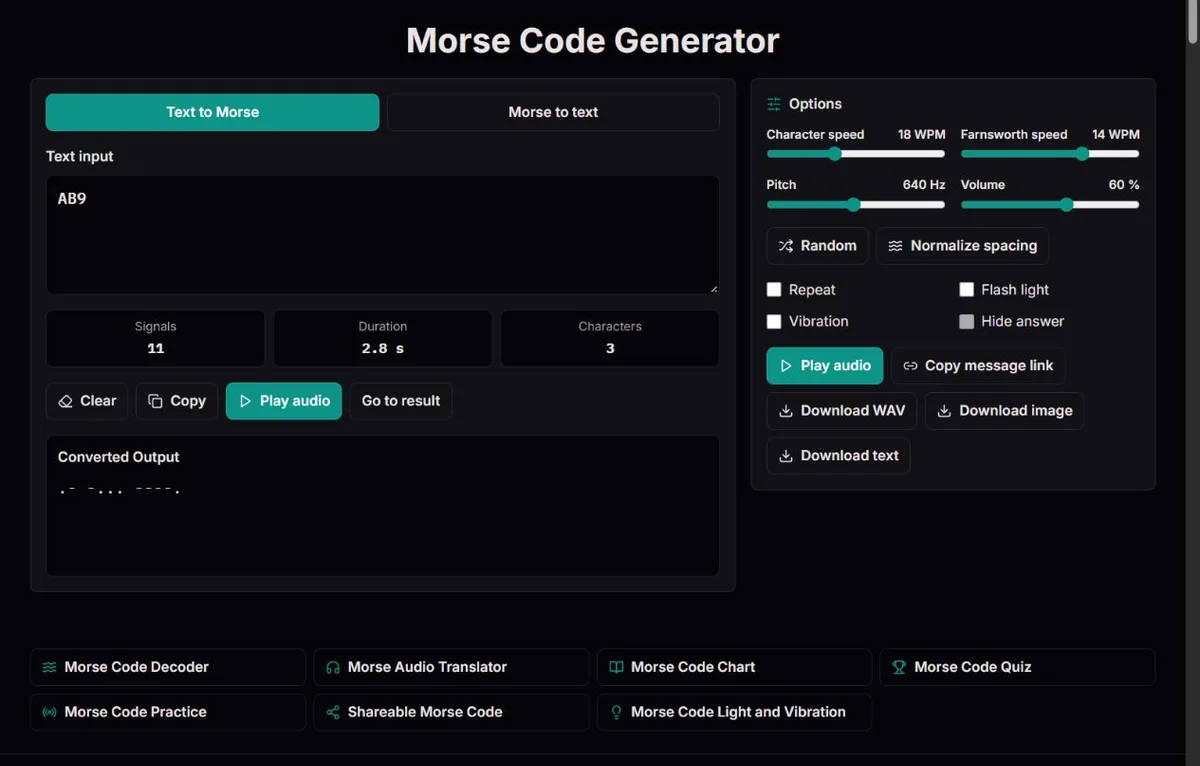
The generator converts supported characters to International Morse; it does not translate a sentence into another language. Lowercase letters are converted through their uppercase form. Leading and trailing whitespace is removed, and runs of spaces, tabs or line breaks separate words. A line break in text input therefore creates a word boundary, not a paragraph feature in the encoded message. Check whether those boundaries are part of your intended phrase.
The mapping includes A-Z, É, digits 0-9, punctuation and four explicit prosign tokens. É also works when entered as E plus a combining acute accent because the source is normalized to composed Unicode. That does not mean all accented letters are accepted. Ä, Ñ, Ç, Cyrillic letters and emoji have no mapping here, and ß is not automatically converted into two S characters. The warning lists unsupported input; its remaining characters are still encoded.
For example, CAFÉ becomes -.-. .- ..-. ..-.. and decodes back to CAFÉ. By contrast, an unsupported character can disappear while the rest forms a perfectly valid signal. A valid-looking result is not proof that every source character survived. Keep the original and correct the spelling deliberately before copying anything that identifies a person, object or place.
The written output uses one space between encoded characters and / between source words. HELLO WORLD contains ten character groups and one word separator. If you collapse all those spaces for a graphic, the decoder cannot uniquely reconstruct the letters. If you replace a space between letters with a slash, you create a word break. Formatting is part of the message contract with the reader.
AB9 becomes .- -... ----.. A contains two marks, B four and 9 five; the three characters stay in one word because the source has no spaces. AB 9 instead contains a word gap before the digit. Use this contrast when designing a clue around an identifier: the tool preserves your divisions but cannot know which grouping your organization or puzzle expects.
A/B becomes .- -..-. -.... The middle group is the transmitted slash character. A B becomes .- / -..., whose slash is only the written word separator. The same care applies to email addresses: @ is .--.-., while a full stop inside an address is .-.-.-. There is no automatic validation of an address, date or mathematical expression.
| Text input | Written Morse | What changes |
|---|---|---|
| AB9 | .- -... ----. | Three characters, no word break |
| AB 9 | .- -... / ----. | A word gap before 9 |
| A/B | .- -..-. -... | A literal slash character |
| A B | .- / -... | A word gap, no slash character |
| CAFÉ | -.-. .- ..-. ..-.. | É retains its distinct signal |
A prosign combines marks into a procedural signal without the normal inter-letter gap. Enter <AR>, <AS>, <SK> or <SOS> explicitly when you intend a joined signal. The angle brackets are input notation, not characters sent as part of the signal. Lowercase token names are accepted through uppercasing, but an unknown token such as <XYZ> is reported, not interpreted as its individual letters.
Compare AR, A R and <AR>. AR gives two letters in one word; A R gives two one-letter words; <AR> gives .-.-. as one joined group. In ITU-R M.1677-1, that pattern is also the cross/addition sign and is used to terminate a telegram. The decoder's prosign preference selects <AR> rather than + when context requires it. No setting can establish the sender's intent from the marks alone.
SOS and <SOS> offer another instructive comparison. Both have nine marks, but SOS inserts character gaps while the joined token keeps one-unit inner gaps throughout. At 20/20 WPM, ordinary SOS takes 1.62 seconds and <SOS> takes 1.38 seconds. Use this to explain a joined signal, not to simulate a certified distress transmission. The generator does not address a station or add a call sign, position, acknowledgement or operational procedure for you.
Character speed sets the dot duration as 1.2 / WPM seconds. At 20 WPM, a dot lasts 0.06 seconds and a dash 0.18 seconds. At equal Farnsworth speed, letter gaps are 0.18 seconds and word gaps 0.42 seconds. Reducing Farnsworth to 10 WPM keeps those dots and dashes intact but increases the letter gap to approximately 0.654 seconds and the word gap to approximately 1.525 seconds. ARRL’s Farnsworth timing calculation explains the PARIS calibration behind these pauses.
For a beginner's name badge demonstration, 18/10 WPM lets you hear a reasonably compact character while allowing more time to identify it. For comparing two generated samples, keep both speed settings, pitch and volume unchanged and alter only the phrase. Otherwise you may be comparing rhythm settings rather than characters. Pitch from 300 to 1000 Hz changes tone colour, not spelling; the volume control does not override a muted device.
Repeat loops the same complete message. It is helpful for familiarization but can make a learner anticipate the sequence instead of recognizing each character. Turn it off for a single attempt, then use the chart or a different phrase to check the uncertain letter. Editing text or changing a setting stops playback; returning from a hidden tab also requires a deliberate new start. None of the generated examples starts automatically.
Copy and text download carry the converted output. A text file is the easiest format for a worksheet author to inspect and revise, but keep a separate source phrase if you need the original spelling and punctuation. The image export creates a static PNG of written code. It does not contain speed, repeat, vibration or an embedded audio track. Check its readability at the final printed size, especially at line breaks.
WAV export carries one audio signal at your selected character speed, Farnsworth spacing, pitch and volume. It is mono, 44.1 kHz, 16-bit PCM. Repeat cycles are not included. Playback and WAV generation are limited to 90 seconds per signal, so a string of long digit patterns at a low Farnsworth speed can exceed the limit sooner than expected. Split a long lesson into short labelled samples rather than removing word gaps to squeeze it into a file.
A share link carries the input and chosen settings in the URL. It is useful when another person needs the same setup, but hidden-answer presentation is not secrecy and the URL is not encrypted message storage. Light and vibration are not armed by opening that link. Test the link yourself before distributing a puzzle and use non-sensitive text. For a durable classroom resource, a checked WAV plus an answer key may be clearer than a link whose recipient can change the settings.
A useful proofreading sequence is source review, warning review, decoding and listening. First confirm spelling and intended spaces. Next check unsupported characters. Then copy the written code into the decoder and compare the returned uppercase text with the supported source. Finally listen at the settings you will actually use. The round trip checks the map and separators; listening checks whether the chosen pace suits the activity. Neither establishes that a distant receiver will hear you.
Expect a few intentional differences on decoding. Letter case is not preserved. Multiplication × uses the X signal under ITU-R M.1677-1, so 2×3 comes back as 2X3. The signal cannot distinguish those source characters. Procedure patterns may come back as punctuation unless prosign preference is enabled. Record that choice if a transcript must retain procedural meaning rather than merely the equivalent marks.
Not every operational rule in the recommendation is automated here. Percentages, mixed fractions and minute/second signs have specific transmission conventions in the document; the generator does not expand % or infer those conventions from a number. For a puzzle, an agreed plain-language spelling may suffice. For studying a historical or operational telegram, consult the relevant rule and preserve the source notation instead of presenting the generated output as a full procedure formatter.
The 1844 message preserved in the Library of Congress's 1844 message tape connects a written phrase with a physical record of a transmission. It helps explain why a generator is useful: someone had to turn a known message into marks, and someone else had to interpret them. Re-entering that phrase here produces today's supported International Morse representation, not the original paper tape, apparatus sound or precise historical timing.
International compatibility developed through more than an alphabet. ITU’s account of the 1865 conference describes the 1865 agreement on service regulations, tariffs and Morse equipment. That history has a practical analogue in a modern handout: identify the chart being used, distinguish extension punctuation and preserve boundaries. A visually attractive clue is only usable when the other person can apply the same reading rules. For creative work, that shared convention is more valuable than adding dramatic historical claims to an unchecked message.
The older maritime examples are also useful when creating a known-text exercise. The 1909 Congressional Record on Jack Binns records Binns's CQD calls in 1909, and the Science Museum's account of Titanic wireless discusses Titanic's CQD and SOS traffic in 1912. Generate CQD as three ordinary letters, then compare SOS with the joined <SOS> token. Ask what an actual receiving operator still needed after recognizing a call: the sending station, position and message. Your generated sample can illustrate that distinction, but it is not an original recording or a complete reconstruction of the historical exchange.
| Text | Morse | What to check |
|---|---|---|
| GOOD LUCK | --. --- --- -.. / .-.. ..- -.-. -.- | Two words; repeated O and the C/K length contrast |
| MEET AT 5 | -- . . - / .- - / ..... | A clear instruction with a five-dot digit |
| CLOCKTOOLS | -.-. .-.. --- -.-. -.- - --- --- .-.. ... | A longer word with repeated O and L |
AB9.- -... ----.Letters A–Z, digits and standard punctuation follow ITU-R M.1677-1. Five additional punctuation patterns are explicitly marked in the chart. Explicit <AR>, <AS>, <SK> and <SOS> tokens are sent as joined signals; the decoder can prefer prosigns where punctuation overlaps. Timing uses 1/3/7 units. Farnsworth stretches only letter and word gaps, calibrated to the 50-unit PARIS convention. Playback, duration and WAV export share the same timeline.
No microphone, radio receiver, camera or torch is used. Unsupported text is reported and omitted from encoded output; invalid Morse groups remain visible as [?] and cannot be played. Sound needs a working browser audio API. Screen and vibration timing can lag; sleeping or backgrounded devices are not reliable signalling equipment. Playback stops when the tab is hidden. Sessions are not saved. Sharing places the complete message in the URL, not in encrypted storage. Accented É is supported, including decomposed Unicode input. Multiplication × uses the X signal and therefore decodes as X: the signal alone cannot distinguish them. Percentage signs and other operational number formats are not expanded automatically.
To report a discrepancy, include the route, exact input, expected result and relevant settings. For timing issues, state both character and Farnsworth speeds. Compare the relevant official table before changing an identifier; remove private information from reports.
Unsupported characters are omitted, and the warning identifies them. É is supported, but not every accented Latin letter or writing system is. Do not use the shortened result as a name label. Choose an agreed alternative spelling, re-enter it and decode the output to check the revised name.
No. It changes signal timing, not character patterns or separators. AB9 has the same written output at 10 and 20 WPM. If you need a reusable comparison, record both character and Farnsworth speeds: two samples with identical written code can have quite different pauses.
Only by changing the source meaning. A slash typed in text mode encodes as -..-.; a slash printed between Morse words represents silence. Keep these distinct in a design. Do not replace every printed separator with a slash-code group unless you actually intend a literal slash character.
Morse output does not distinguish letter case. The decoder returns uppercase supported letters. If typography or case matters for a name, email address or design, retain the original text separately. A successful Morse round trip is not an exact Unicode or case-preserving archival copy.
The multiplication sign and X share -..- under the cited ITU convention. The decoder uses X for that pattern, because the signal alone cannot identify which character you originally typed. Preserve the original expression alongside the code if that distinction matters.
No. % is unsupported rather than expanded into an operational number form. ITU-R M.1677-1 gives separate conventions for percentages and related notation. Read those rules when studying operational messages; for a simple activity, deliberately spell out the meaning in supported text and verify it.
<AR> requests one joined procedure signal, .-.-. AR requests A followed by R with a character gap. The decoder can interpret the joined pattern as + or <AR> depending on the prosign preference. Use the token only when that procedural meaning is intended.
Text is best when an editor needs to preserve and inspect individual groups; PNG is convenient for a fixed visual. Neither carries playback timing. Check the final size and line breaks, then decode the printed groups as a separate quality check before producing multiple copies.
A volume of zero generates silent audio, and device or media-player volume can also mute it. Check the page volume before exporting, then test the saved file in your intended player. Turning on repeat or light will not add sound to a WAV created at zero volume.
It checks that the supported characters and separators return through the same map. Also inspect the source spelling, extension punctuation, printed readability and chosen listening speed. A puzzle can decode perfectly yet be unfair because its instructions are unclear or its audio is too fast for the audience.