Step 1
Paste separated groups
... --- ... / .x-SOS [?]Use spaces between characters and / or a new line between words. Common typographic dots and dashes are accepted.
Decode separated dots and dashes, preserve unknown groups and choose how overlapping prosigns should be interpreted.
Decode separated dots and dashes, preserve unknown groups and choose how overlapping prosigns should be interpreted.
... --- ... / .x-SOS [?]Use spaces between characters and / or a new line between words. Common typographic dots and dashes are accepted.
Normalize spacing does not delete unknown characters. Review each [?] result against the original group.
.x-[?]Enable prosign interpretation for joined procedure signals. Copy the transcript only after checking ambiguous groups.
Keep a copy of the clue exactly as received. Paste one short line, inspect word separators and use Normalize spacing to standardize accepted typographic marks. If ... --- ... / .x- gives SOS [?], isolate .x- and compare it with the source or chart. Do not delete x simply because .- would produce a plausible A. Once the sender confirms the intended group, repair that one group and decode the full clue again. This leaves a clear trail between what the puzzle supplied, what the converter recognized and what you changed.
Copy the actual dots and dashes from the artwork, not a fresh conversion of its intended phrase. For a name or date, compare the result character by character with the approved source. Check whether a layout line break has turned into a word boundary and whether a decorative long dash is accepted as a dash. If every group is valid but the words are wrong, examine lost spaces: validity does not detect a rearranged message. Correct the artwork and repeat the check on the final version before ordering prints.
For a short generated training phrase, listen once at fixed settings, write down the characters you think you heard and separately transcribe the mark groups when needed. Use the decoder to inspect a disputed group, then compare your text with the original phrase. For a second pass, keep character speed at 18 WPM and lower Farnsworth speed to 10 WPM if the problem is keeping up between letters. This page supports checking a transcription; it does not assess your hearing, capture microphone input or recognize an uploaded recording.
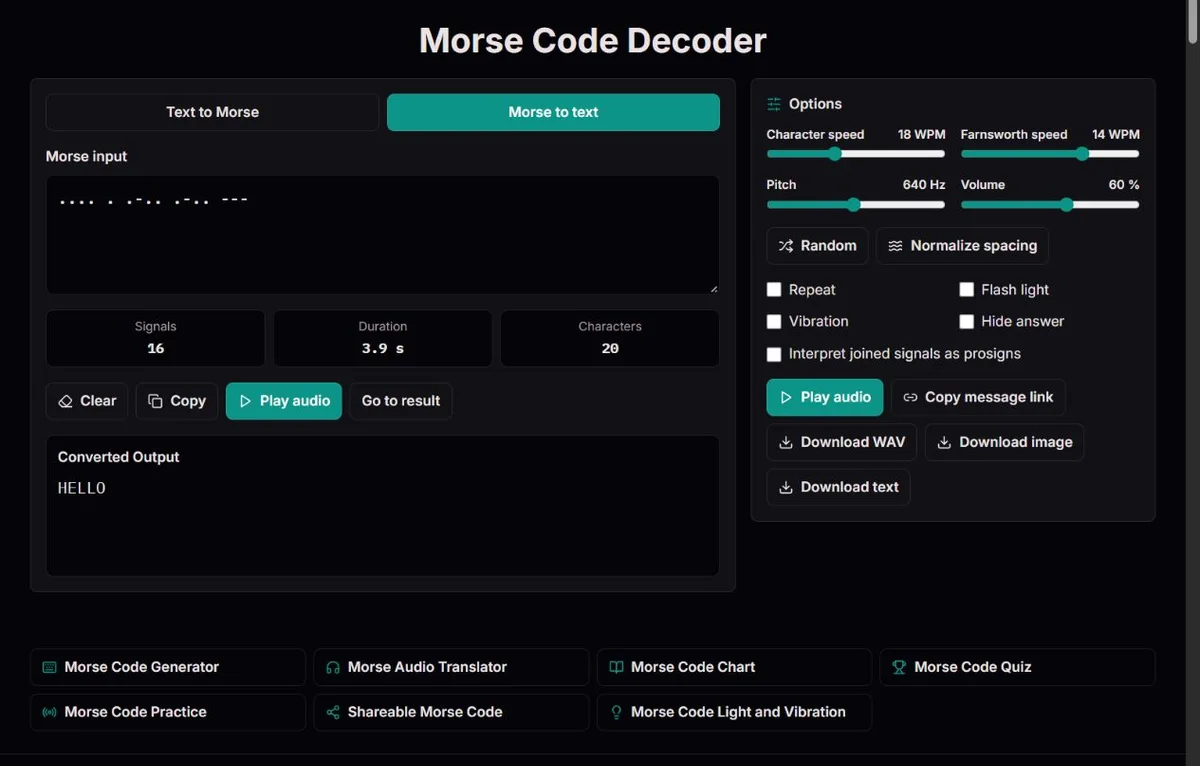
Enter dots and dashes with spaces between character groups. A slash divides words, and a line break is treated as another word divider. Leading or repeated word dividers are cleaned up rather than creating empty words. The converted text updates from the normalized groups, but it still depends on the boundaries you supplied. Ordinary spaces are not a signal for a word boundary in this notation.
Compare ..., . . . and . / . / .. The first is S, the second EEE and the third E E E. An uninterrupted stream is not uniquely decodable because Morse character patterns have different lengths. Even .- can be A or E followed by T if a missing gap is allowed. A decoder that chooses a plausible word would be guessing, not recovering information preserved in the input.
When a sender has supplied separate letters but no word separators, the letters can still decode, although word divisions are lost. Ask for the original grouping before adding them. If a long clue is only visually wrapped, remove editorial line breaks deliberately while retaining its true word separators. Do not merge everything into one stream; letter boundaries are more important than making the input compact.
| Morse input | Result | Interpretation |
|---|---|---|
... | S | One character |
. . . | EEE | Three characters in one word |
. / . / . | E E E | Three one-character words |
..--.. | ? | A recognized question mark |
| .x- | [?] | An unrecognized group requiring review |
The decoder accepts periods as dots and hyphens as dashes. Middle dots and bullets become periods; en dashes, em dashes and mathematical minus signs become hyphens. A vertical bar or backslash is normalized to a word separator. Repeated whitespace and separators are made consistent. These changes are useful when copying code from a document with typographic substitutions.
Normalize spacing preserves unfamiliar characters inside a group. Thus .x- remains invalid instead of quietly becoming .-. That distinction matters: deleting x would create A and hide the original problem. The same applies to commas used as tiny dots, decorative symbols or an OCR error. Accepted normalization is not an optical-character-recognition service, and the tool does not interpret every glyph that resembles a mark.
Save the original before normalizing a transcription of archival material. A normalized working copy can be easier to decode, but it no longer preserves the exact typography, line layout or separators of the source. If context matters, note which changes were mechanical and which involved an editorial decision. For a classroom clue, this is an opportunity to distinguish changing a representation from changing its information.
... --- ... / .x- produces SOS [?]. The recognized groups are retained, and the invalid group is visible in the output and warning. [?] is a placeholder, not the result for an encoded question mark. A real question mark is ..--.. and decodes as ?. Keep that distinction when proofreading a clue with both uncertainty and punctuation.
Unknown groups are listed distinctly in the warning, so the list is not necessarily a count of every occurrence. Use the output to locate repeated placeholders and inspect the corresponding input groups. A single invalid group prevents a valid playback timeline for the whole Morse input. Removing the group would make the remaining sequence playable, but it would also remove information; only do that if you explicitly intend an incomplete excerpt.
A valid result can still be wrong. If ... was meant to be ...., the converter returns S rather than detecting the lost dot of H. If a character space is misplaced, two valid shorter groups may replace one intended letter. Meaning and source comparison therefore remain necessary even when no warning appears. Think of validity as 'recognized by the map', not 'confirmed by the sender'.
Several joined signals overlap displayed punctuation. .-.-. normally decodes as +, but the prosign preference makes it <AR>. .-... normally decodes as the additional & pattern and becomes <AS> with that preference. The option does not modify the input marks or their audio; it selects the text representation for an overlapping group.
Joined ...-.- and ...---... have no ordinary punctuation entry in this map, so they decode as <SK> and <SOS> even with preference off. Separated ... --- ... remains the three letters SOS. Likewise, .- .-. remains AR rather than becoming a joined prosign. The spaces tell the decoder that the letters were separate.
ITU-R M.1677-1 gives procedural meanings and transmission rules, not simply a list of interchangeable labels. Its wait and end-of-work signals help explain the AS and SK conventions used here. It also includes an eight-dot error signal, understood signal and starting signal that are not supported tokens in this tool. An eight-dot group will therefore be unknown here even though it has a defined role in the document. Do not call every unknown group meaningless or every accepted label a complete operational transcript.
| Joined input | Preference off | Preference on |
|---|---|---|
.-.-. | + | <AR> |
.-... | & | <AS> |
...-.- | <SK> | <SK> |
...---... | <SOS> | <SOS> |
The decoder returns uppercase letters, digits, É and mapped punctuation. It does not preserve source case or translate a message into the page's language. A Russian-language explanation does not turn a Latin Morse group into a Cyrillic character. Different alphabets or national adaptations may use some of the same patterns; this tool applies the mapping displayed in its chart.
A written word separator / is distinct from the character group -..-., which decodes as a literal slash. For a fraction or date copied in Morse, preserve that group rather than replacing it with a separator. Multiplication shares -..- with X and decodes as X. The message context can suggest an intended multiplication sign, but the converter does not recover the original typography from an identical signal.
The punctuation view marks !, &, ;, _ and $ as additional patterns, not punctuation entries in the cited ITU table. A puzzle may deliberately use them, but another tool or operational convention may differ. If an accepted group yields surprising punctuation, compare the chart and source before rewriting it. Percentages and operational number formatting are not interpreted automatically; a readable transcription is not an evaluated expression or validated coordinate.
Start with the smallest disputed passage and its source. First check whether the marks were copied correctly. Then inspect spaces between letters and the true word separators. Next normalize accepted typography. Finally examine procedural context and the prosign option. This ordering separates an input problem from a choice of representation. Re-running the same damaged line with different speed settings cannot repair text, because WPM affects playback only.
After an agreed correction, decode the complete message again and compare both the newly repaired portion and its neighbours. A separator change may affect more than one letter. If the result is intended for print, repeat the check on the final artwork rather than only on an intermediate text file. If it came from someone else, retain an indication of uncertain material instead of silently presenting a guessed word as confirmed.
Audio playback is an optional comparison once all groups are valid. For a visual check of S versus H, the chart is usually faster. For distinguishing A and N by rhythm, try the same character speed and pitch for both. Playback proves that a recognized written sequence can be generated as tones; it does not prove your transcription matches a recording, and there is no automatic audio-input decoder to make that comparison for you.
For a self-check, Hide answer is available in Morse-to-text mode; try reading the code first, then reveal the transcript. Random replaces the current input with a built-in practice word in the selected notation, so keep your original before using it. Copy and text download keep the converted transcript, including [?] placeholders. PNG and WAV instead represent the input Morse, with WAV requiring valid groups. Keep the original as a source record beside a corrected transcript when your edits need to remain auditable.
The Library of Congress's 1844 message tape shows a recorded message from Morse to Vail in 1844. Operators could work from a physical record, while a sounder such as the Smithsonian's telegraph sounder let them interpret electrical pulses through audible clicks. Both required a human to identify patterns and boundaries. The modern typed decoder begins after that identification: it receives explicit groups, not an ambiguous real-world signal.
The distinction also explains the value of the earlier maritime examples. The 1909 Congressional Record on Jack Binns records Jack Binns's CQD distress calls in 1909; the Science Museum's account of Titanic wireless describes how Titanic's calls and messages were received by other ships in 1912. A recognized distress pattern was only one part of an exchange, which also needed identifying information and attentive operators. These histories do not show that an isolated SOS translation contains everything needed for a useful communication.
For a visual example, the National Archives' Denton interview record documents the word TORTURE blinked during an interview in 1966. Human interpretation of a timed recording is different from entering separated groups here. When teaching with that episode, distinguish the historical evidence, your transcription and the converter's output. An invented transcript or a generated audio sample must not be presented as the original recording.
... --- ... / .x-SOS [?]Letters A–Z, digits and standard punctuation follow ITU-R M.1677-1. Five additional punctuation patterns are explicitly marked in the chart. Explicit <AR>, <AS>, <SK> and <SOS> tokens are sent as joined signals; the decoder can prefer prosigns where punctuation overlaps. Timing uses 1/3/7 units. Farnsworth stretches only letter and word gaps, calibrated to the 50-unit PARIS convention. Playback, duration and WAV export share the same timeline.
No microphone, radio receiver, camera or torch is used. Unsupported text is reported and omitted from encoded output; invalid Morse groups remain visible as [?] and cannot be played. Sound needs a working browser audio API. Screen and vibration timing can lag; sleeping or backgrounded devices are not reliable signalling equipment. Playback stops when the tab is hidden. Sessions are not saved. Sharing places the complete message in the URL, not in encrypted storage. Accented É is supported, including decomposed Unicode input. Multiplication × uses the X signal and therefore decodes as X: the signal alone cannot distinguish them. Percentage signs and other operational number formats are not expanded automatically.
To report a discrepancy, include the route, exact input, expected result and relevant settings. For timing issues, state both character and Farnsworth speeds. Compare the relevant official table before changing an identifier; remove private information from reports.
Check that you pasted dots and dashes, not ordinary words, and that each character has a space boundary. Inspect unfamiliar glyphs before normalizing. If a group is not in the supported map, [?] preserves that uncertainty; changing pitch or speed will not change the decoded text.
Not uniquely in general. Morse groups have variable length, so an unbroken stream admits different divisions. Restore boundaries from the original or ask the sender for a separated version. A plausible sentence obtained by guessing is not a verified decoding, even if every guessed group is valid.
A new line is normalized to a word boundary. That is useful for code written one word per line, but not for a line wrapped only to fit a page. Remove editorial wrapping while keeping actual character spaces and word separators. Preserve the original version if you are transcribing historical material.
No. It standardizes accepted symbols and separators but leaves an unfamiliar character such as x in .x-. Deleting it would silently create A. Compare the original and correct the specific typo deliberately; normalization is not a general error-correction algorithm.
..--.. is a mapped question mark and returns ?. [?] is the tool's placeholder for an unrecognized group. The distinction lets a transcript contain an intentional question without making it look like a failure. Keep placeholders until the corresponding input has been checked.
The joined .-.-. pattern overlaps the addition/cross sign and AR convention. Enable prosign preference when the source uses it procedurally. The option changes the displayed interpretation, not the sound, and cannot tell whether the sender intended arithmetic or an end-of-message signal.
The ITU document defines it, but this tool implements only its displayed map and the four explicit AR, AS, SK and SOS tokens. It is not a complete parser of all operating procedure. Retain the original and annotate that procedural signal separately rather than treating it as a corrupted letter.
Yes. A missing dot can turn H into a valid S, and a misplaced separator can create valid but unintended letters. The warning detects unknown groups, not departures from the sender's meaning. Compare the result with the source or obtain a repeat when the message matters.
The transcript retains recognized groups and placeholders, so it is useful for investigation. Playback needs a valid timeline for every group and rejects invalid Morse. Copying SOS [?] does not confirm the missing group; repair the original before exporting a complete audio signal.
No. It has no recording analysis or microphone reception. You can enter a manually separated transcription and use the chart or generated playback as a comparison. Keep uncertain marks or gaps documented instead of assuming the tool has recovered details that were never supplied.