Step 1
Pick a practice set
A N.- / -.Start with letters or digits before choosing words. Changing the set begins a new score session.
Listen to letter, digit or word challenges, choose among four answers, review mistakes and advance or reset the session.
Listen to letter, digit or word challenges, choose among four answers, review mistakes and advance or reset the session.
A N.- / -.Start with letters or digits before choosing words. Changing the set begins a new score session.
Replay the signal as needed. The written pattern stays hidden unless you choose to reveal it.
.- / -.A NOne answer counts per round. After a right or wrong answer, review the feedback and move to the next round.
Choose the letters set and keep the written code hidden for the first attempt. Play a round, answer, then use the feedback to name the confusion: A versus N is order, S versus H is mark count, and R versus K is a mixed dot-dash shape. Replay before answering when you need another listen; replay is not penalized. After a wrong choice, use Show if you want the written code, compare it with the chart, and do a few more letter rounds. The quiz chooses from A-Z and does not let you create a custom pair list, so treat the session as sampling practice rather than a controlled drill generator.
Select letters, numbers or words, then let one person press Play while participants write or call their answers before the four choices are selected. Keep the written pattern hidden until everyone commits. A short group round works better than a long score chase because the score belongs to the open browser session and resets when the set changes. For beginners, start with letters or numbers before words such as HELLO, RADIO and KEEP GOING. The page is a recognition game, not an exam: no target speed, certification, saved leaderboard or export is produced.
Use the score as a session marker, then keep a separate note of repeated confusions and replay counts. If three wrong answers all involve reversed order, review A/N, U/D or B/V on the chart before continuing. If numbers feel slow, remember that every digit has five marks; compare 1 and 9, then 2 and 8, rather than guessing from duration alone. Change one setting at a time. Character WPM changes dot and dash length; Farnsworth spacing gives more silence between letters and words, but it does not stretch an isolated single-letter prompt by itself.
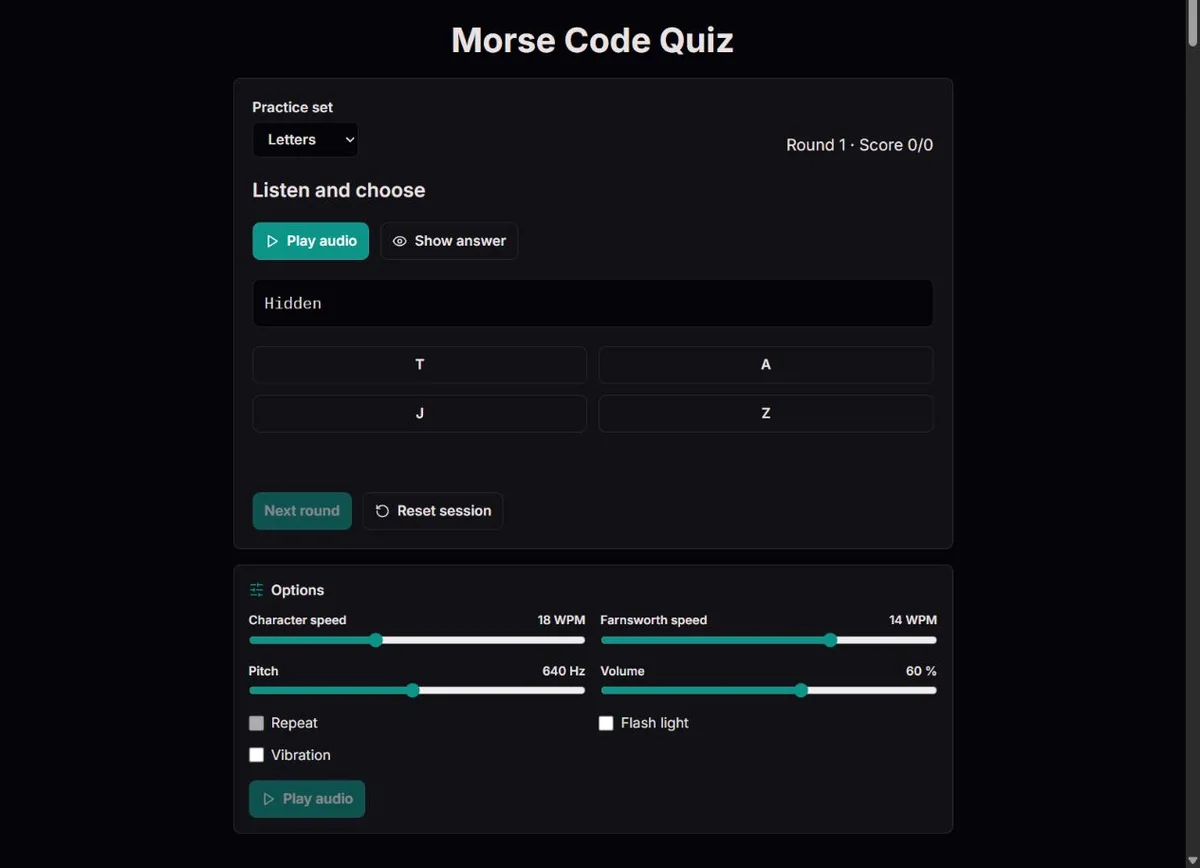
The quiz is a four-choice recognition exercise. The current set can be letters, numbers or the built-in word list. Letters are A-Z, numbers are 0-9, and the word set contains fixed English prompts such as SOS, HELLO, CLOCK, SIGNAL, LEARN CODE and KEEP GOING. A new prompt is random but excludes the immediately previous item; older prompts can appear again. There is no custom subset editor, adaptive curriculum, saved deck or free-text answer field; quiz answering happens through the four visible decoded choices.
Each round begins with four decoded choices visible and the written Morse hidden. Press Play to hear the current answer as generated audio. You may replay before choosing. Showing the written code is available when you want visual support, but using it changes the exercise from audio-first recognition to guided comparison. Once you select an answer, the round locks, playback stops and only that first selection counts.
A correct first selection adds one point. A wrong selection reveals the correct decoded answer and still allows Next. The denominator in the score counts answered rounds, including the current one after a choice is made. For example, if the display is Round 6 with Score 3/5 before you answer, a correct sixth answer changes the score to 4/6; a wrong answer changes it to 3/6. Replay and Show carry no score penalty, but they change what the score indicates: 4/6 after several reveals is evidence of supported recognition, not the same thing as 4/6 from audio alone. Reset starts again from round 1 with score 0, and changing from letters to numbers or words also restarts the session and stops any sound. Nothing is stored after leaving the page.
| Action | What happens | How to interpret it |
|---|---|---|
| Play before answering | Plays the current prompt with current audio settings | Use replay to hear structure; it does not reduce score |
| Show written code | Displays dots and dashes for the current prompt | Useful for review, but no longer a pure listening attempt |
| Choose an answer | Locks the round and stops audio | Only the first choice can add a point |
| Next round | Picks a new non-immediate-repeat prompt | Older prompts may return later |
| Change set or Reset | Clears score and restarts round count | Treat each set as a separate session |
The Options panel uses the same playback settings as the converter. Character speed ranges from 5 to 40 WPM, Farnsworth spacing ranges from 5 up to the character speed, pitch ranges from 300 to 1000 Hz, and volume ranges from 0 to 100 percent. The default is 18 WPM characters, 14 WPM spacing, 640 Hz and 60 percent volume. These settings affect playback only; they do not change the written answer or which choices appear.
Before using a slow-spacing recipe, check what kind of prompt you are hearing. Farnsworth spacing expands the pauses between letters and words. A single isolated quiz letter or digit has no following character gap inside its own signal, so lowering spacing from 18 to 10 WPM will not give that one item the extra thinking gap a learner might expect. Multi-character word prompts such as HELLO, LEARN CODE or GOOD MORNING show the benefit because they contain letter gaps and sometimes a word gap.
For a learner who can identify a pattern on paper but loses multi-character words in sound, try 18 WPM characters with 10 or 12 WPM Farnsworth spacing. The marks remain reasonably character-like while the gaps give more thinking time. For isolated letters or digits that still feel too fast, lower character WPM instead. If the spacing feels too slow on words, raise Farnsworth in small steps. Pitch is comfort and clarity, not spelling; pick a tone that is easy to hear without strain. The timing model follows International Morse mark and gap relationships in ITU-R M.1677-1 International Morse code recommendation, with Farnsworth spacing calculated from the PARIS convention described in ARRL QEX article on Farnsworth timing.
The Options panel also offers optional Flash light and Vibration cues. Light mirrors marks in a small indicator, not a torch, and is disabled by reduced-motion preference; use it only when flashing is suitable for everyone watching. Vibration is a browser request, not proof of hardware response. These can support a lesson, but a quiz result with visible or tactile cues is not an audio-only attempt. Note that assistance when comparing sessions. Even volume 0 still requires the browser audio engine to run the player.
| Situation | Try this | Why |
|---|---|---|
| Letters sound clipped | Lower character WPM | Dots, dashes and inner gaps all become longer |
| Words blur together | Lower Farnsworth WPM | Letter and word gaps expand while character shapes stay intact |
| Audio is tiring | Adjust pitch and volume | Comfort helps attention; it does not change code |
| Single letters do not slow down after spacing changes | Use character WPM or a multi-letter prompt | Farnsworth acts on outer gaps, not a lone character |
| Score drops after switching sets | Reset expectations for the new set | Digits and words have different length and memory demands |
A wrong answer is most useful when you classify it. Did you hear the wrong number of marks, reverse the order, miss a long dash, or answer before the signal ended? The page shows the correct decoded answer after the first choice. Use that moment to replay mentally, then show the written code if you need to compare the exact pattern. Moving immediately to the next prompt can make the score feel active while leaving the same confusion untouched.
Common beginner families are small enough to review deliberately. E, I, S and H are all-dot patterns of increasing length. T, M and O are dash patterns. A/N, U/D, R/K and F/L are useful mixed comparisons because order matters as much as mark count. Numbers require a different expectation: every digit contains five marks, so 3 and 8 are not short even though they are familiar written characters.
The quiz is recognition with visible alternatives, not unaided copy from a live signal. Research on retrieval practice, including the prose-recall experiments by Roediger and Karpicke, is a cautious reason to try before revealing, but it is not a Morse-specific guarantee and it does not make four-choice recognition identical to typed transcription Roediger and Karpicke 2006 retrieval-practice paper. For stronger evidence about your own listening, pair quiz rounds with the practice page or audio page and compare whether the same confusable pattern still causes trouble without choices.
| If the mistake looks like | Review this | Next action |
|---|---|---|
| A chosen for N, or N chosen for A | Same marks, reversed order | Play A and N on the chart, then quiz letters again |
| S chosen for H | Three dots versus four | Count complete marks after the signal finishes |
| R chosen for K | Mixed rhythm around a middle mark | Compare .-. with -.- at the same speed |
| Digits feel too long | Five-mark number patterns | Practice 1/9 and 2/8 pairs before mixed numbers |
| Wrong word after one replay | Early commitment | Listen to the whole word once more before selecting |
Historical examples are useful when they explain the task honestly. The 1909 public recognition of Jack Binns after the Republic collision shows how much value was placed on an operator who could keep sending and receiving intelligible wireless distress traffic 1909 Congressional Record recognition of Jack Binns. The Science Museum's Titanic account describes CQD and SOS traffic and the role of a receiving watch in 1912 Science Museum account of Titanic wireless telegraphy. Those stories are about trained communication under real constraints, not about a browser quiz certifying operating ability.
The connection is narrower and still worthwhile: Morse was meaningful because someone could recognize timed patterns and act on them. A quiz round gives a small, low-stakes version of the recognition decision. You hear a controlled signal, choose an answer and get feedback. It omits noise, fading, message handling, station procedure, fatigue and responsibility, so it should be framed as practice for pattern recognition rather than proof of field readiness.
Use history to choose better classroom questions. After a round on SOS, compare ordinary SOS with the joined <SOS> signal on the generator or audio page and ask what else a receiver would need beyond the famous pattern. After a number round, discuss why receiving a complete position or time would demand more than recognizing one digit. These comparisons help connect a successful quiz answer with the broader task of understanding a complete message.
A N.- / -.The quiz chooses a prompt from A-Z, digits 0-9 or twelve fixed English words and phrases, avoiding only the immediately previous prompt. Four distinct decoded choices include one correct answer. Only the first choice counts; it stops playback and locks that round. Generated audio follows ITU-R M.1677-1 International Morse code recommendation and the PARIS-based Farnsworth calculation in ARRL QEX article on Farnsworth timing. A score describes answered rounds in this session, not certified speed or unaided reception.
There is no custom subset, adaptive curriculum, microphone input, sending assessment, saved score or progress export. Word prompts remain English on localized pages. You may press Play again and reveal the written code without a point penalty; note that assistance when comparing results. The automatic Repeat checkbox is disabled for exercises. Use the prompt's Play button. Browser audio must be available, and setting changes, a new round, a hidden tab or navigation cancel output.
To report a discrepancy, include the route, exact input, expected result and relevant settings. For timing issues, state both character and Farnsworth speeds. Compare the relevant official table before changing an identifier; remove private information from reports.
No. You can choose the letters, numbers or words set, but you cannot limit the quiz to a pair such as A/N or S/H. If one pair keeps causing errors, use the chart to compare it, then return to the letters set and keep your own note of whether that pair improves.
No. Replay before answering does not change the score, and only the first selected choice for the round counts. A score earned with many replays is still useful, but it tells you about supported recognition rather than first-listen recognition.
Show reveals the written Morse pattern for the current prompt; it does not open a typed-answer field. Use it after committing when you want to compare the exact dots and dashes, or before committing when the goal is guided review rather than an audio-first attempt.
Reset clears the session. Changing between letters, numbers and words also starts a new score and round count because the prompt pool and difficulty have changed, so the old denominator would no longer describe the same exercise.
No. The score exists only in the open page session. If you want to track progress, record your own notes such as fewer replays, fewer A/N reversals or a stronger words-set result; the page itself has no export, leaderboard or history.
Farnsworth spacing expands pauses between letters and words. A lone quiz letter or digit has no outer gap inside its own playback, so 18 WPM characters with 10 WPM spacing mainly helps word prompts, not isolated letters. Lower character WPM if the single pattern itself is too fast.
No. It is a four-choice practice tool using controlled browser audio. It can show which patterns you recognize in this session, but it does not measure live reception, interference handling, sending skill, endurance or standardized operating speed.
Name the mistake before moving on. If S was chosen for H, count the dots; if A was chosen for N, compare mark order; if a word was missed, replay the whole prompt once and then show the written code. Repeated errors give a better next action than the raw score alone.
Yes. Use short rounds as listening challenges, let participants write answers before the four choices are selected, then reveal and discuss the pattern. Keep the score as a session aid rather than a ranking because replay and Show choices affect what the number means.
The words set uses fixed words and short phrases such as HELLO, LEARN CODE and GOOD MORNING. They include multiple letters and sometimes word gaps, so they take longer to hear and are where a lower Farnsworth WPM value can create useful extra gaps.