Step 1
Choose a group
E T A N. / - / .- / -.Filter letters, numbers or punctuation to keep the reference focused. Additional punctuation is marked with an asterisk.
Inspect and hear Morse letters, digits and punctuation, filter the reference and download the displayed entries as text.
Inspect and hear Morse letters, digits and punctuation, filter the reference and download the displayed entries as text.
E T A N. / - / .- / -.Filter letters, numbers or punctuation to keep the reference focused. Additional punctuation is marked with an asterisk.
Select a character to play its pattern at the current speed. A new selection stops the previous signal.
morse-chart.txtÉ ..-..
× -..-Download the displayed entries as text. The note identifies non-ITU punctuation shortcuts.
Select letters and compare A .- with N -., then U ..- with D -... Use 18 WPM characters and 10 WPM Farnsworth spacing as an initial setting for later word comparisons, with pitch around 640 Hz at a comfortable volume. Each chart click plays only one character, so listen for the order of marks rather than waiting for an inter-letter pause. Play one entry to completion, then the other. Once the distinction is clear, generate AN or UD and try hearing the same letters together. A new chart selection cancels the previous sound; rapid clicking creates truncated comparisons.
Select letters before downloading morse-chart.txt if the lesson concerns spelling, or numbers if it concerns identifiers and dates. The file contains the currently displayed entries, so check the filter before distributing it. Introduce E, T, I and M first, then combine them into a short supported word and return to the chart only for uncertain patterns. Keep the reference available during the first exercise, then ask for a second attempt without lookup. Record mistakes as specific pairs to revisit, not as evidence of a learner's fixed ability.
Use the punctuation filter when a fraction, email address or procedural group gives a surprising decoded result. Confirm / as -..-. and @ as .--.-., then distinguish those character patterns from a slash used as a written word boundary. Note any asterisk: it marks additional punctuation rather than an unqualified ITU entry. For a printed clue, copy its actual groups into the decoder after consulting the chart. A useful reference check tests the final artifact; regenerating the intended text alone cannot reveal a missing mark in the artwork.
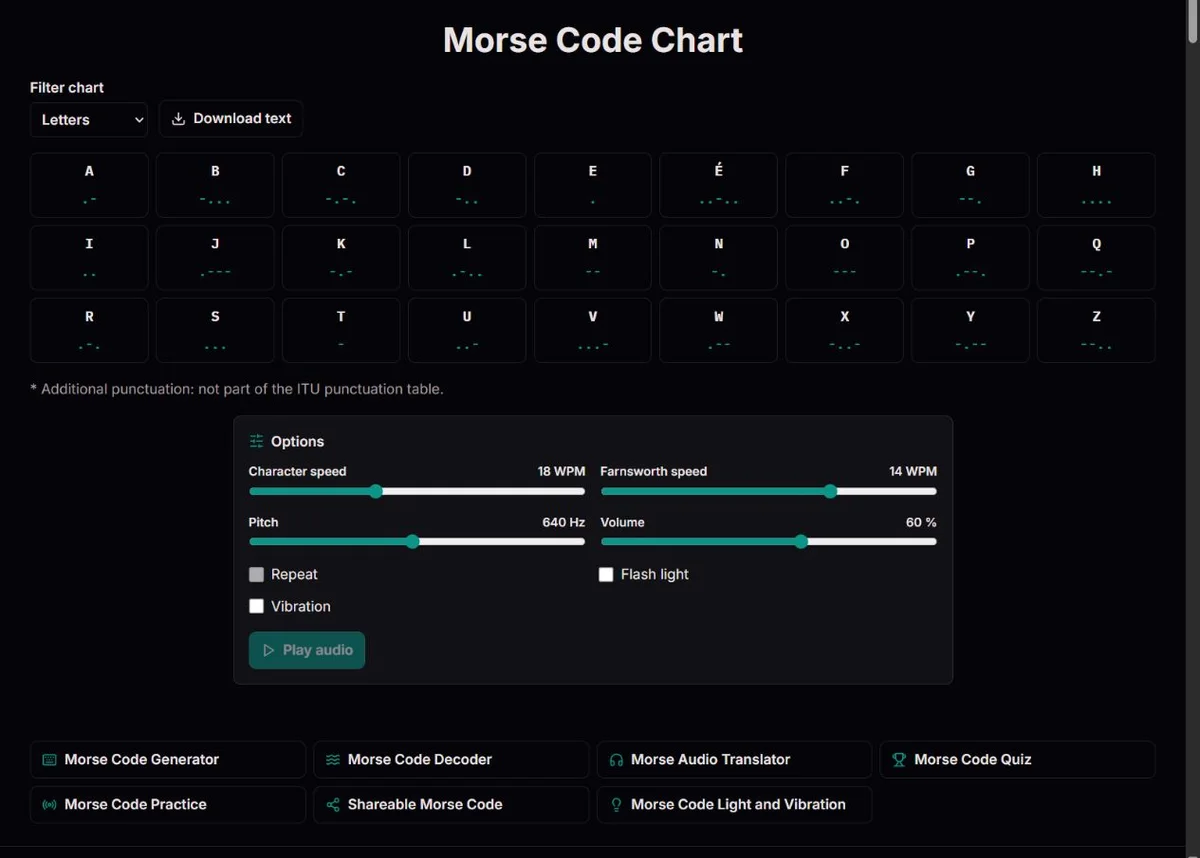
The chart displays the characters supported by the converter and their dot-and-dash patterns. Filters show all entries, letters, numbers or punctuation. The letters filter includes É as well as A-Z; the numbers filter shows 0-9. Selecting a displayed character plays its pattern using the current sound settings. The buttons play individual examples; clicking a sequence of entries does not compose or save a message.
A new click stops the previous signal. This is useful when you intentionally change the example, but it also means rapid clicks are a poor way to hear a word. Use text to Morse or the audio page for a complete phrase with correct letter and word gaps. The chart's text download contains the displayed mapping, not a sound file or a record of which entries you clicked.
For lookup, locate the exact symbol rather than a vaguely similar group. For learning, compare its shape with one other character and then use it in context. If a code has been copied from another alphabet or historical reference, the same marks may have different labels; the chart is a statement of this tool's mapping, not a promise to interpret every national or historical Morse system.
E is one dot and T one dash. I is two dots and M two dashes. Their small size makes them useful first comparisons, but short does not automatically mean easy in a flowing message: you still need to hear where the character ends. A dot lasting one unit and a dash lasting three use the same pitch. ITU-R M.1677-1 specifies one-unit inner gaps, three-unit letter gaps and seven-unit word gaps at normal spacing.
A .- and N -. contain the same number of dots and dashes. At 20 WPM both last five dot units, or 0.30 seconds, but the long part occurs in a different position. U ..- and D -.. both contain two dots and one dash. F ..-. and L .-.. both contain three dots and a dash. In each pair, counting marks or measuring total duration alone is insufficient: their order is the distinguishing information.
Play a pair slowly enough to identify the difference, then test it in a short unfamiliar combination. A fixed example such as A N is a comparison, not a prediction of a random quiz question. If you find yourself visually reciting dots and dashes while audio plays, listen once with your eyes away from the chart and check afterward. The chart remains a verification aid rather than a required intermediate step for every received letter.
| Pair | Patterns | What to hear |
|---|---|---|
| E / T | . / - | Short versus long mark |
| A / N | .- / -. | Long mark at the end versus the beginning |
| U / D | ..- / -.. | Two dots before versus after the dash |
| F / L | ..-. / .-.. | Position of the dash among three dots |
| S / H | ... / .... | Three dots versus four, with inner gaps |
| S / O | ... / --- | Three short marks versus three long marks |
Every digit displayed has five marks. From 1 through 5, the leading dots increase: 1 is .----, 2 ..---, 3 ...--, 4 ....- and 5 ...... From 6 through 0, leading dashes increase: 6 -...., 7 --..., 8 ---.., 9 ----. and 0 -----. The numbers table makes that progression easy to inspect without confusing a pattern's final dot with sentence punctuation.
Use the numbers filter to hear 1 and 9, then 2 and 8. These have opposite dot/dash placement, but that symmetry is not a substitute for hearing the whole sequence. A clipped final mark can turn a reference comparison into an incomplete signal. Let each chart playback finish and keep pitch and speed constant so the only change is the digit.
For dates and mixed identifiers, use the generator after lookup. AB9 is one text group; AB 9 contains a word break. The chart cannot infer the correct form of a call sign, date or coordinate, and it does not provide an operational abbreviated-digit mode. Write the exact intended characters, then compare the decoded result. Digits are often longer to send than short letters, so a numeric exercise may need more listening time than its written length suggests.
| Digit | Morse | Digit | Morse |
|---|---|---|---|
| 1 | .---- | 6 | -.... |
| 2 | ..--- | 7 | --... |
| 3 | ...-- | 8 | ---.. |
| 4 | ....- | 9 | ----. |
| 5 | ..... | 0 | ----- |
Unmarked punctuation follows the corresponding table in ITU-R M.1677-1. A full stop is .-.-.-, comma --..--, question mark ..--.., slash -..-. and commercial at .--.-.. The quotation-mark group is .-..-., distinct from the apostrophe .----.. These are patterns for characters, not typographic spacing instructions. In a Morse message, a printed / between groups is a word-divider convention rather than the transmitted slash pattern.
Five entries are marked as extensions: !, &, ;, _ and $. Their presence means this converter accepts those patterns; it does not mean they are punctuation entries in ITU-R M.1677-1. If a puzzle will be solved with a different reference, either supply this chart or choose unambiguous supported standard punctuation. Asterisks also appear in the text export alongside the additional entries and in its explanatory note.
Some marks have more than one reading. Multiplication × and X share -..-, so the decoder returns X. The + pattern .-.-. can be rendered as <AR> when prosign preference is enabled, and the additional & pattern .-... can be rendered as <AS>. A chart label is not a conclusion about the sender's meaning. Preserve context and consult the decoder's interpretation option when the source contains procedural signals.
É has its own ..-.. pattern here, including composed or decomposed accented input in the generator. Other accented letters and Cyrillic are not automatically mapped or transliterated. When a learner sees a foreign-language page, distinguish the language of the explanation from the alphabet being encoded. The same supported identifiers and mark patterns stay unchanged across the eight page languages.
The chart lists ordinary mapped characters. The converter separately accepts <AR>, <AS>, <SK> and <SOS> as joined tokens; they are not a dedicated set of chart buttons. Ordinary AR and joined <AR> sound different because ordinary letters have an inter-letter gap. The ITU document also includes procedure signals such as eight dots for error that are not implemented as tokens here. This is a useful compatibility boundary, not evidence that those signals do not exist.
ITU-R M.1677-1 also explains special treatment of percentages, fractions and minute/second signs. This chart does not expand % or format a numerical message according to all those rules. For an engineering or history lesson, examine the relevant document passage alongside the mapping. For a simple date design, choose the intended written characters yourself and verify them through the generator and decoder.
Choose a few patterns rather than trying to learn all entries at once. E, T, I, M, A and N allow several concrete comparisons: one mark versus two, dot versus dash, and reversed order. Listen to an entry, identify it, then make a short word with the generator. Finally try a different arrangement without watching the chart. Return to the chart for the pair that caused difficulty, not for every letter you already recognize.
An 18 WPM character setting with 10 WPM Farnsworth spacing can be a useful starting experiment for words. A chart entry contains only one character, so reducing Farnsworth alone does not lengthen that isolated pattern: there is no following letter or word gap inside its playback. To compare spacing, use two characters on the audio page. This prevents a common misunderstanding in which a learner repeatedly adjusts spacing while expecting a single A button to sound slower.
Keep a brief note of specific uncertainties, such as A/N order or S/H mark count. Revisit those before trying a longer phrase. Change one setting at a time, keep volume comfortable and stop if repeated listening becomes tiring. Quiz and practice provide further prompts, but the chart itself stores no learning progress and makes no assessment of proficiency. Learning advice here is a practical experiment, not a promise about a fixed number of sessions.
The Library of Congress's 1844 message tape preserves a physical record of Morse's 1844 message to Vail. A reference chart connects marks with characters, but the original event involved apparatus, timing and an operator's interpretation. Later sounders such as the Smithsonian's telegraph sounder converted electrical pulses into clicks. Hearing an entry here connects written and audible representations, but the generated tone is not a reproduction of every historical receiver or alphabet.
ITU’s account of the 1865 conference describes international coordination in 1865, when countries agreed on service rules, tariffs and Morse equipment. That is meaningful context for a chart: an alphabet only works between people who also agree how to send, divide and interpret a message. The same principle applies when supplying a worksheet to a class. State the separator convention and the status of extension entries rather than assuming every printed chart is identical.
Earlier maritime examples show why lookup was not the final task. The 1909 Congressional Record on Jack Binns records contemporary recognition of Binns's CQD calls in 1909, while the Science Museum's account of Titanic wireless discusses received distress messages in 1912. A chart can identify a pattern, but the exchange depended on attentive operators and contextual information. Use those cases to ask what a receiver still needed after recognizing the signal, instead of treating a famous label as proof of communication.
E T A N. / - / .- / -.Letters A–Z, digits and standard punctuation follow ITU-R M.1677-1. Five additional punctuation patterns are explicitly marked in the chart. Explicit <AR>, <AS>, <SK> and <SOS> tokens are sent as joined signals; the decoder can prefer prosigns where punctuation overlaps. Timing uses 1/3/7 units. Farnsworth stretches only letter and word gaps, calibrated to the 50-unit PARIS convention. Playback, duration and WAV export share the same timeline.
No microphone, radio receiver, camera or torch is used. Unsupported text is reported and omitted from encoded output; invalid Morse groups remain visible as [?] and cannot be played. Sound needs a working browser audio API. Screen and vibration timing can lag; sleeping or backgrounded devices are not reliable signalling equipment. Playback stops when the tab is hidden. Sessions are not saved. Sharing places the complete message in the URL, not in encrypted storage. Accented É is supported, including decomposed Unicode input. Multiplication × uses the X signal and therefore decodes as X: the signal alone cannot distinguish them. Percentage signs and other operational number formats are not expanded automatically.
To report a discrepancy, include the route, exact input, expected result and relevant settings. For timing issues, state both character and Farnsworth speeds. Compare the relevant official table before changing an identifier; remove private information from reports.
The cited ITU table includes accented E as ..-.., and the converter supports É. This is a specific supported letter, not a general promise for all accents. Check names with Ä, Ñ, Ç or other unsupported characters separately before creating code from them.
Yes. Select the numbers filter and then download text. The file contains the entries currently displayed and the extension note. Open it to confirm the set before distributing it; changing the filter after downloading does not alter a file you already saved.
An isolated entry has only its own marks and inner gaps. Farnsworth changes pauses between letters and words, which are absent from a single-character playback. Reduce character speed to change the entry itself, or use a two-character message on the audio page to compare spacing.
No. Each click starts a new isolated pattern and cancels the previous one. For a word with proper boundaries, enter the text on the generator or audio page. Rapid chart clicks can cut off marks and are not a substitute for a composed message.
No. They label five additional punctuation entries: !, &, ;, _ and $. The pattern beside the character is what plays. Keep the note when sharing a text reference so readers can distinguish accepted software extensions from the cited ITU punctuation table.
This chart shows the ordinary character map, not a separate procedural button set. Enter <AR>, <AS>, <SK> or <SOS> in the generator to produce a joined signal. Use the decoder's prosign preference for overlapping groups when the source has a procedural meaning.
ITU assigns the multiplication sign the signal for X. Both entries therefore play -..-, and the decoder returns X. Context can explain which was intended, but hearing the marks cannot recover a distinction the signal does not carry.
Keep speed, pitch and volume fixed, let each playback finish and focus on whether the long mark comes last or first. Both have the same total duration. Then try AN and NA on the audio page; a successful isolated lookup is only the first step towards recognition in context.
It may belong to a national adaptation, historical code, extension or procedure convention. This tool uses its displayed International Morse mapping. Compare the exact reference and retain the source context before changing the label. There is no universal automatic selection of an alphabet from a bare dot-and-dash group.
It can verify individual patterns, but the complete artifact also needs correct order and boundaries. Copy the actual printed groups into the decoder, compare the result with the intended text and inspect legibility at final size. Valid individual characters do not prove that the overall phrase is right.