Step 1
Start with a short message
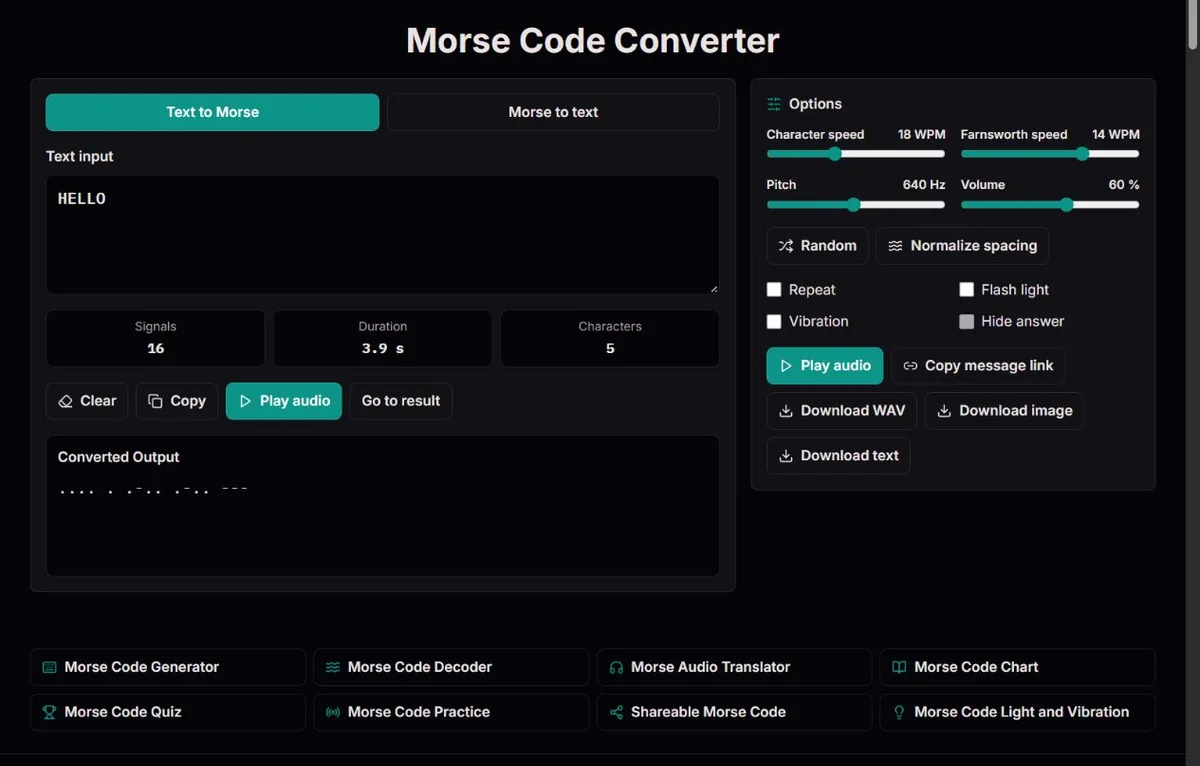
HELLO.... . .-.. .-.. ---Type HELLO or switch to Morse input. Keep the converted result visible while checking the original.
Translate text and Morse, compare timing, then open focused chart, audio, quiz, practice, sharing or light tools.
Translate text and Morse, compare timing, then open focused chart, audio, quiz, practice, sharing or light tools.
HELLO.... . .-.. .-.. ---Type HELLO or switch to Morse input. Keep the converted result visible while checking the original.
A space separates characters; a slash separates words. Play only after correcting unknown groups.
/morsecode/morse-code-chart/morsecode/morse-code-quiz/morsecode/morse-code-practiceOpen the chart for reference, the quiz for recognition or sharing for a message link. Nothing plays automatically.
Start a classroom activity with E, T, A and N rather than a whole alphabet. Use 18 WPM characters, 10 WPM Farnsworth spacing and a comfortable pitch around 640 Hz; keep light and vibration off for the first listening comparison. Ask students what changes when A becomes N: the number of marks stays the same, but their order changes. Then generate TEAM, give the written code to another group and check the returned text in the decoder. A wrong answer becomes evidence to examine: was a mark reversed, a character gap lost or a word boundary invented? This teaches representation and verification, not just memorization.
For a treasure hunt, generate MEET AT 9 and keep the two word separators visible. Download text if someone will edit a worksheet; use the code image if a fixed layout is preferable. Before printing, paste the code into the decoder and compare the returned words and digit with your answer key. Give beginners a chart and explain spaces versus slashes. For an audio clue, use 18/10 WPM and listen once without looking at the answer. Avoid clues that depend on guessing missing boundaries: difficulty should come from the puzzle, not a damaged signal.
If you know the chart but cannot follow a short word, compare written and heard HELLO. Its two L characters should have the same rhythm. Keep character speed at 18 WPM and reduce spacing to 10 WPM, then gradually bring spacing closer to character speed as recognition becomes comfortable. Try a different short word before deciding you have learned the letters: remembering HELLO's melody is not the same as recognizing L elsewhere. The quiz and practice pages can provide further prompts; their session feedback is useful for choosing what to revisit, not a certificate of radio proficiency.
Morse conversion has two directions. If you already know the message, the text-to-Morse page creates its written signal. If you have dots and dashes, the decoder turns separated groups into characters. The audio page generates tones from either of those inputs; the word translator in its name does not mean it listens to recordings. A microphone, radio receiver or automatic speech-like recognition step is not part of these tools.
The chart is better for a single disputed character than for a whole sentence. Select a group, find the symbol and play it. For learning, move from that reference to listening and then to a quiz or practice prompt. For reuse, choose the format your recipient needs: editable text, a static image, a WAV signal or a message link. These are different representations of the same checked message, not interchangeable evidence that it was understood.
The focused pages share mapping and playback controls. You do not need to learn a new alphabet on each page, but each route has a different first task. Keep your original text or clue alongside the result when moving between tools. A successful round trip can reveal missing characters or damaged separators; it cannot repair a misspelled source message.
Random replaces the current input; it does not append a new word or save the previous message. Normalize spacing changes whitespace and accepted Morse notation, not unsupported letters into supported spellings. In Morse-to-text mode, Hide answer lets you attempt the reading before revealing the transcript. Use these controls for a deliberate self-check, and keep the original elsewhere before switching modes or opening another tool page: navigation is not a saved workspace.
| Starting material | First choice | Useful next check |
|---|---|---|
| A known phrase | Text to Morse | Decode the output and compare the source |
| Separated dots and dashes | Morse to text | Inspect unknown groups in the chart |
| A listening exercise | Morse audio | Keep settings fixed and vary the message |
| One uncertain symbol | Morse chart | Compare its order with a confusable pattern |
A dot and a dash describe short and long signal durations, not two different notes. At ordinary spacing, a dot is one unit, a dash three, the silence inside a character one, the silence between letters three and the silence between words seven. These relationships are specified in ITU-R M.1677-1. In written output, a space represents a character boundary and a slash represents a word boundary. That printed slash is an annotation for silence, not a slash tone.
Compare ..., . . . and . / . / .. They decode as S, EEE and E E E respectively. The marks are identical, but the grouping is not. Removing spaces to make a design look tidier removes part of the message. Likewise, inserting a line break while editing a Morse clue creates a word boundary in this decoder, rather than merely wrapping the display.
For a literal slash, such as in A/B, text input produces .- -..-. -...: three characters in one group of text. Keep that distinct from A B, whose written code is .- / -.... This small comparison is useful before preparing fractions, dates or a clue that contains punctuation.
HELLO becomes .... . .-.. .-.. ---. There are five character groups and 16 individual marks. The displayed character count measures input characters; the signal count measures dots and dashes. Neither is a word count. At 20 WPM with Farnsworth also 20, this signal takes 49 dot units, or 2.94 seconds, ending with the last dash. Its duration excludes a final word gap and does not measure when a listener actually hears the speakers.
Try AB9 next. The number 9 is ----., a five-mark digit rather than an abbreviation or spoken number. A mixed identifier should preserve every character and its order. The converter uppercases supported letters, but it does not decide whether AB9, AB 9 or A B9 is the identifier you intended. Spaces in the source matter.
Warnings deserve attention even when the remaining output looks plausible. Unsupported text is omitted during encoding; an unknown Morse group becomes [?] during decoding. Those are different failure states. A message containing an omitted name character may still play, whereas an invalid written Morse group prevents a valid playback timeline. Check the warning and the original, not only whether the Play button produced sound.
| Text | Morse | What to notice |
|---|---|---|
| TIME | - .. -- . | Compare a dash, two dots, two dashes and a dot |
| 2026 | ..--- ----- ..--- -.... | Four five-mark digits, including a repeated 2 |
The available character speed is 5 to 40 WPM. Farnsworth spacing ranges from 5 WPM up to the current character speed. At the default 18/14 setting, each character keeps an 18 WPM shape while the longer gaps give more time between characters. For a first comparison, 18/10 is a reasonable experiment, not a prescribed learning level. If the whole character is unclear, lower character speed; if you recognize it but cannot keep up with the next one, adjust spacing first.
Pitch can be set from 300 to 1000 Hz and volume from 0 to 100. Pitch changes the tone, not the Morse mapping or duration. Choose a comfortable volume on both the page and your device before repeating anything. Repeat plays the same message with a pause between cycles; it does not create a new exercise. Changing the input or settings stops the current playback, so restart deliberately after making a comparison.
Light and vibration are optional ways to demonstrate the same marks. A screen indicator is not the camera flashlight, vibration may not be supported, and screen timing can differ from audio timing. Keep such output voluntary and do not rely on a sleeping or hidden tab: playback stops when the page becomes hidden. The point of a demonstration is to inspect the signal, not establish a dependable emergency channel.
The Library of Congress's 1844 message tape preserves the message sent by Samuel Morse to Alfred Vail in Baltimore on 24 May 1844. The apparatus recorded raised marks on paper for an operator to read. That artifact is a useful reminder that a message could be recorded first and interpreted afterward. A modern generated line of code recreates a representation of text; it is not a facsimile of that historical apparatus or its original alphabet.
Sound changed the operator's task. The Smithsonian's telegraph sounder describes electrical pulses moving a lever through electromagnets so that the receiver could hear the message as clicks. The tone generated here is a different sound, but the comparison explains why duration and gaps carry more information than a row of punctuation suggests. The display tells you the mapping; listening exposes the time needed to distinguish it.
The 1865 Paris conference addressed a network problem as well as a code problem. ITU’s account of the 1865 conference explains that participating countries agreed on international service regulations and tariffs, including adoption of Morse instruments. A common signal did not by itself make messages interoperable: handling rules and compatible equipment mattered too. Today a puzzle sender and solver face a smaller version of that problem when they agree on separators, supported symbols and how to interpret procedure signals.
The 1909 Republic rescue and Titanic's 1912 distress traffic are useful teaching topics because they show operators exchanging messages, not merely emitting a famous pattern. The 1909 Congressional Record on Jack Binns records contemporary recognition of Jack Binns and the CQD calls from Republic. The Science Museum's account of Titanic wireless describes both CQD and SOS in Titanic's wireless traffic and the importance of a receiving operator being on watch. Titanic was not the event that invented SOS.
Use SOS to compare letters and procedure, but label the exercise accurately. Typed SOS produces three separated characters, ... --- .... Typed <SOS> produces the joined ...---... signal. They contain the same nine marks but different inner silences. This is a timing lesson, not a claim that playing a browser signal will contact anyone. For a fuller history lesson, ask what additional information a receiving station needed: an identity, a position and an intelligible message.
Morse has also carried information visually. The National Archives' Denton interview record documents Jeremiah Denton's 1966 interview, during which he blinked the word TORTURE. The important distinction is between a human interpreting a timed visual message and software translating already written groups. This site does the latter and generates demonstrations; it does not analyze eye movements, video or recorded sound. Keep that boundary clear when using these examples in a classroom.
HELLO.... . .-.. .-.. ---Letters A–Z, digits and standard punctuation follow ITU-R M.1677-1. Five additional punctuation patterns are explicitly marked in the chart. Explicit <AR>, <AS>, <SK> and <SOS> tokens are sent as joined signals; the decoder can prefer prosigns where punctuation overlaps. Timing uses 1/3/7 units. Farnsworth stretches only letter and word gaps, calibrated to the 50-unit PARIS convention. Playback, duration and WAV export share the same timeline.
No microphone, radio receiver, camera or torch is used. Unsupported text is reported and omitted from encoded output; invalid Morse groups remain visible as [?] and cannot be played. Sound needs a working browser audio API. Screen and vibration timing can lag; sleeping or backgrounded devices are not reliable signalling equipment. Playback stops when the tab is hidden. Sessions are not saved. Sharing places the complete message in the URL, not in encrypted storage. Accented É is supported, including decomposed Unicode input. Multiplication × uses the X signal and therefore decodes as X: the signal alone cannot distinguish them. Percentage signs and other operational number formats are not expanded automatically.
To report a discrepancy, include the route, exact input, expected result and relevant settings. For timing issues, state both character and Farnsworth speeds. Compare the relevant official table before changing an identifier; remove private information from reports.
Start with text to Morse when you know the words, and Morse to text when you have separated dots and dashes. Use the audio page for generated sound or the chart for one symbol. Choosing the starting material first avoids pasting ordinary text into the decoder and treating its unknown groups as a mystery.
Characters counts the input, including separators; signals counts the dots and dashes in a valid timeline. HELLO has five input characters but 16 marks. A prosign token has several written characters yet forms one joined signal. These totals describe different things, so neither alone verifies a message.
No. These pages accept text or written Morse groups and generate output. There is no recording upload or microphone decoder. If you transcribe a recording yourself, preserve the character and word gaps; the converter cannot recover timing that you have left out.
No. The mapping supports Latin A-Z, É, digits and the displayed symbols. It does not transliterate Cyrillic, expand ß to SS or strip every accent. Choose an agreed spelling when a name is unsupported, then check the warning and decode the result before using it.
It is a readable code, not encryption. Anyone with the chart can decode it, and a shared message URL contains the message and settings. Hidden answers are suitable for a puzzle, not confidentiality. Use a harmless phrase for public links and avoid private identifiers.
Keep a copy of the original. For text input, look for unsupported characters that were omitted. For Morse input, inspect each [?] group and its separators. Repair one identified issue at a time and compare the full result again; do not silently substitute a plausible sentence for uncertain material.
No. WAV contains one generated audio signal using the chosen speed, spacing, pitch and volume. Repeat is a live playback option; vibration and screen output are device actions, not audio-file content. Listen to the saved file separately before handing it to a class or puzzle solver.
A message link can include character speed, Farnsworth spacing, pitch, volume, mode, repeat and hidden-answer choices. The page validates these values on opening. Review them before pressing Play, especially volume and repeat. A shared link does not start playback automatically.
There is no saved session transcript. Download or copy a checked result when you need a record, or deliberately keep a message link with its privacy implications. A refresh or navigation is not a reliable way to preserve unsaved edits, quiz results or a current playback position.
The limit is calculated signal duration, not just letter count: slower spacing and many digits can make a short-looking message long. Playback and WAV are limited to 90 seconds per signal. Check for invalid groups, split a longer message at a sensible boundary and test the shorter file.