Step 1
Pick the center
5 × 5
6 × 6
Odd widths center on a block; even widths center between four blocks. Choose a diameter from 3 to 121.
Choose the outer width first. A circle on square blocks is an approximation, not a uniquely perfect shape.
Choose the outer width first. A circle on square blocks is an approximation, not a uniquely perfect shape.
5 × 5 6 × 6
Odd widths center on a block; even widths center between four blocks. Choose a diameter from 3 to 121.
.###.
#####
#####
#####
.###.
Filled includes the disk, Outline keeps its four-neighbor boundary, and Ring removes a smaller inner disk. Only Ring uses thickness.
X 2–4
Z 0
Read the one-based X ranges from top to bottom. Save the map or commands. Keep a fixed north-west origin for every command.
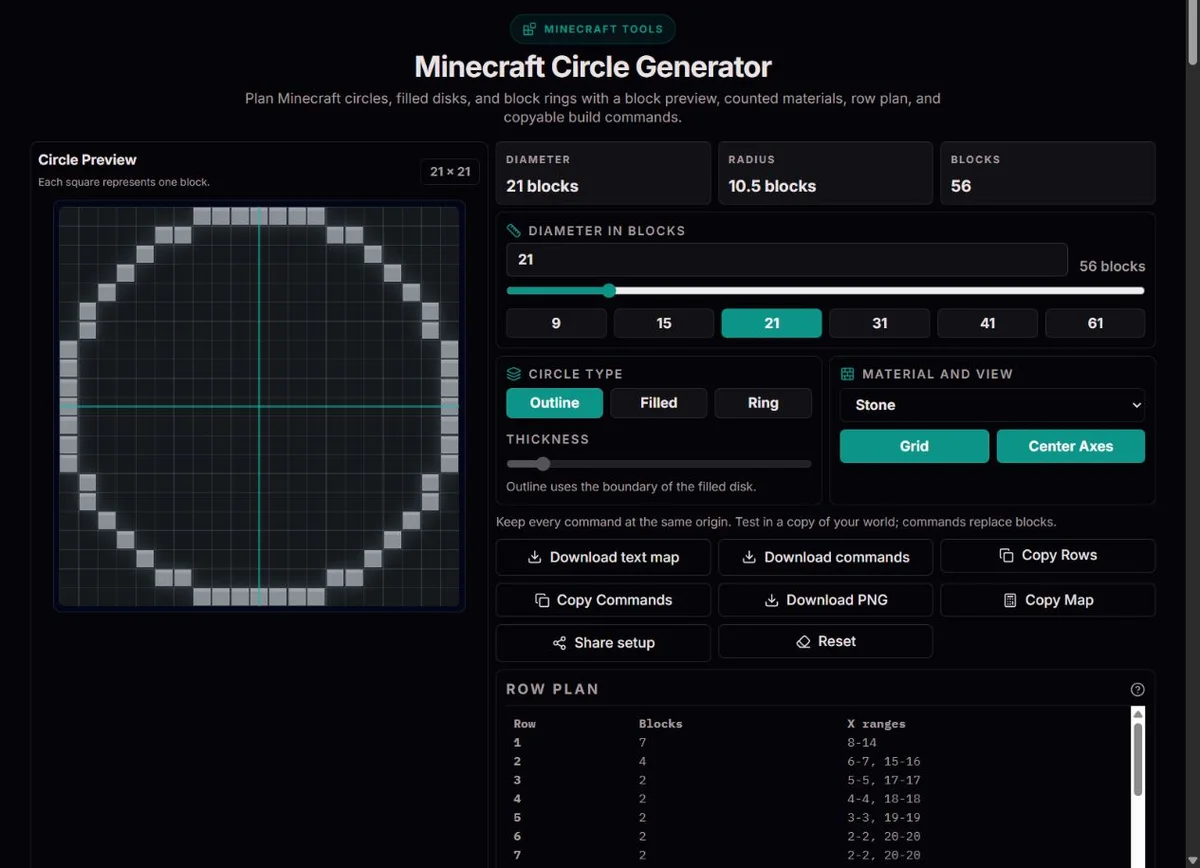
Start with Outline and the intended outside diameter, keeping Grid and Center Axes visible while marking the footprint. Check an odd center block versus an even four-block junction before placing a doorway. Repeat the row pattern at each wall height yourself; the generator plans one layer, not a complete tower with entrance, roof or structural supports.
Choose Filled for one flat layer and read the actual block count, rather than buying the full square’s area. Diameter 5 contains 21 selected blocks, not 25. Two identical complete layers use 42 before accounting for openings or supports. Change material for appearance and commands; it does not change geometric count.
Compare Ring thickness 1 and 2 at the same diameter. A radial band and the four-neighbor Outline can select different cells, especially on diagonals. Use the row ranges to inspect changes rather than assuming a uniformly two-block wall everywhere. Prepare any entrance or missing segments in the world or your plan; the tool does not carve doors.
The center coordinate is (d − 1)/2 and the geometric radius is d/2. A block is included in the filled disk when its center satisfies (x − c)² + (z − c)² ≤ (d/2)². This rule is reproducible for both odd and even diameters.
Outline keeps an included block if at least one of its four side neighbors lies outside the disk. Ring excludes centers at or inside the inner radius only while that radius is positive. At inner radius zero it includes the whole disk, including an odd center block. Increasing thickness does not modify Outline.
Minecraft’s official coordinate documentation distinguishes world-relative coordinates from coordinates relative to the direction you face. Here rows advance along positive Z and columns along positive X. Rotating your view does not rotate the exported pattern.
The /fill command, described in the official fill-command reference, fills a region between two positions. A horizontal segment can therefore be represented by one command with matching Y and Z values, rather than one command per block.
The row table numbers columns from 1 for reading, while command offsets start at 0. Row 1 with X 2–4 becomes offsets ~1 through ~3 at Z ~. Stand at the intended north-west origin and do not move between relative commands; a command block uses its own execution origin.
These files are plans, not automatic world edits. Commands require appropriate permissions, and block identifiers or command rules can differ by edition and version. Test on a copy because fill replaces existing blocks. ClockTools is an independent utility, not an official Minecraft product.
Diameter means outer width in blocks, from 3 to 121, not the radius or circumference. Numeric changes are rounded to a whole number. Odd and even sizes use different center placement, so changing 31 to 32 is not simply adding a border around the same central block. Establish a bounding square and its north-west origin before building; retain the same orientation for every row.
Filled selects the disk, Outline keeps a four-neighbor boundary and Ring applies an inner-radius rule. Thickness only affects Ring and is clamped to 1–ceil(d/2). When the inner radius reaches zero the engine returns the filled disk, including an odd center block. Material changes preview color and exported identifiers, not geometry. Grid and Center Axes are guides, not additional blocks; at large diameters the preview omits fine grid lines to remain readable.
For Filled diameter 5, rows from north to south have widths 3,5,5,5,3, totaling 21. Row 1 occupies one-based X 2–4; rows 2–4 occupy 1–5; row 5 repeats 2–4. Start each row from the same left edge rather than from the previous row’s first selected block. Both endpoints count, so 2–4 means three blocks.
For Filled diameter 6, widths are 4,6,6,6,6,4, totaling 32, with center between four blocks. A hollow row can have two disjoint ranges: place both and leave the middle gap empty. Check the row count and left/right symmetry after laying the first half. The table and text map describe the exact selected cells, which is more useful than estimating a curved edge by eye.
| Setting | Row widths | Selected blocks |
|---|---|---|
| Filled, d=5 | 3, 5, 5, 5, 3 | 21; center on one block. |
| Filled, d=6 | 4, 6, 6, 6, 6, 4 | 32; center at a four-block junction. |
| Full square d=5 | 5, 5, 5, 5, 5 | 25; not this circle’s footprint. |
| X 2–4 | Inclusive endpoints | 3 blocks, not 2. |
The block count covers selected cells in one horizontal layer. Stack estimates use stacks of 64, not inventory-slot limits for every possible item. For 21 blocks you need less than one full stack; for repeated identical layers multiply the actual count, then separately account for entrances, foundations, lighting and waste. Ring thickness does not specify wall height, and no sphere or dome layers are generated.
Copy Rows gives readable ranges, Copy Map or a text download gives # for selected cells and . for gaps. Use monospace and preserve line breaks when viewing that map. PNG saves the current preview, including chosen guides and material appearance; if canvas fails, use rows or text. Share restores diameter, mode, effective thickness, material and guide choices, not a world, location or blocks already placed. Reset returns to diameter 31 and Outline.
The north-west first grid cell is offset X=0,Z=0, not the center. Row 1, X 2–4 becomes /fill ~1 ~ ~ ~3 ~ ~ minecraft:stone. The official axis reference identifies positive X as east and positive Z as south: columns run east, rows run south, on unchanged Y. Looking another direction does not rotate world-relative ~ offsets. Run the commands from the same location each time; a command block or other execution context has its own origin.
A command text file is not a function pack or automatic world import. It uses chat-style /fill segments, and destination syntax, permissions and material identifiers depend on edition/version. Test one segment in a disposable copy before a whole plan: fill can overwrite existing blocks and this page cannot undo that. An absolute-coordinate workflow requires your own careful conversion; no world coordinate selector is offered here.
d = 5; c = 2; r = 2.5The filled disk contains 21 blocks under the cell-center rule. Its center is a block, not an empty gap.
d = 6; c = 2.5; r = 3The filled disk contains 32 blocks and mirrors about the junction between center cells.
X 2–4 → 3 blocksBoth endpoints count. The corresponding command uses zero-based offsets 1 and 3.
The generator applies a cell-center disk test on a d × d grid. Outline is the four-neighbor boundary; Ring subtracts an inner disk. Counts, row segments, maps and commands derive from the same boolean grid. Materials affect appearance and command identifiers, not geometry.
Diameters are 3–121 blocks and thickness is clamped to 1–ceil(d/2). Small circles can look square; there is no universally perfect voxel circle. The count is for one layer, with 64-block stack estimates. PNG needs canvas support; text downloads remain available. Commands may replace blocks and need edition-specific checking.
For a layout mismatch, preserve diameter, mode, effective thickness and exported map. Check one-based table columns against zero-based command offsets and the actual execution origin. Report a small reproducible row example, browser and locale; do not send private world files.
An even-width square has its center between the four middle cells. The circle is symmetric around that junction.
No. Outline is the boundary of the filled disk. Thickness applies to Ring; Filled includes every disk cell.
No. Test permissions, identifiers and syntax for your edition and version in a copied world. The exports do not run commands for you.
Different raster rules can select different edge cells. This tool uses block centers within radius d/2, then applies its documented boundary or ring rule. Compare diameter, centering and construction method before treating a mismatch as an error. There is no uniquely perfect continuous circle made of square blocks.
Yes. Effective thickness is limited to ceil(d/2); once the inner radius is zero, the engine includes every disk cell, including the center of an odd-sized disk. It does not preserve a mandatory one-block hole. Review actual row ranges after increasing thickness.
Offsets begin at the north-west bounding-square cell, not at the circle center. Stand at that origin and keep it fixed, or convert carefully to absolute coordinates. A command block uses its own execution origin. Turning your view does not rotate the X/Z directions.
No. It is one flat layer. You can repeat a footprint at different heights yourself; a dome requires changing layer diameters and a separate three-dimensional plan. Block totals exclude roof, lighting, foundation and openings. Do not interpret thickness as height.
The renderer omits fine lines when cells become very small. Selected cells and row ranges are unchanged. Use the row table or monospace text map for exact placement, and keep center axes visible if helpful. PNG requires canvas; text is an alternative when rendering is unavailable.