Step 1
Choose a shape
Select paragraphs for body copy, words for a small field, or list items for repeated content.
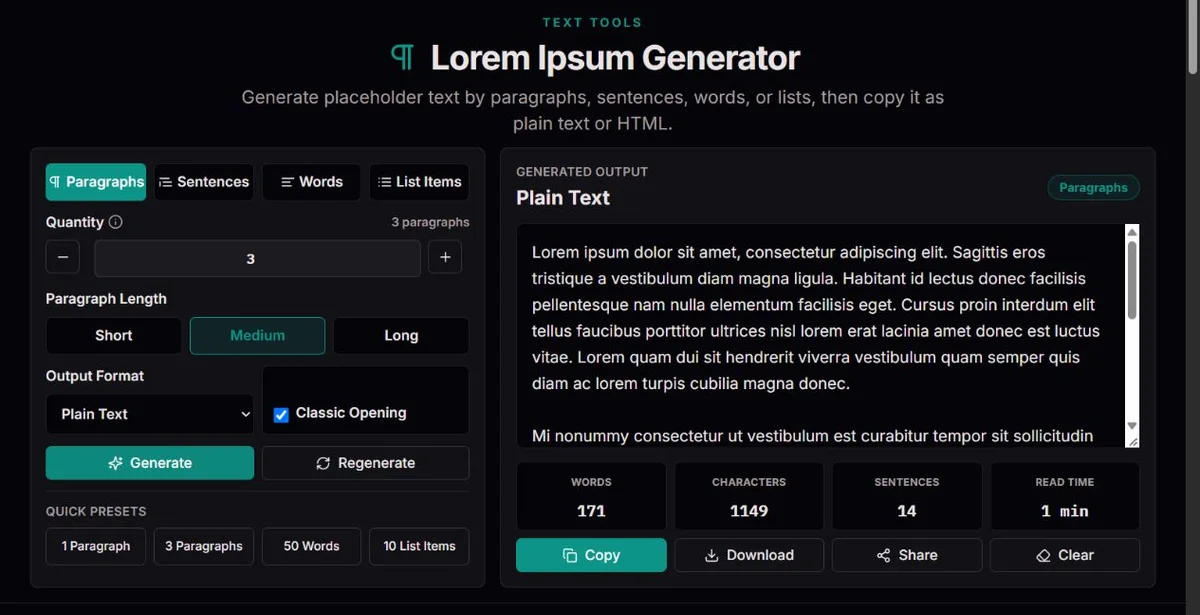
Create placeholder paragraphs, sentences, exact word counts or numbered lists, with plain text and HTML exports for layout testing.
Create placeholder paragraphs, sentences, exact word counts or numbered lists, with plain text and HTML exports for layout testing.
Select paragraphs for body copy, words for a small field, or list items for repeated content.
Use 1–500 words, 1–50 sentences or list items, or 1–20 paragraphs. Short, medium and long change paragraph density.
<p>Lorem ipsum…</p>

<ol>
  <li>Lorem ipsum…</li>
</ol>
Choose plain text or HTML, then generate. Copy or download the current result; generating again creates a new variation.
Generate three short paragraphs, save them, and check the actual layout at narrow and wide widths. Then save a three-long-paragraph fixture to test scroll length, spacing and adjacent content. Compare the same saved fixture while changing CSS; otherwise random word lengths can obscure the cause. Replace it with real localized copy before deciding the design is finished.
Generate 25 words for a draft summary, then 50 words for a longer boundary case. Paste into the real field and check clipping, wrapping and nearby actions. An exact word count does not define a character limit or rendered line count. Add a real long name, identifier or URL separately because the generator's vocabulary does not cover those edge cases.
Set List Items to 8, choose numbering when order matters or bullets when it does not, then save the HTML fixture. Changing Numbered list generates a fresh sample, not just different markers. Check hanging indentation and multi-line items in the target component. A generated list is one list structure, not eight cards with titles and descriptions. For repeated cards, distribute saved samples into the actual fields and include empty and unusually long content.
The familiar opening echoes a fragment of Cicero’s discussion of pleasure and pain in De finibus. The words adapted for the opening appear in Cicero’s Latin text (book I, section 32); the modern filler is not a faithful quotation or a Latin lesson.
This generator assembles a Latin-like vocabulary, with an optional familiar opening. It does not reproduce a complete historical passage and does not claim that every generated sentence has a coherent meaning.
Recognizable filler can help a team discuss spacing before wording is settled. That usefulness ends when people need to understand a real action, error or product promise: use meaningful draft copy for those decisions.
A paragraph and a list are different structures. The HTML specification’s grouping-content section defines paragraphs, ordered lists and unordered lists. HTML output supplies those elements; plain output supplies ordinary text with line breaks or list markers.
The quantity is an integer target for the selected unit. Paragraph length controls a sentence range, so paragraph word counts vary. The statistics describe the plain text, not HTML tag characters.
Words is the choice for an exact word fixture, including a single word. Sentences makes the requested number of sentences in one prose block. Paragraphs makes separate blocks whose sentence counts vary with Short, Medium or Long. List Items makes one sentence per item. Paragraph length applies only to Paragraphs; changing it does not make every list item or word-mode result longer.
Choose the structure before the quantity. A page filled with one 80-word paragraph behaves differently from several smaller paragraphs even when totals are similar: margins and break opportunities differ. Limits keep each generation manageable. Values are truncated to whole numbers and constrained to the chosen range; selecting a different mode resets its quantity to that mode's default. Check the settings again when switching between units.
| Goal | Settings | Expected result |
|---|---|---|
| Short summary | Words: 25 | Exactly 25 words; one block, not 25 lines. |
| Long body section | Paragraphs: 3, Long | Three blocks with 6–7 sentences each; word total varies. |
| Ordered sequence | List Items: 8, numbered, HTML | One ol containing eight li elements. |
| Compact prose | Sentences: 4 | Four sentences in one block; not four paragraphs. |
The classic-opening switch makes the first sentence familiar in prose and list modes. In Words it supplies as many of Lorem ipsum dolor sit amet as fit the requested count; it never expands a one-word request to five words. The remaining text is sampled from a fixed Latin-like vocabulary. There is no topic, tone, translation, custom-vocabulary or grammatical-Latin option.
Quantity, paragraph length and the opening choice describe the next generation; use Generate to apply those edits. Selecting a mode or a quick preset already generates a new result. Changing Numbered list also generates a fresh fixture from the current settings, applying pending quantity or opening edits, so export the chosen sample first. Switching Plain Text and HTML instead changes the representation of the current sample without resampling it.
Use Plain Text in a design text layer, document or field that expects visible words. HTML is source markup: prose is wrapped in <p>, lists use <ul> or <ol> and <li>. This preserves semantic structure when placed in an appropriate template. Copying HTML into an ordinary text box can show literal tags; it does not turn that box into a rendered web page.
The HTML option supplies a snippet, not a styled site, document template or CMS integration. Its paragraph margins, list indentation, fonts and line spacing come from the destination's CSS. Download uses the selected format and the current output. For a preview, insert the snippet through your normal development workflow, then inspect the real component; the generator cannot tell you whether the destination clips or overrides it.
The selected mode and Quantity specify the requested structure: separate paragraphs or list items, or one continuous passage in Words or Sentences mode. The result displays Words, Characters, Sentences and Read Time. Words counts tokens in the plain representation, not HTML tags or list numbering. Characters includes plain spaces, punctuation, list markers and line breaks. Sentences counts sentence-ending punctuation, excluding the numbered-list prefix. These readouts describe the generated text, not pending quantity edits, readability or layout quality.
For three long paragraphs, expect 18–21 sentences, not a guaranteed word total: most generated paragraph sentences contain 8–19 words, while the familiar opening has its own length. The reading-time label divides words by 200 and rounds up to at least one minute for nonempty output. Since the filler has no coherent message, this is a rough density indicator, not a prediction of how people will understand final copy.
First test a stable short, typical and long fixture in the actual font and container. Look for clipping, awkward gaps, scroll depth, list indentation and controls pushed out of place. Then add cases filler will not create: an empty value, a long unbroken identifier, realistic links, a long translated heading and text in the intended writing direction. There is no single Lorem setting that substitutes for this second pass.
Use meaningful drafts when testing instructions, errors, forms or a decision flow. Before release, replace filler in visible fields, hidden panels, samples and metadata, and inspect the completed page again.
Generation samples a fixed vocabulary locally. Words produce an exact count; sentences and list items produce the requested number. Paragraphs contain 2–3, 4–5 or 6–7 sentences. Reading time assumes 200 words per minute and is only a rough indicator.
Placeholder text cannot test comprehension, translated copy, real names, very long identifiers or right-to-left layout. Random results are not reproducible after reload unless exported. Replace filler and recheck accessibility before publication.
Check the selected mode and plain-text statistics if the quantity seems wrong. Report the requested count and format with a saved sample. Use actual target-language text for final overflow and reading tests.
Yes. Word mode accepts whole-number counts from 1 to 500. Decimal values are reduced to a whole number.
No. Bullets and item numbers are excluded from the word statistic; their characters remain part of plain output.
No. It is Latin-like layout filler, not a translation or reliably grammatical Latin.
The quantity control prepares the next generation. Press Generate after changing count, paragraph length or the opening switch. Mode changes and presets generate immediately. The statistics describe the current result, so they can differ from settings you have edited but have not yet applied.
Copy or download it. There is no seed control or saved generation history; keep the file with your layout test and record the settings.
The character statistic describes plain text, whereas HTML includes tags and structural markup. Numbered or bulleted list prefixes also differ from HTML list elements. Use a file or code editor to measure the exported snippet's size; do not interpret the plain count as HTML bytes.
Only part of the geometry. Latin-like filler does not reproduce language-specific word lengths, shaping, direction or meaning. Use real target-language labels and sentences for final checks, and test meaningful content with assistive technology. Filler is not evidence that a user understands a task or an error.
Download the current output in the desired format, or select it and copy manually if your browser allows that. Clipboard access depends on browser permissions and context. Confirm whether you need plain words or source HTML before pasting; a successful copy does not guarantee correct rendering in the destination.