Step 1
Set the two dates
Fixed example
2000-01-012026-01-01Enter the birth date and the date on which you want to measure age. Today uses your device’s local date.
Calculate Gregorian calendar age, total days and the next birthday with an explicit leap-day rule. Copy or download the result.
Calculate Gregorian calendar age, total days and the next birthday with an explicit leap-day rule. Copy or download the result.
Fixed example
2000-01-012026-01-01Enter the birth date and the date on which you want to measure age. Today uses your device’s local date.
Fixed example
02-2902-28 / 03-01For a February 29 birthday, choose February 28 or March 1 in non-leap years.
Fixed example
2023-01-312023-02-282023-03-01Read completed years, months and remaining days, then copy or download the dated summary.
Suppose a person born on 2000-06-15 will celebrate on 2026-06-14. Enter those two dates, leave times off, and read 25 years, 11 months and 30 days: the celebration is one day before the 26th birthday. Move the reference to 2026-06-15 and the result becomes 26 years, 0 months and 0 days, with zero days until the anniversary. This is useful when writing invitations or checking a dated form. For an institution's age cutoff, use its specified reference date and rule rather than assuming that the celebration date determines eligibility.
A family photograph may be dated while its caption gives an age in months. Use the photograph's date as the reference and compare completed months, not total days divided by 30. If a birth date of 2023-01-31 is compared with 2023-03-01, the calendar result is one month and one day, while the day total is 29. Keep both measurements in your notes so another reader knows which convention the caption used. The weekday can help flag a transcription discrepancy, but matching a weekday does not establish that a date or a person's identity is correct.
When two age results disagree, compare the same birth date and reference date with times off first. Try 2023-01-31 to 2023-03-31: this tool reports two months, not two months and three days from repeatedly adding clamped months. Then test a February 29 birth under both anniversary rules. These small examples isolate month anchoring and leap-day handling before you investigate a long lifetime calculation. Copy the dated summary with the rule; sending only the three age numbers makes it hard for someone else to reproduce the difference.
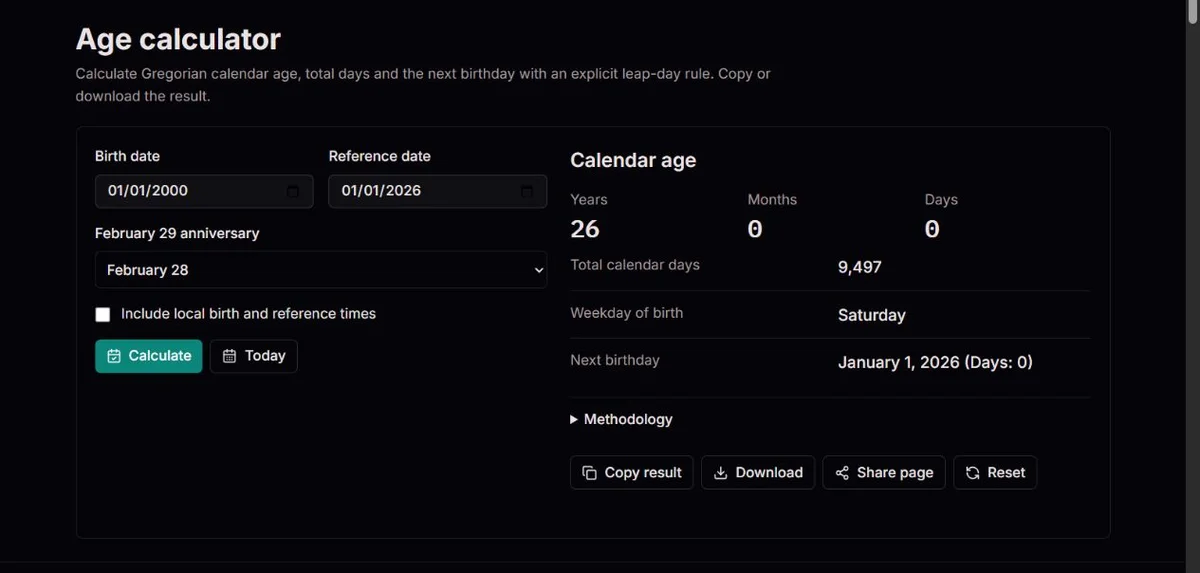
Calendar age answers a civil-date question: how many full anniversaries, then full calendar months, then remaining calendar days have passed? It is deliberately different from dividing seconds or total days by an average year length.
Enter a valid birth date and choose the date on which the age matters. Today uses the device's local date; it is not a UTC date hidden behind the display. Past and future reference dates are allowed, but the birth date cannot be in the future or after the reference. The accepted range is 0001-01-01 through 9999-12-31. The Temporal.PlainDate documentation describes the important distinction: a calendar date is independent of a time zone.
The main result is the triplet of completed years, months and days. The supporting rows give total calendar days, completed weeks, completed months, weekday of birth, the selected February 29 anniversary rule and the next birthday with days remaining.
The optional time section is a separate elapsed-hours check. It combines the birth date, birth time, reference date, reference time and the device time zone; it does not change the calendar age. The Temporal.ZonedDateTime documentation explains why skipped and repeated local clock times need an explicit disambiguation rule, and this tool rejects those ambiguous cases instead of guessing.
2023-01-312023-02-282023-03-01For birth date 2023-01-31 and reference date 2023-03-01, no complete year has passed, so January 31 remains the year anchor. The tool checks one calendar month from that anchor. It lands on February 28 in 2023 because February has no 31st day. This adjustment is called clamping: keep the requested month, but use its last valid day when the original day does not exist.
The next day, March 1, is then one remaining civil day after the clamped monthly anchor. The result is not 29 divided by an average month; it is zero years, one month and one day under this tool's month-end convention.
This example is useful when comparing calculators. If another calculator reports zero months and 29 days, it may be using a duration convention instead of anniversary-and-month arithmetic. Neither number is self-explanatory unless the rule is stated.
Every month candidate is measured from the same year anchor. For January 31 to March 31, adding two months directly gives March 31, so the age is two months and zero days. Repeatedly adding one month would go January 31 to February 28 to March 28 and introduce a three-day drift. The independent anchors avoid that drift; they do not turn all months into equal durations.
| Step | Date or value | Meaning |
|---|---|---|
| Birth date | 2023-01-31 | The anchor date from which completed years and months are measured. |
| One completed month | 2023-02-28 | The calendar month addition is constrained to the last valid day of February. |
| Reference date | 2023-03-01 | One remaining civil day after the February 28 anchor. |
| Displayed age | 0 years, 1 month, 1 day | The triplet is a calendar-age result, not an average-duration result. |
The large years, months and days numbers are the calendar age on the selected reference date. They are the safest row to quote when someone asks how old a person is on a date.
Total calendar days is an exclusive day difference: it is zero on the birth date, one on the next date, and so on. Completed weeks is that day count divided by seven and rounded down; completed months is years times twelve plus the displayed month count.
Next birthday is calculated using the same February 29 rule selected in the form. If the reference date is the birthday, the days remaining value is zero because the next anniversary has already arrived on that date.
| Row | What it measures | Best use |
|---|---|---|
| Years, months, days | Completed civil anniversaries, completed months and remaining civil days. | Age on a birthday, application date, appointment date or planned event. |
| Total calendar days | Exclusive civil-day difference from birth date to reference date. | Uniform day-count checks, milestones and debugging another calculation. |
| Completed weeks | Total days divided by seven and rounded down. | Rough weekly milestones without implying extra precision. |
| Completed months | Completed years converted to months plus the displayed month count. | Quick comparison of infant or project-age records where months are common. |
| Weekday of birth | The weekday for the birth date under the tool's Gregorian calendar. | Timeline review and record checking, not identity proof. |
| Elapsed hours | Exact instant difference from the optional local times when the time zone accepts both times. | Hospital, travel or scheduling examples where time of day matters. |
Enable the time option only when both clock times are known and the device time zone is appropriate for both endpoints. The form has birth and reference times, but no separate birth-place or time-zone selector. A recorded 09:00 in another country is not automatically interpreted in that country's zone. Leave times off when you only need civil age, or use a zone-aware conversion outside this tool before making an elapsed-time comparison.
With a device set to America/New_York, noon on 2024-03-09 to noon on 2024-03-10 spans one civil day but 23 elapsed hours; noon on 2024-11-02 to noon on 2024-11-03 spans 25 hours. These are fixed examples of offset changes, not results for your present location. The hour row is displayed with up to two decimal places. That presentation is not evidence that an uncertain historical birth time is known precisely.
A skipped local time does not correspond to an instant, and a repeated local time can correspond to two. The tool rejects both rather than silently selecting an offset. It also rejects a reference instant before the birth instant, including reversed clock times on the same date. Calendar age can remain visible when hours fail, but result copy/download are disabled until the times are corrected or the time option is turned off.
| Question | Use this setting | Interpretation |
|---|---|---|
| How old is someone on April 12? | Use dates only. | The calendar age is based on civil anniversaries and is not affected by daylight saving. |
| How many hours passed between two local times? | Enable local times and enter both clock times. | The elapsed-hours row uses the device time zone and may reject skipped or repeated times. |
| Why does the hour count differ from days times 24? | Compare the date result and the hour result separately. | A civil day near a time-zone transition can have 23 or 25 elapsed hours. |
The page applies Gregorian calendar arithmetic throughout its supported range. The US Naval Observatory calendar overview describes the Gregorian calendar as the internationally accepted civil calendar, and the US Naval Observatory leap-year rule gives the century-year exception that makes 1900 common and 2000 leap.
A February 29 birthday needs an explicit non-leap-year convention. The tool offers February 28 and March 1 because both appear in real record-keeping contexts, but the selection is a calculation rule rather than a legal, medical or benefits decision.
Older documents may use another calendar, an estimated age, a rounded age or a local convention that is not written down. This tool can make a Gregorian calculation consistent and repeatable; it cannot identify the calendar behind an ambiguous source record.
A useful saved result includes the two dates and the anniversary rule, not just an age. Copy and download keep that context in the summary. Share page is different: it sends only the clean tool link and does not recreate your inputs for the recipient.
For a February 29 birth date, the selected rule affects completed years, the next birthday and any result exported from the page. Keep the rule with the copied or downloaded summary so the number can be interpreted later.
February 28 treats the non-leap-year anniversary as the last day of February. March 1 treats it as the next calendar date after February 28. The tool does not decide which rule an institution should use.
When you are checking a family note or a form that does not say which convention was used, run both rules and record the difference. If the difference matters, consult the policy or source record rather than treating the calculator as an authority.
For birth 2020-02-29 and reference 2021-02-28, the February 28 rule gives one completed year; the March 1 rule gives zero completed years, 11 months and 30 days. On 2021-03-01, the March 1 rule gives exactly one year, while the February 28 rule gives one year and one day. The total civil-day difference is unchanged by either choice: only the anniversary-based decomposition changes.
| Setting | Non-leap-year anniversary | Use when |
|---|---|---|
| February 28 | The anniversary is counted on February 28 in a common year. | A record or policy says the birthday is observed on the last day of February. |
| March 1 | The anniversary is counted on March 1 in a common year. | A record or policy treats the birthday as the day after February 28. |
| Unknown | The calculator cannot infer the original convention. | Run both rules and keep the source uncertainty visible. |
The date inputs are Gregorian civil dates, not a universal decoder for every historical calendar. A birth recorded under a Julian, lunar, religious or local civil calendar may need conversion before it is entered.
The US Naval Observatory leap-year rule is enough to explain why simple every-four-years shortcuts fail for 1700, 1800, 1900 and 2100, but it does not tell you which calendar a handwritten register used.
For genealogy or archival work, keep the original wording, the calendar system if known, the converted date if you use one, and the calculator rule. The result is easier to audit when the conversion assumptions are not hidden.
| Record clue | Risk | Practical response |
|---|---|---|
| Only a date is written | The calendar system may be unstated. | Identify the source calendar before comparing it with a Gregorian date. |
| The age says about 25 | The number may be rounded or estimated. | Use the calculator for a scenario, not as proof of the exact birthday. |
| The person was born on February 29 | The anniversary convention may change the age near February or March. | Check both rules unless the source or policy states one. |
Copy result keeps a labeled summary; Download offers the same information in clocktools-age.txt. Both include the birth and reference dates, age components, totals and selected anniversary rule. A valid time calculation also includes both clock times and the device zone. Keep that context when comparing calculations made on different days: an age number without a reference date quickly becomes ambiguous.
Share page opens supported native sharing or copies the page link. It deliberately strips the query string and fragment and does not attach your dates or summary. To let someone check your calculation, send a separately reviewed summary or fictional reproduction rather than expecting the shared link to restore it. The calculator does not create a saved input history, so download a needed result before leaving or resetting the page.
If Copy is blocked, select the displayed information manually. If Download reports that it has started, check the browser's downloads before assuming a file was saved. For an unavailable hours result, correct the times or turn the time option off to export the date-only calculation. If the guide fails to load, its retry action leaves your working inputs alone; a guide-loading message is not an arithmetic error.
The calculator parses strict Gregorian YYYY-MM-DD civil dates, rejects invalid or out-of-range dates, and requires the birth date to be on or before today and the reference date to be on or after birth. It finds completed years from the selected February 29 anniversary rule, adds completed months from that year anchor with month-end clamping, then counts remaining civil days. Total days are exclusive civil-day differences; completed weeks are total days divided by seven and rounded down. Optional elapsed hours combine the two dates with local times in the device time zone and reject reversed, skipped or repeated local times.
Dates must be valid Gregorian dates from 0001 through 9999. Future birth dates are rejected, but a future reference date is allowed for age-on-date planning. The February 29 setting is a calculation convention, not an official eligibility decision. Local-hour results depend on the browser, the device time-zone database and the entered clock times. The page does not convert historical calendar systems, prove identity, verify a birth record or decide legal age rules.
To check a suspected issue, use non-sensitive example dates whenever possible. Include the birth date, reference date, February 29 rule, whether local times were enabled, both times, the device time zone shown in the result, the expected rows and the observed rows. First compare the stated month-end and leap-day rules with the other source; many disagreements come from a different convention rather than a software defect.